How to Set Up OneDrive on Windows 11


OneDrive is Microsoft’s built-in cloud storage service for Windows 11. It saves your files online so they stay safe and you can open them from any phone or computer. Setup links your PC to your online Microsoft account, so your important documents and photos can be backed up automatically.
You choose which folders to sync and share across the devices signed in to the same account. If your computer hardware fails, the copies in the cloud are still there.
Check your storage first. The free plan includes 5 GB. Backing up Desktop, Documents and Pictures can pass that limit quickly, especially if you keep photos or videos in those folders. Once you are over the limit, OneDrive stops syncing new files until you free up space or buy more. More space needs a Microsoft 365 subscription or a separate OneDrive storage plan. Look at how big those three folders are before you turn on backup.
Open OneDrive from the Start menu, sign in with your Microsoft account, then accept or change the folder location and choose whether to turn on Files On-Demand. Check the cloud icon near the clock in the taskbar to confirm it is running. The free plan includes 5 GB, so check the size of Desktop, Documents and Pictures before you finish.
How to set up OneDrive on 🪟 Windows 11
OneDrive shows up in several places on the system. You will usually find it in the taskbar notification area, in the File Explorer navigation pane, and in the Start menu app list. On Windows 11 the setup is often built in and linked to the Microsoft account you used to sign in to Windows. In that case OneDrive may already be running, and you only need to confirm it and choose your folders.
1Check if OneDrive is Running
First, check whether OneDrive is running on the PC.
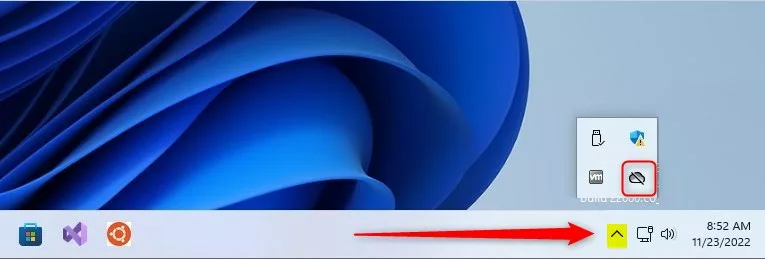
- Look at the bottom right corner of the screen, near the clock, for the cloud icon. If you do not see it, click the Show hidden icons arrow (the small caret) next to the tray, because Windows often tucks it away there.
- If the icon is not there, OneDrive may not be running. Open the Start menu , type OneDrive, and select the app from the results. The cloud icon should appear in the tray after a few seconds.
- If searching finds nothing, OneDrive is not installed. Download it from Microsoft and run the installer. A link to the official site is in the reference at the end of this guide.
- You can also check your account from Settings Accounts. Windows backup in that area shows whether the Windows Backup app is turned on for your account.
The Windows Backup app is separate from the OneDrive app, but the two work together. It can back up your folders, settings and apps to your Microsoft account, which makes moving to a new PC easier. The folder part of that backup uses OneDrive storage, so the 5 GB limit above applies to it.

2Sign In
Enter the email address and password of your Microsoft account, then follow the prompts. If you do not have an account yet, you can create one here: How to create a Microsoft account.
If the PC is already signed in with a Microsoft account, OneDrive may offer that account automatically. Check that it is the account you want, because the files will be stored in that account’s online storage and count against its quota. If a sign-in screen asks for a second verification step, finish it before moving on.

3Choose Your Folder
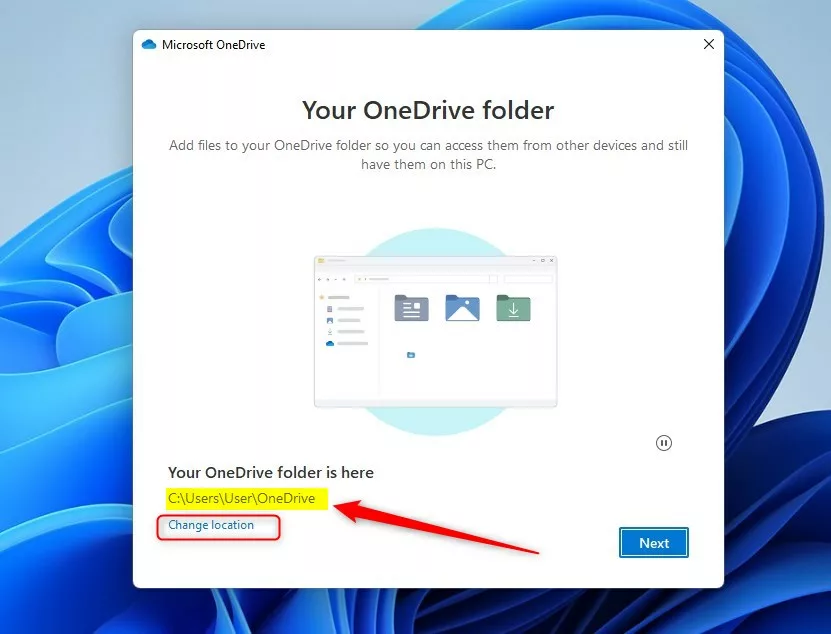
A prompt asks where to keep your OneDrive files.
- To accept the default location, click Next. The folder is normally created inside your user profile.
- To use a different drive, select Change location and pick the new folder. Do this now rather than later, because moving the folder after setup means unlinking the account.
Choose that option only if the folder holds files from this same account.
4Files On-Demand
Files On-Demand lets you see all your cloud files in File Explorer without downloading them to the PC. That preserves hard drive space. Turn it on if your drive is small or your OneDrive holds a lot of data. Files you open are downloaded when you need them, so you need an internet connection to open files that are not stored locally.

5Finish Up
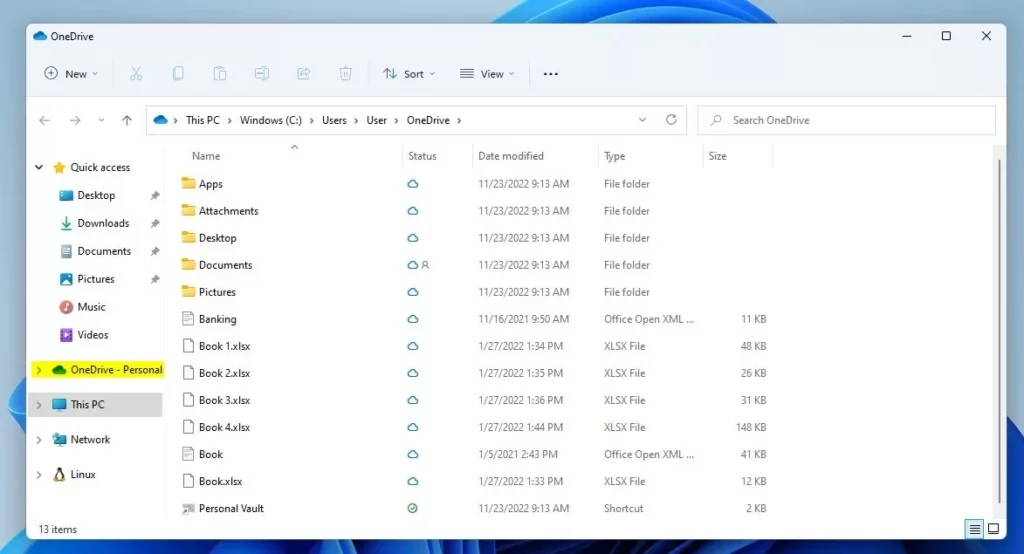
Click Next through the remaining setup screens. Some of them offer extras such as a tour or a mobile app, and you can skip these. On the last screen, a button opens your OneDrive folder in File Explorer, Windows’ file management tool. You should see the OneDrive folder in the left pane of File Explorer from then on.

Managing Your OneDrive Experience
Storage limits and backup preferences are configured after the first setup finishes.
- Select the cloud icon in the taskbar notification area . The OneDrive flyout opens.
- Select the gear icon (Help & Settings), then choose Settings.
- Select Sync and backup, then select Manage backup.
- Switch on the folders you want to protect: Desktop, Documents and Pictures. OneDrive then keeps them backed up continuously.
Check the storage figure shown in the dialog before you save. If the folders are larger than your free 5 GB, the backup will not finish until you free up space or add a storage plan.
Be careful when you change this later. Backing up a folder moves it into your OneDrive folder, so its files no longer sit in the original location. Stopping the backup, changing which folders are backed up, or unlinking the account can change where those files live, and they may not return to their original places on their own. Before you make such a change, confirm that the files have finished syncing and know where they will end up.
Understanding Sync Icons
When OneDrive is active, small status icons appear next to files and folders in File Explorer to show their sync state. With Files On-Demand turned on, they mean the following:
- Cloud icon: the file is online only. It takes no space on the PC and downloads when you open it.
- Green check mark: the file was downloaded to the PC, usually because you opened it. Windows can remove the local copy later if space runs low.
- Solid green circle with a white check mark: the file is set to Always keep on this device. It stays on the PC and is always available offline.
To reclaim space, right-click a file or folder in File Explorer and choose Free up space. The file goes back to online-only and keeps its cloud icon. To keep something available offline, right-click it and choose Always keep on this device. If these options are missing, Files On-Demand is probably turned off in the OneDrive settings.
OneDrive Personal Vault
Personal Vault is a protected area that needs a second verification step before it opens. It suits sensitive items such as passports or tax forms. You open it from your main OneDrive folder, where it appears as a Personal Vault item. Windows asks you to verify your identity the first time and again whenever the vault locks. On the free plan, Personal Vault holds only 3 files. A Microsoft 365 subscription removes that cap.
Troubleshooting and Sync Errors
Sync errors show up as a red circle with a white X on the tray icon, and the problems are listed in the OneDrive flyout. Start by opening the flyout and reading the message. Most errors name the file and the cause.
Fixing these errors usually means renaming the problem files or resetting the desktop app. Before you do either, save a copy of any file that has not finished syncing. A reset makes OneDrive disconnect and then re-sync everything from scratch. On a large library that can take a long time and use a lot of bandwidth. Changes that never reached the cloud can be lost or end up as conflicting copies, so back them up first.
- Open the OneDrive flyout and note which files are listed as having a problem.
- Copy any unsynced files to a safe place outside the OneDrive folder.
- Rename the problem files. Remove characters OneDrive does not accept, and shorten very long names. Then see whether the error clears.
- If errors continue, reset the OneDrive app as a last resort, and wait for the full re-sync to finish.
Reference: Microsoft.com
Summary
Setting up OneDrive on Windows 11 stores your files online, keeps them in sync across your devices, and handles automated backups. Keep an eye on your storage: 5 GB goes fast once Desktop, Documents and Pictures are included.
Have a question about this guide?
Answered by AI from this guide. Good questions may be added to this page — please don't include personal details.
Did this guide fix your problem?

About the Author
Richard
Tech Writer, IT Professional
Richard is a writer at Geek Rewind who turns complex IT tasks into clear, step-by-step guides. He draws on years of hands-on experience in system administration and enterprise IT operations, focusing on Windows, Linux and WordPress: the problems people actually run into, and the fixes that work. His server and WordPress guides come from systems he runs himself. Richard builds and maintains the platform behind Geek Rewind, from its Ubuntu servers and Nginx configuration to its custom WordPress plugins. Many new tutorials start with readers' questions, and he's always glad to answer them in the comments.
[…] The OneDrive app lets you sync files and folders on your computer with Microsoft Cloud. It allows you to access them anywhere on your mobile devices and other computers using the service. […]
[…] The OneDrive app lets you sync files and folders on your computer with Microsoft Cloud. It allows you to access them anywhere on your mobile devices and other computers using the service. […]
[…] The OneDrive app lets you sync files and folders on your computer with Microsoft Cloud. It allows you to access them anywhere on your mobile devices and other computers using the service. […]
[…] This post shows students and new users steps to turn on or offOOneDrive files on-demand when using Windows 11. Files On-Demand is a feature that works with all the apps from the Windows Store, including OneDrive. […]
[…] The OneDrive app lets you sync files and folders on your computer with Microsoft Cloud. It allows you to access them anywhere on your mobile devices and other computers using the service. […]
[…] The OneDrive app lets you sync files and folders on your computer with Microsoft Cloud, allowing you to access them anywhere on your mobile devices and other computers using the service. […]
[…] The OneDrive app lets you sync files and folders on your computer with Microsoft cloud, allowing you to access them anywhere on your mobile devices and other computers using the service. […]
[…] The OneDrive app lets you sync files and folders on your computer with Microsoft cloud, allowing you to access them anywhere on your mobile devices and other computers using the service. […]
[…] The OneDrive app lets you sync files and folders on your computer with Microsoft cloud, allowing you to access them anywhere on your mobile devices and other computers using the service. […]
[…] steps to enable or disable “Save photos and videos from devices to OneDrive” in the OneDrive app in Windows […]
[…] article describes steps to enable or disable “Notify me when syncing is paused” in the OneDrive app in Windows […]
[…] OneDrive app lets you sync files and folders on your computer with Microsoft Cloud. It allows you to access them […]
[…] article describes the steps to enable or disable the OneDrive folder on the File Explorer navigation pane in Windows […]
This setup assumes that I have sufficient space on my computer hard drive to store all the files that I may want to put into OneDrive. In my case, before even starting, I know that I do not have sufficient space on any of my physical hard drives. Yet Windows keeps prompting me to finish the setup when I can’t do that.
[…] install and set up OneDrive on both your Windows and phone. Then, use OneDrive to back up and restore files and folders on your […]
[…] The OneDrive app lets you sync files and folders on your computer with Microsoft Cloud. It allows you to access them anywhere on your mobile devices and other computers using the service. […]
[…] The OneDrive app lets you sync files and folders on your computer with Microsoft Cloud. It allows you to access them anywhere on your mobile devices and other computers using the service. […]
[…] The OneDrive app lets you sync files and folders on your computer with Microsoft Cloud. It allows you to access them anywhere on your mobile devices and other computers using the service. […]
[…] The OneDrive app lets you sync files and folders on your computer with Microsoft Cloud. It allows you to access them anywhere on your mobile devices and other computers using the service. […]
[…] OneDrive app helps you sync your files and folders to the Microsoft Cloud. This lets you reach your files from […]
[…] OneDrive app lets you sync files and folders on your computer with Microsoft Cloud. It allows you to access them […]
[…] is a tool that OneDrive app syncs your files and folders to the cloud. This lets you reach your documents from any device. You […]
[…] OneDrive app is a tool that keeps your files in the cloud. It lets you see your files on any device. You can […]
[…] OneDrive app service helps you keep your files synced between your computer and the cloud. It lets you reach […]
[…] is a tool that OneDrive app saves your files to the internet. This lets you reach your documents from any device. You can also […]