How to Lock and Unlock OneDrive Personal Vault in Windows 11


- 19 steps
- Needs administrator rights
OneDrive Personal Vault in Windows 11 is a protected folder inside your OneDrive. It asks for an extra identity check before it opens. The check can be a fingerprint, a face scan, a PIN, or a code sent by text or email. Use it for tax forms, passcodes, scans of IDs and private photos. If someone gets onto your unlocked PC, they still can’t open the vault.
The vault locks by itself after 20 minutes of inactivity. You can also lock it right away from the OneDrive icon in your taskbar by choosing the lock option. To open it again, you have to verify who you are, for example with a security code sent to your phone or email.
Good to know: Personal Vault is part of personal Microsoft accounts. Free OneDrive storage limits how many files the vault can hold. A Microsoft 365 subscription removes that limit, apart from your overall storage space.
Unlock your OneDrive Personal Vault by double-clicking its icon in File Explorer and verifying your identity with PIN, fingerprint, or Microsoft Authenticator. Alternatively, click the OneDrive cloud icon on your taskbar, then the gear icon for Settings, and select Unlock Personal Vault.
How to Unlock OneDrive Personal Vault
A locked vault takes only a few clicks to open. You can use either File Explorer or the OneDrive icon in the taskbar. Both ask for the same identity check.
Using File Explorer
Using File Explorer
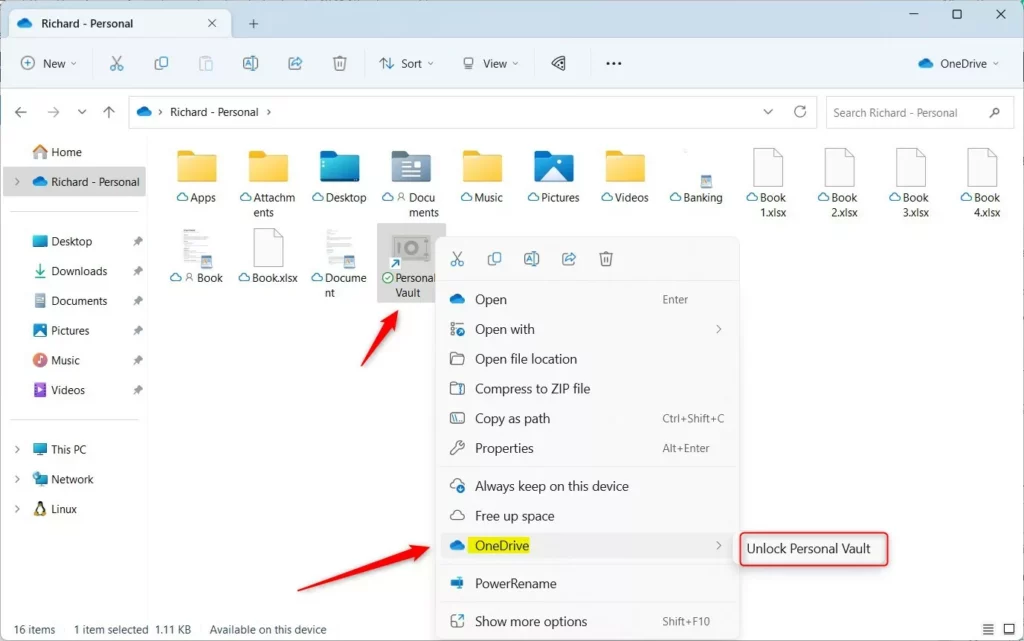
- Open File Explorer and go to your OneDrive folder. You should see a folder named Personal Vault with a lock icon.
- Right-click the Personal Vault icon.
- In the menu that appears, choose OneDrive Unlock Personal Vault
- Complete the verification when the window appears. Depending on your setup, this is Windows Hello or a code sent to your phone or email. Once you pass it, the folder opens and you can see your files.
Using the Taskbar Menu
Using the Taskbar Menu
- Click the OneDrive cloud icon in the taskbar . If it isn’t visible, click the up arrow in the system tray to show hidden icons.
- When the vault is still locked, click the gear icon for Settings.
- Select Unlock Personal Vault.
- Complete the identity check. The vault opens in File Explorer once you are verified.

Troubleshooting and Error Handling
If the Personal Vault doesn’t show up, first check that the OneDrive app is up to date. An old version is the most common reason the folder is missing. Also make sure you are signed in with a personal Microsoft account, because work or school accounts don’t get a Personal Vault.
Configuration and Security Settings
You can change how the vault behaves, including how long it waits before locking itself. Here is how to change the auto-lock timer:
- Click the OneDrive cloud icon in the taskbar , then click the gear icon and choose Settings.
- Open the Account tab.
- Find the Personal Vault section.
- Change the inactivity timeout to the duration you want. The new setting applies the next time the vault is unlocked.
If an option is greyed out or missing, you are probably on a managed PC, or the setting is controlled by an administrator.
Summary
The vault protects your files with extra verification steps. These include Windows Hello (fingerprint, face or PIN) and two-factor authentication, a sign-in check that requires two separate forms of proof. Even if someone knows your Microsoft account password, they still can’t get into the vault without the second proof.
Why does my Personal Vault keep locking automatically?
Why does the vault lock on its own? It is a core security measure. The folder locks after a set period of inactivity, so you don’t leave your private files exposed by accident. You can change the length of that period in the OneDrive settings, as described above. The folder will always lock if your computer sits idle for too long, so you can’t turn the protection off entirely.
Why does my Personal Vault keep locking automatically?
The Personal Vault is designed to lock automatically after a set period of inactivity to ensure your files remain secure. This is a built-in security feature. Adjusting the timeout duration in your OneDrive settings alters how long the folder stays open, but idle computers trigger an automatic lock.
Can I change the unlock method from Windows Hello to 2FA?
You are not stuck with Windows Hello. If you want a different unlock method, or Windows Hello isn't working, you can switch:
- Start the unlock process so the verification window appears.
- Click More options or Use a different method. The wording depends on your version of OneDrive.
- Choose the Microsoft Authenticator app or an email code.
- Enter the code or approve the request to finish unlocking the vault.
Can I change the unlock method from Windows Hello to 2FA?
Different authentication methods work for unlocking the folder. While Windows Hello serves as the default for convenience, choosing the Microsoft Authenticator app or an email code works during the unlock prompt. Click 'More options' or 'Use a different method' when the verification window appears to select a preferred 2FA (two-factor authentication) choice.
How do I share files stored inside the Personal Vault?
You can't share a file directly from inside the Personal Vault. This is a security restriction, and it is by design. To share a file, do this:
- Unlock the vault and open it in File Explorer.
- Move the file out of the Personal Vault and into a regular OneDrive folder.
- Right-click the file in its new location and use the normal OneDrive sharing options.
Once the file is outside the vault, it no longer has the vault's extra protection. When you finish sharing, you can move the file back into the vault, or delete the shared copy if you no longer need it.
How do I share files stored inside the Personal Vault?
For security reasons, files inside the Personal Vault cannot undergo direct sharing. Move the file out of the Personal Vault and into a regular folder within your OneDrive first. Standard share options become available for sending the item to others once the file moves.
Have a question about this guide?
Answered by AI from this guide. Good questions may be added to this page — please don't include personal details.
Did this guide fix your problem?

About the Author
Richard
Tech Writer, IT Professional
Richard is a writer at Geek Rewind who turns complex IT tasks into clear, step-by-step guides. He draws on years of hands-on experience in system administration and enterprise IT operations, focusing on Windows, Linux and WordPress: the problems people actually run into, and the fixes that work. His server and WordPress guides come from systems he runs himself. Richard builds and maintains the platform behind Geek Rewind, from its Ubuntu servers and Nginx configuration to its custom WordPress plugins. Many new tutorials start with readers' questions, and he's always glad to answer them in the comments.
No comments yet — be the first to share your thoughts!