Link Your Phone to Microsoft Teams: SMS Integration Guide

Linking your phone to Microsoft Teams lets you send and receive SMS messages right from your PC, bringing your mobile texts into your work communication hub.
This SMS integration means you can manage all your text conversations together with your other Teams chats and calls on your computer.
With this feature, you can handle text messages, see missed calls, and listen to voicemails directly within the Teams app.
To use this, you generally need Microsoft Teams Premium or a specific Microsoft 365 Business license.
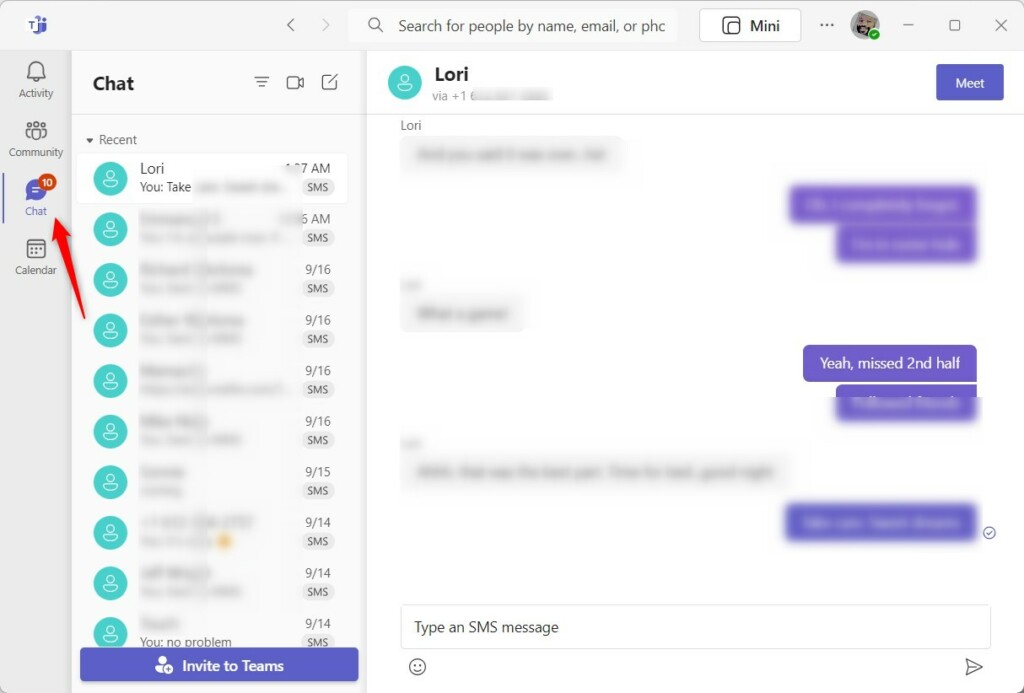
Once connected, your SMS chats show up in the Chat section of Teams, so you don’t have to switch away from your PC to text.
Link your phone to Microsoft Teams by opening Teams settings, navigating to the Mobile device tab, and clicking “Link your phone”. Scan the QR code with your phone to connect. Your SMS messages will then appear in the Teams Chat section.
Administrative Prerequisites and Licensing
To use Microsoft Teams SMS integration, your IT admin needs to make sure your company has the right setup, including a Microsoft Teams Phone license and a phone number for each user, and that you’re in the US or Canada.
10DLC Registration and Compliance
How to Enable SMS in the Teams Admin Center (Admin Only)
Admins can enable SMS for Microsoft Teams users directly in the Teams Admin Center. This involves checking that the user’s phone number is set up for voice calls and then adjusting the messaging policies to allow SMS communication. Your 10DLC registration must be approved before you can turn on SMS.
- Log in to the Teams Admin Center.
- Navigate to Voice > Phone numbers.
- Select the user’s phone number and ensure it is voice-enabled.
- Go to Messaging policies to enable SMS features for specific users.
- Ensure your 10DLC brand and campaign are approved to avoid message segment delivery failures.
How to link your phone
Linking your phone to Microsoft Teams lets you handle calls and texts directly from your computer. To connect your device, open the Teams app, go to Settings, and follow the simple steps provided to pair your phone. This makes managing your communications much easier.
- Open the Start menu and find Microsoft Teams in your list of apps.

Turn on or off automatically starting Microsoft Teams - You can also launch the app using the Taskbar.

Turn on or off automatically starting Microsoft Teams - If a small window appears, click the expansion button on the menu bar to open the full Teams window.

Turn on or off automatically starting Microsoft Teams - Click the Settings and more (three dots) button near your profile picture. Select Settings from the menu.

Turn on or off automatically starting Microsoft Teams - On the left side of the screen, click the Mobile device tab.
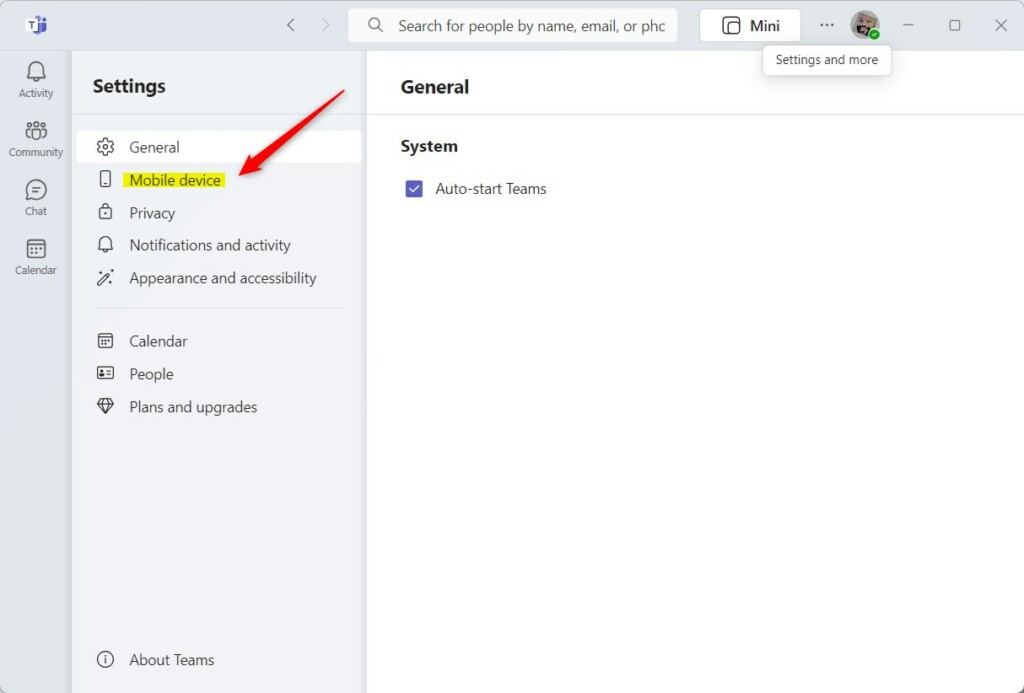
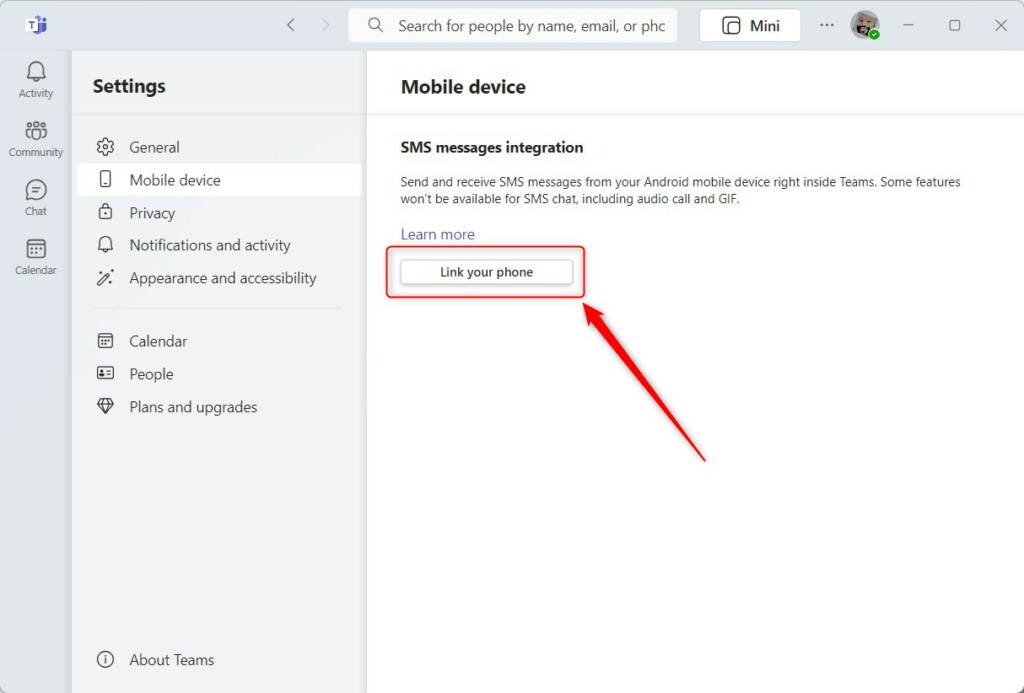
Link your phone to Microsoft Teams app - Look for the SMS messages integration section and click the Link your phone button.
Link your phone to Microsoft Teams app - A window will pop up with a QR code. Use your phone to scan this code.
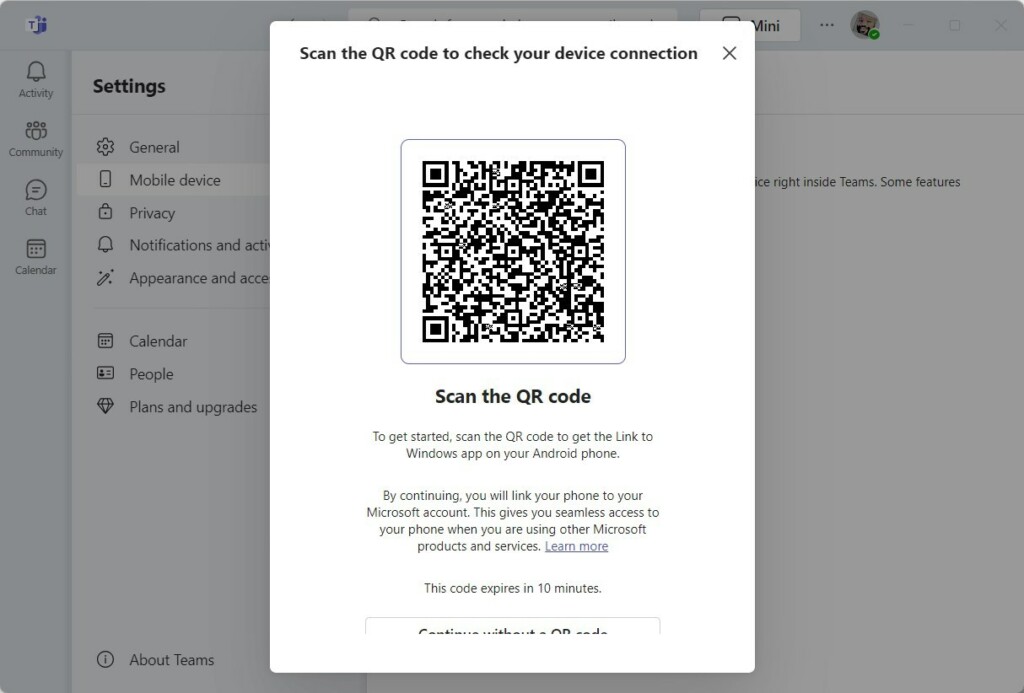
Link your phone to Microsoft Teams app - Check the code on your phone to confirm the connection. Once finished, your device will show as connected.
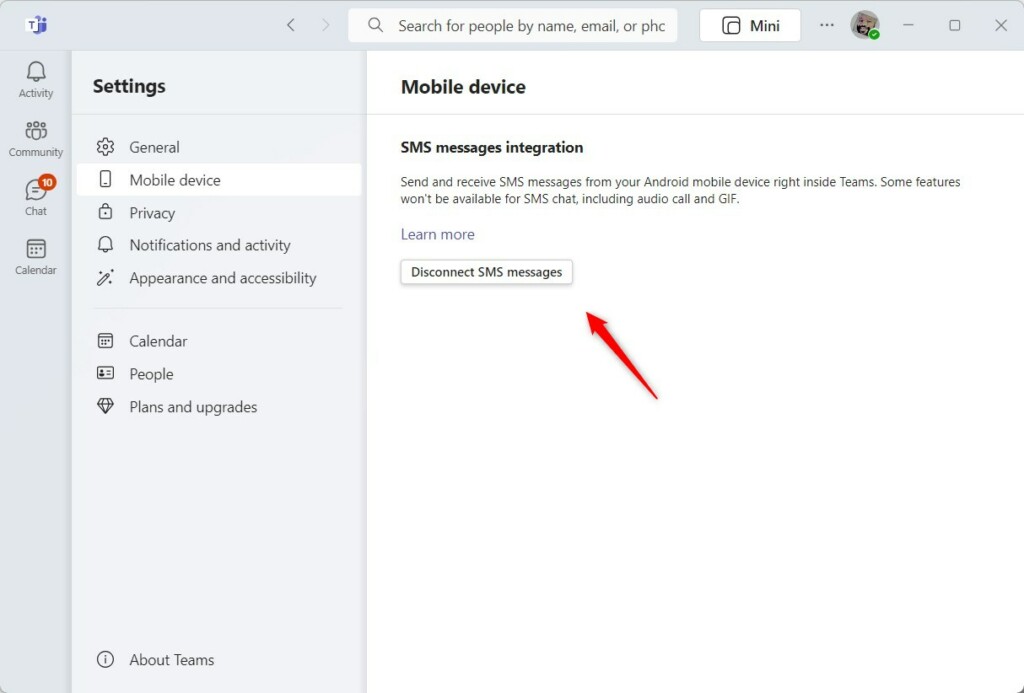
Link your phone to Microsoft Teams app
You will now see your text messages in the Chat section of your Teams app.
Summary
Linking your phone to Microsoft Teams lets you use your computer as a central place for calls and texts, helping you stay organized and save time, as long as the required licensing and registration are in place.
Is SMS in Teams available outside the US and Canada?
Currently, Microsoft Teams SMS integration is exclusively available for users located in the United States and Canada. Microsoft has not yet announced a timeline for expanding this specific SMS functionality to other international regions. Please check the official Microsoft Learn documentation for the most recent updates on geographical availability.
Can I use SMS with Direct Routing or Operator Connect?
Microsoft Teams SMS works best with Microsoft Calling Plans, and while some Operator Connect services might offer texting, it’s not a standard feature with Direct Routing, so you’ll need to check with your provider.
Was this guide helpful?

About the Author
Richard
Tech Writer, IT Professional
Richard, a writer for Geek Rewind, is a tech enthusiast who loves breaking down complex IT topics into simple, easy-to-understand ideas. With years of hands-on experience in system administration and enterprise IT operations, he’s developed a knack for offering practical tips and solutions. Richard aims to make technology more accessible and actionable. He's deeply committed to the Geek Rewind community, always ready to answer questions and engage in discussions.



[…] The Phone Link app (soon to be renamed to Mobile devices) is a feature on Windows that allows you to link your phone and PC using Wi-Fi or Bluetooth and access your phone’s apps and data from your PC. It lets you browse, play, order, chat, and more using your PC’s larger screen and keyboard while your phone stays in your pocket or desk. […]
[…] The Phone Link app is a feature on Windows that allows you to link your phone and PC using Wi-Fi or Bluetooth and access your phone’s apps and data from your PC. It lets you browse, play, order, chat, and more using your PC’s larger screen and keyboard while your phone stays in your pocket or desk. […]
[…] The Phone Link app is a feature on Windows that allows you to link your phone and PC using Wi-Fi or Bluetooth and access your phone’s apps and data from your PC. It lets you browse, play, order, chat, and more using your PC’s larger screen and keyboard while your phone stays in your pocket or desk. […]
[…] The Phone Link app is a feature on Windows that allows you to link your phone and PC using Wi-Fi or Bluetooth and access your phone’s apps and data from your PC. It lets you browse, play, order, chat, and more using your PC’s larger screen and keyboard while your phone stays in your pocket or desk. […]
[…] The Phone Link app is a feature on Windows that allows you to link your phone and PC using Wi-Fi or Bluetooth and access your phone’s apps and data from your PC. It lets you browse, play, order, chat, and more using your PC’s larger screen and keyboard while your phone stays in your pocket or desk. […]
[…] The Phone Link app is a feature on Windows that allows you to link your phone and PC using Wi-Fi or Bluetooth and access your phone’s apps and data from your PC. It lets you browse, play, order, chat, and more using your PC’s larger screen and keyboard while your phone stays in your pocket or desk. […]
[…] The Phone Link app is a feature on Windows that allows you to link your phone and PC using Wi-Fi or Bluetooth and access your phone’s apps and data from your PC. It lets you browse, play, order, chat, and more using your PC’s larger screen and keyboard while your phone stays in your pocket or desk. […]
[…] The Phone Link app is a feature on Windows that allows you to link your phone and PC using Wi-Fi or Bluetooth and access your phone’s apps and data from your PC. It lets you browse, play, order, chat, and more using your PC’s larger screen and keyboard while your phone stays in your pocket or desk. […]
[…] The Phone Link app is a feature on Windows that allows you to link your phone and PC using Wi-Fi or Bluetooth and access your phone’s apps and data from your PC. It lets you browse, play, order, chat, and more using your PC’s larger screen and keyboard while your phone stays in your pocket or desk. […]
[…] The Phone Link app is a feature on Windows that allows you to link your phone and PC using Wi-Fi or Bluetooth and access your phone’s apps and data from your PC. It lets you browse, play, order, chat, and more using your PC’s larger screen and keyboard while your phone stays in your pocket or desk. […]
[…] The Phone Link app is a feature on Windows that lets you link your phone and PC using Wi-Fi or Bluetooth and access your phone’s apps and data from your PC. It lets you browse, play, order, chat, and more using your PC’s larger screen and keyboard while your phone stays in your pocket or desk. […]
[…] The Phone Link app is a feature on Windows that lets you link your phone and PC using Wi-Fi or Bluetooth and access your phone’s apps and data from your PC. It lets you browse, play, order, chat, and more using your PC’s larger screen and keyboard while your phone stays in your pocket or desk. […]
[…] The Phone Link app is a feature on Windows that lets you link your phone and PC using Wi-Fi or Bluetooth and access your phone’s apps and data from your PC. It lets you browse, play, order, chat, and more using your PC’s larger screen and keyboard while your phone stays in your pocket or desk. […]
[…] The Phone Link app is a feature on Windows that lets you link your phone and PC using Wi-Fi or Bluetooth and access your phone’s apps and data from your PC. It lets you browse, play, order, chat, and more using your PC’s larger screen and keyboard while your phone stays in your pocket or desk. […]
[…] The Phone Link app is a feature on Windows that lets you link your phone and PC using Wi-Fi or Bluetooth and access your phone’s apps and data from your PC. It lets you browse, play, order, chat, and more using your PC’s larger screen and keyboard while your phone stays in your pocket or desk. […]
[…] Teams chat, sync contacts with Teams, connect to Google Calendar, link your mobile device, turning message preview on or off, turn spell check on or off, turn on or off phone […]
[…] Microsoft Teams app. You can sync contacts with Teams, connect to Google Calendar, link your mobile device, turn message preview on or off, manage teams notifications during calls, set […]
[…] enable in the Microsoft Teams app. You can sync contacts with Teams, connect to Google Calendar, link your mobile device, turn message preview on or off, and […]
[…] Phone Link is a handy Windows 11 feature that connects your PC with your Android phone. It lets you share files, see your phone’s notifications, send texts, and more — all from your computer screen. […]
[…] The Phone Link app is a feature on Windows that allows you to link your phone and PC using Wi-Fi or Bluetooth and access your phone’s apps and data from your PC. It lets you browse, play, order, chat, and more using your PC’s larger screen and keyboard while your phone stays in your pocket or desk. […]
[…] Teams chat, sync contacts with Teams, connect to Google Calendar, link your mobile device, turning message preview on or off, turn spell check on or off, turn on or off phone […]
[…] Phone Link app is a tool built into Windows. It lets you link your phone and PC using Wi-Fi or Bluetooth. It shows your phone apps and data on your computer screen. You can use your keyboard and mouse to text, play games, or shop while your phone stays in your pocket. […]