Manage Phone Link Photo Permissions in Windows 11


If you are looking for photo link for Windows, it is the Photos section of the Phone Link app in Windows 11. You control whether Phone Link can delete pictures from your Android phone in the app’s settings, under Settings Features Photos. Phone Link connects your phone to your PC, so you can read text messages, see notifications, and view up to 2,000 of your most recent camera roll photos on your computer screen.
Turning off photo deletion keeps you from accidentally erasing pictures from your phone when you only want to tidy up what you see on your desktop. The change takes a few clicks and applies right away, with no restart.
To manage Phone Link photo permissions in Windows 11, open the Phone Link app, click the gear icon in the top-right corner, and select the Features tab. Expand the Photos tile and check or uncheck “Allow Phone Link to delete photos from my mobile device.” Unchecking it stops deletions from reaching your Android phone.
Allow Phone Link to delete photos from your mobile device
Phone Link photo permissions decide whether the app can delete pictures from your phone through your computer. When the option is on, deleting a picture in Phone Link also removes it from your mobile device. You don’t need to touch your phone.
If it isn’t, the Photos options may not appear.
- Open the Phone Link app on your PC. You should see your linked phone and its sections, such as Photos and Messages.
- Click the Settings button (the gear icon) in the top-right corner. The Phone Link settings page opens.
- Select the Features tab. You should see a list of features for your linked phone.
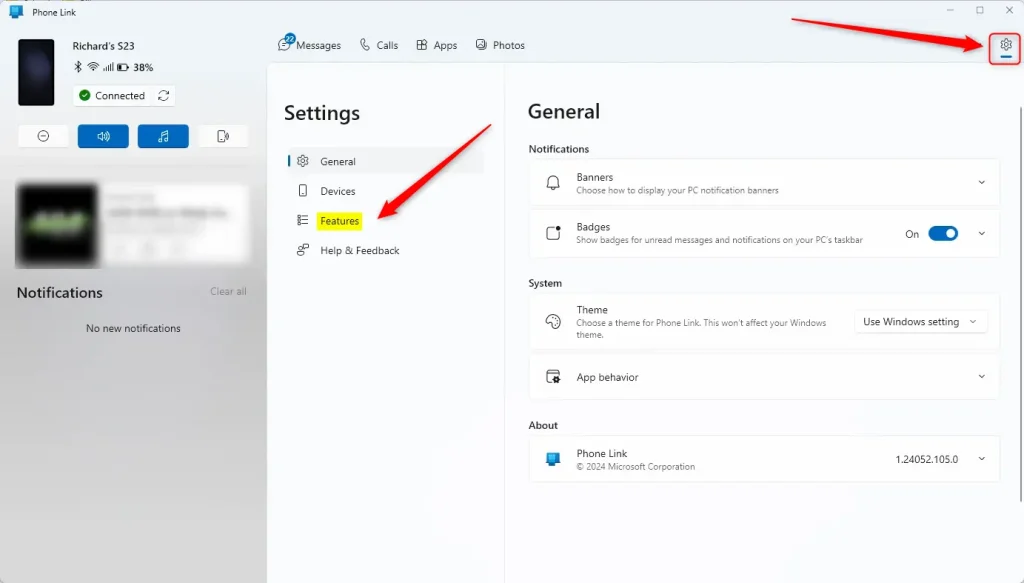
- On the right side, under Features, select the Photos tile to expand it. The photo options appear below it.
- Check the box next to “Allow Phone Link to delete photos from my mobile device” to turn deletion on.
To stop Phone Link from deleting photos on your phone, uncheck the same box. This is also how you undo the change if you turn it on and later change your mind.
A photo deleted from Phone Link is removed from the phone too. Check your phone’s gallery for a recycle bin or “recently deleted” folder if you delete one by mistake.
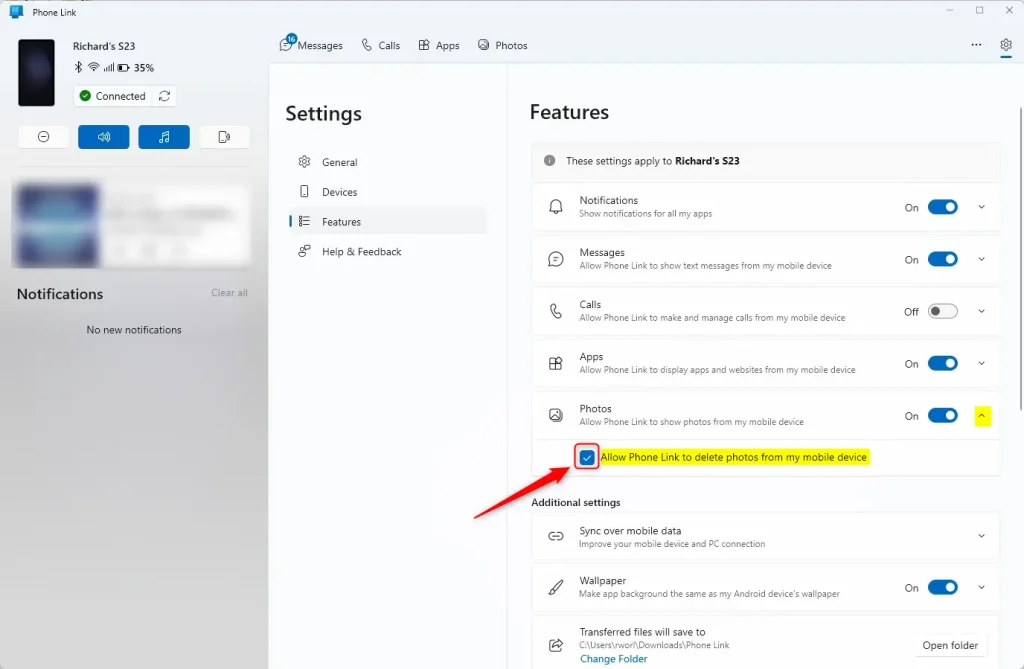
Close the settings page when you are done. Your choice is saved, and Phone Link will follow it the next time you open the Photos section.
Your settings are now updated.
Reference:
Conclusion:
- The Phone Link app on Windows 11 connects your PC and your mobile device, so you can access and manage your phone's data from your computer.
- To allow or block Phone Link from deleting photos on your mobile device, open the Settings inside the Phone Link app and go to the Features tab.
- With the steps above, you can control whether Phone Link can delete photos from your Android device and avoid removing pictures by accident.
Have a question about this guide?
Answered by AI from this guide. Good questions may be added to this page — please don't include personal details.
Did this guide fix your problem?

About the Author
Richard
Tech Writer, IT Professional
Richard is a writer at Geek Rewind who turns complex IT tasks into clear, step-by-step guides. He draws on years of hands-on experience in system administration and enterprise IT operations, focusing on Windows, Linux and WordPress: the problems people actually run into, and the fixes that work. His server and WordPress guides come from systems he runs himself. Richard builds and maintains the platform behind Geek Rewind, from its Ubuntu servers and Nginx configuration to its custom WordPress plugins. Many new tutorials start with readers' questions, and he's always glad to answer them in the comments.
No comments yet — be the first to share your thoughts!