
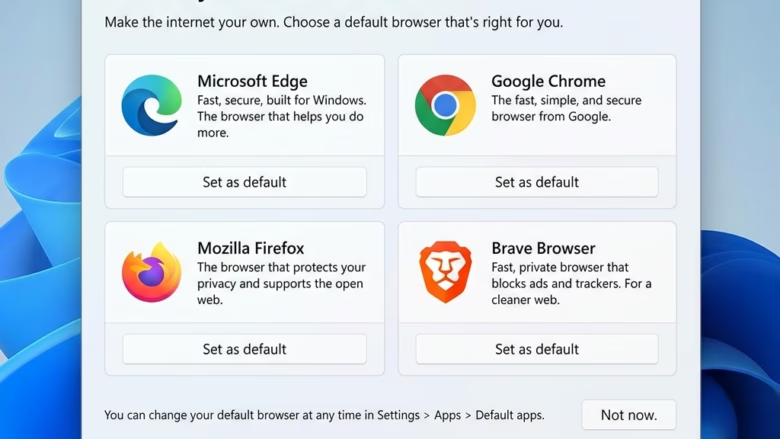
Microsoft Edge and Google Chrome are the two most popular web browsers on Windows 11. Which one you use affects battery life, page speed, and how much RAM your PC has free for other work.
Microsoft Edge comes built into Windows 11. It uses the Chromium engine, the underlying software framework that also powers Chrome. In most everyday use, Edge needs less memory than Chrome.
Google Chrome remains the top alternative. It has a huge library of extensions and add-ons and syncs tightly with Google accounts. It tends to use more system resources when you keep many tabs open and multitask heavily.
Microsoft Edge uses less memory and battery than Chrome, making it better for Windows 11 laptops and older PCs. Chrome offers more extensions and tighter Google account integration. Edge comes built-in to Windows 11; Chrome requires download and installation.
What happens when you choose?
Once you pick a browser, it becomes your daily hub for shopping, work, and streaming. You can switch later, but it takes some effort. Staying with one browser keeps your bookmarks, saved passwords, and history in one place.
Sign in to your account in the new browser first so your data syncs across your devices.
Microsoft Edge
Microsoft Edge is the built-in browser for Windows 11. It focuses on speed, battery efficiency, and close integration with the system. In most comparisons, Edge uses less memory (RAM) and CPU power than Chrome, which makes it a good fit for laptops and tablets. It also includes a PDF reader and a distraction-free reading mode, so you don’t need extra software for common tasks.
Because Edge is built on Chromium, it can also run most extensions from the Chrome Web Store. That closes much of the extension gap with Chrome. Edge also has power-saving options, such as Efficiency mode and sleeping tabs, which pause tabs you aren't using. They help most on a laptop running on battery.
- Design: It looks modern and clean.
- Performance: It is fast and uses less of your computer's memory (RAM). This keeps your computer running smoothly, especially when many apps are open.
- Features: It has built-in tools like a PDF reader and a reading mode. Both work without installing anything.
- Security: It uses Microsoft Defender SmartScreen to warn you before you visit dangerous websites or download risky files.
Google Chrome
Google Chrome is the most popular web browser in the world. It is known for fast page loading and a very large library of browser extensions. Chrome stands out for how well it syncs with your Google account, Gmail, and Android devices. If you already live in Google's services, it feels familiar and works with almost no setup.
They are worth turning on if you notice it slowing down your PC. Even so, Chrome often uses more RAM than Edge when you have many tabs open, so it can feel heavier on older or lower-spec machines.
- Design: It uses a classic, simple layout that many people already know.
- Customization: You can add thousands of "extensions" to change how it works.
- Google Integration: It connects instantly to your Gmail, Google Drive, and other Google services.
- Performance: It is very fast, but it can use a lot of memory if you have many tabs open at once.
How to Switch Browsers
Switching your default web browser on Windows 11 takes a few minutes. You download the installer from the official website, run the setup program, and then update your Windows settings so that web links open in the new browser instead of the old one. Installing a browser does not make it the default on its own, so don't skip the last step.
- Download the installer from the browser's official website. You should now see the installer file in your browser's downloads list.
- Run the file. It is usually in your Downloads folder, for example C:\Users\GenericUser\Downloads, where GenericUser is your own account name. If Windows asks whether to allow the app to make changes, choose Yes.
- Follow the on-screen prompts to install. When it finishes, the new browser usually opens by itself and may offer to become your default browser. If it does, accept the offer.
- If it didn't offer, or you skipped it, open Settings Apps Default apps and choose the new browser from the list. Then select the option to set it as your default. After that, links you click in email and other apps should open in the new browser.
You can undo this at any time by returning to the same Default apps page and picking your old browser again. No restart is needed. If a link still opens in the old browser, check that the file and link types, such as HTTP and HTTPS, are also assigned to the new one.
Here's a post on how to use default apps in Windows 11.
Summary
Edge delivers fast performance, better battery life, and tight system integration, so it is the easier choice for most Windows 11 users, especially on laptops. Choose Chrome if you rely heavily on Google services and extensions. Neither choice locks you in, so you can try one for a week and switch if it doesn't suit you.
Have a question about this guide?
Answered by AI from this guide. Good questions may be added to this page — please don't include personal details.
Did this guide fix your problem?

About the Author
Richard
Tech Writer, IT Professional
Richard is a writer at Geek Rewind who turns complex IT tasks into clear, step-by-step guides. He draws on years of hands-on experience in system administration and enterprise IT operations, focusing on Windows, Linux and WordPress: the problems people actually run into, and the fixes that work. His server and WordPress guides come from systems he runs himself. Richard builds and maintains the platform behind Geek Rewind, from its Ubuntu servers and Nginx configuration to its custom WordPress plugins. Many new tutorials start with readers' questions, and he's always glad to answer them in the comments.
No comments yet — be the first to share your thoughts!