Enable or Disable Microsoft Edge on Startup in Windows


Microsoft Edge startup control decides whether your browser opens on its own when you sign in to Windows 11. Stopping Edge from launching at sign-in saves memory and helps the desktop settle faster after you log in.
The change takes under a minute. You make it in Edge’s own settings, and you can also check the Startup apps list in Task Manager. Turning off unneeded startup apps cuts background resource use from the moment you log in.
Open Microsoft Edge settings, navigate to “Start, home, and new tabs,” and toggle the “Automatically opens Microsoft Edge when you sign into Windows” switch to your desired position. This controls whether Edge launches upon Windows startup.
Automatically open Microsoft Edge when you sign into Windows
The switch that controls this lives inside the browser itself. You can have Edge open as soon as you sign in, or stay closed until you click it. The steps below work the same on Windows 11 Home and Pro. No restart is needed. The new setting applies the next time you sign in.
- Open the Microsoft Edge browser. You should see the browser window with the toolbar across the top.
- Click the three dots (…) in the upper right-hand corner of Edge. This is the Settings and more menu, which you can also open with Alt+F. A drop-down menu appears.
- Click Settings in that menu. Edge opens the Settings page in a new tab.

- On the Settings page, click the
Start, home, and new tabsbutton in the left panel. The options on the right change to match.
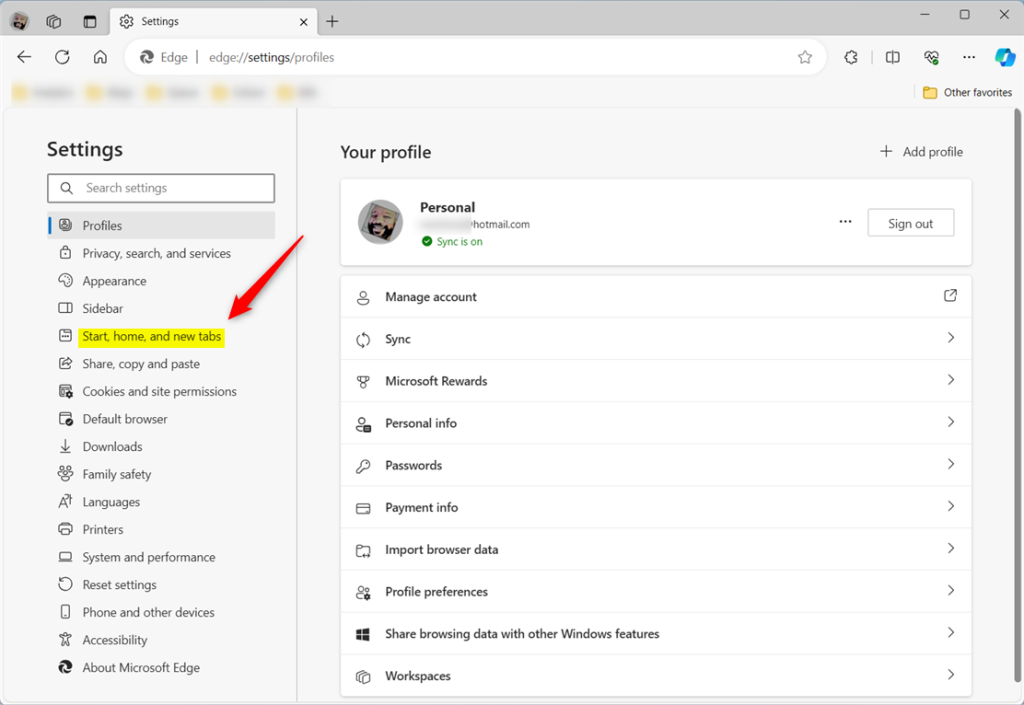
- On the right side, look under When your Windows device starts. Find the tile named Automatically open Microsoft Edge when you sign into Windows.
- Flip the switch to On if you want Edge to open at sign-in. Flip it to Off to stop that. The change saves right away, so you do not need to click anything else.
To test it, sign out of Windows and sign back in. Edge should open or stay closed according to the switch. To undo the change, go back to the same page and flip the switch the other way.
If the switch is greyed out or missing, the setting may be managed by an organization policy. This is common on work or school PCs. Ask your IT administrator in that case. If Edge still starts after you turn the switch off, press Ctrl+Shift+Esc to open Task Manager and go to the Startup apps page. Look for a Microsoft Edge entry there. If it says Enabled, right-click it and choose Disable.
Conclusion:
Disabling startup launch gives you more control over system resources and stops unwanted windows from appearing.
- Enabling the "Automatically opens Microsoft Edge when you sign in to Windows" feature can save time and effort for frequent Edge users.
- On the other hand, disabling this feature gives users more control over browser preferences and may help conserve system resources.
- Users can easily manage this feature through the Settings menu in the Microsoft Edge browser, providing flexibility based on individual needs and preferences.
Have a question about this guide?
Answered by AI from this guide. Good questions may be added to this page — please don't include personal details.
Did this guide fix your problem?

About the Author
Richard
Tech Writer, IT Professional
Richard is a writer at Geek Rewind who turns complex IT tasks into clear, step-by-step guides. He draws on years of hands-on experience in system administration and enterprise IT operations, focusing on Windows, Linux and WordPress: the problems people actually run into, and the fixes that work. His server and WordPress guides come from systems he runs himself. Richard builds and maintains the platform behind Geek Rewind, from its Ubuntu servers and Nginx configuration to its custom WordPress plugins. Many new tutorials start with readers' questions, and he's always glad to answer them in the comments.
No comments yet — be the first to share your thoughts!