Enable or Disable Read Responses in Windows 11 Copilot


Read responses in Windows 11 Copilot let the built-in AI assistant speak its text answers out loud using Microsoft’s online speech service. Copilot is an AI helper included in Windows 11 version 23H2 and later. It answers questions and manages apps through chat.
The speech feature is on by default whenever you ask a question using your microphone. If you would rather have silent answers, you can change this in the Copilot app preferences. The answer still appears as text in the chat window. The setting only controls whether Copilot also reads it aloud.
To turn off Copilot read responses aloud in Windows 11, open the Copilot app, click your profile picture in the top-right corner, expand Settings, and choose Voice. Under “Read responses aloud,” select Never. The change takes effect immediately, and answers will still appear as text in the chat window.
Turn on or off “Read responses aloud” in Copilot
You turn Copilot read responses on or off from the profile menu in the Copilot app. The setting controls whether the assistant speaks its answers back to you using text-to-speech. It takes a few clicks from the menu in the top-right corner of the app window. You do not need administrator rights, because the setting applies to your own Copilot profile.
- First, open the Copilot app. You should see the Copilot chat window.
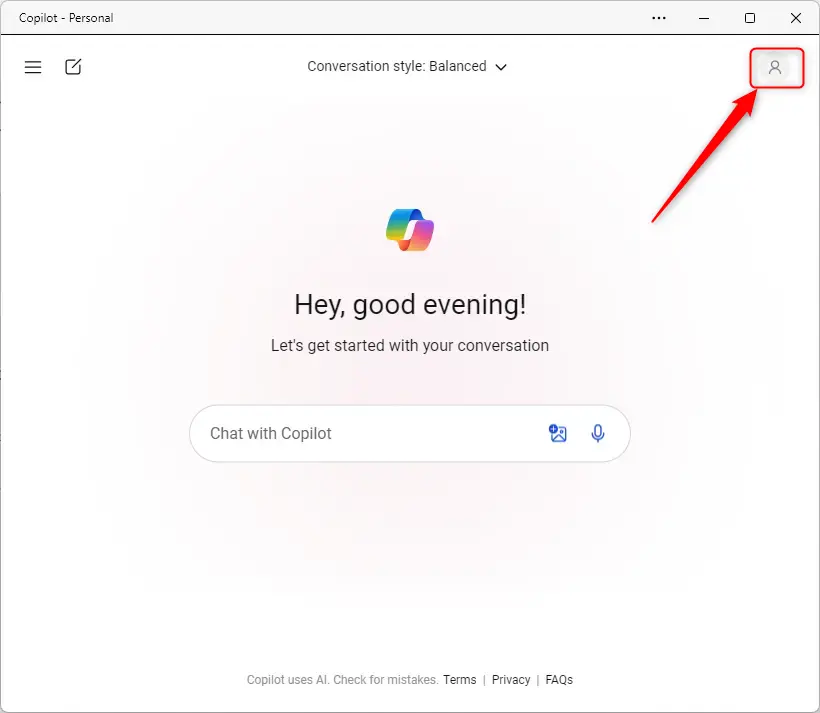
- Click your profile picture, or the Sign in icon if you are not signed in, in the top-right corner of the window. A drop-down menu opens.
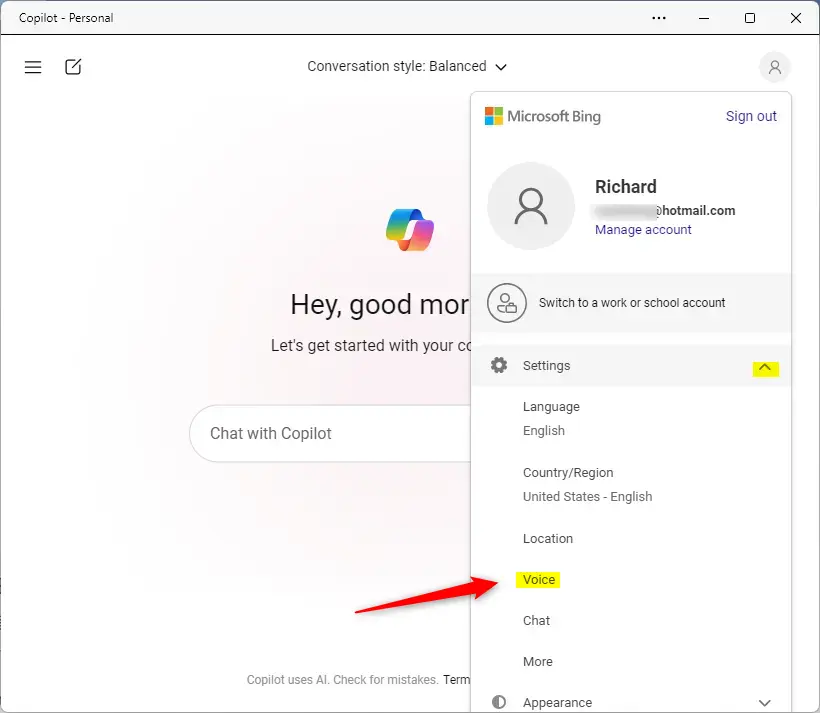
- In the drop-down menu, expand the Settings section.
- Choose Voice. The Settings page for voice opens.
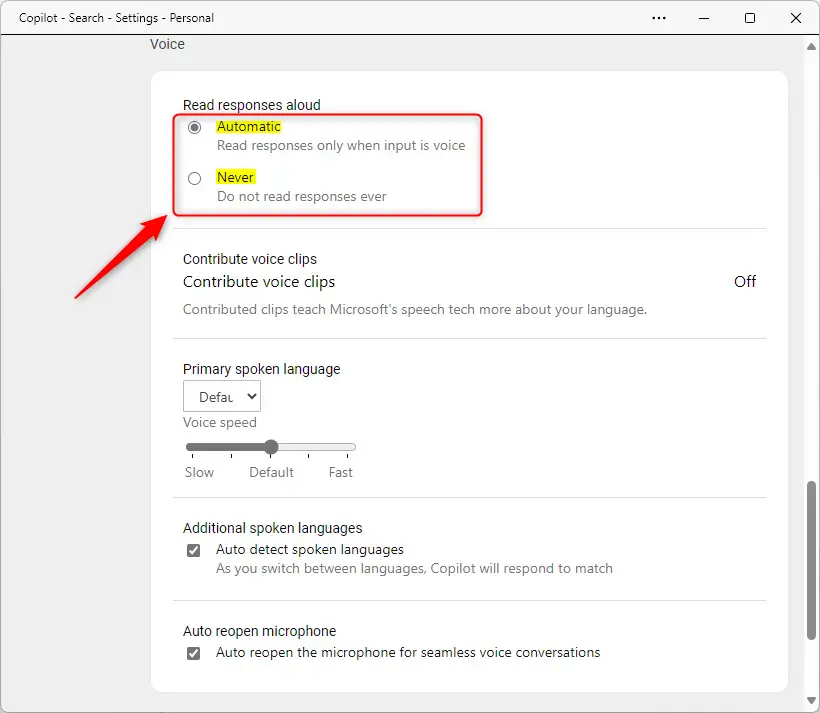
- Find the “Read responses aloud” section on the Settings page under Voice.
- Pick the behavior you want:
- Automatic – Read responses only when input is voice. This is the default behavior.
- Never – Do not read responses, ever. Choose this if you want Copilot to stay silent, even when you talk to it.
The new audio preference takes effect immediately. You do not need to restart Copilot or Windows. Ask Copilot a question to test it. With Never selected, the answer appears as text only.
If you cannot find the Voice option, the Copilot app on your PC may be out of date or laid out differently. Check for an update to the Copilot app in the Microsoft Store and look again.
Reference:
Conclusion:
- Copilot in Windows 11 simplifies tasks by allowing users to interact using natural language.
- The Copilot button on the Taskbar provides quick access to the flyout interface.
- The redesigned Copilot app offers a familiar experience, including window resizing and movement.
- Users can turn the "Read responses aloud" feature in Copilot on or off from the Voice settings.
- With control over this feature, users can customize their Copilot experience based on their preferences and needs.
Have a question about this guide?
Answered by AI from this guide. Good questions may be added to this page — please don't include personal details.
Did this guide fix your problem?

About the Author
Richard
Tech Writer, IT Professional
Richard is a writer at Geek Rewind who turns complex IT tasks into clear, step-by-step guides. He draws on years of hands-on experience in system administration and enterprise IT operations, focusing on Windows, Linux and WordPress: the problems people actually run into, and the fixes that work. His server and WordPress guides come from systems he runs himself. Richard builds and maintains the platform behind Geek Rewind, from its Ubuntu servers and Nginx configuration to its custom WordPress plugins. Many new tutorials start with readers' questions, and he's always glad to answer them in the comments.
No comments yet — be the first to share your thoughts!