How to Check Your Time Zone Setting for Morocco in Windows 11

- 16 steps
- Needs administrator rights
- Includes a restart or sign-out
Morocco’s time zone in Windows 11 moves to permanent UTC+00:00 on September 20, 2026. A Windows update, KB5124008, adjusts Morocco Standard Time so your PC shows the correct local time after the transition. This post shows how to check your time zone setting, confirm the update is installed, and fix the clock if it looks wrong.
UTC (Coordinated Universal Time) is the global reference time that clocks are measured against. UTC+00:00 means no offset from that reference. In Windows, Morocco uses the Casablanca entry in the time zone list, and the underlying zone name is Morocco Standard Time.
To check your Morocco time zone in Windows 11, open Settings Time & language Date & time and look at the Time zone list for Casablanca. The entry should show UTC+00:00 once KB5124008 is installed, which changes Morocco Standard Time to permanent UTC+00:00 from September 20, 2026.
What the Morocco time zone update changes
Does Windows 11 change the Morocco time zone to UTC+00:00? Yes. KB5124008 changes Morocco Standard Time to permanent UTC+00:00, effective September 20, 2026. The zone keeps its name and its Casablanca entry in the list. Only the rules behind it change.
Windows stores the rules for every time zone inside the operating system. These rules include the UTC offset, the number of hours a zone runs ahead of or behind UTC. When a country changes its rules, Microsoft ships the new rules in a Windows update. Your PC does not learn about the change from the internet or from your location.
The release notes for KB5124008 say the update adjusts Morocco Standard Time to reflect Morocco’s transition to permanent UTC+00:00. The purpose is to display the correct local time after the transition. Microsoft’s own description is on the KB5124008 support page, which also lists the Windows versions the update applies to.
Before you start
These steps apply to Windows 11 and use the Settings app. The Date & time page works the same way on Home and Pro. Before you start, check three things.
- An internet connection, so Windows Update can find the update and your clock can sync with a time server.
- Administrator privileges for installing updates and, on some PCs, for changing the time zone. On a standard account, a prompt may ask for an administrator password.
- A work or school PC may have these settings locked by an administrator. If so, the options appear greyed out or show a message that your organization manages them.
If you are unsure whether to let Windows pick the zone or choose it yourself, read Should You Change Your Active Time Zone Manually or Let Windows Detect It first. It explains how each choice behaves.
How to check your Morocco time zone setting in 🪟 Windows 11
These steps check your zone, confirm the update is installed, and sync your clock. Work through them in order, because later steps depend on what the earlier ones show.
- Open Settings. Press Win+I. The Settings window opens with a list of categories on the left.
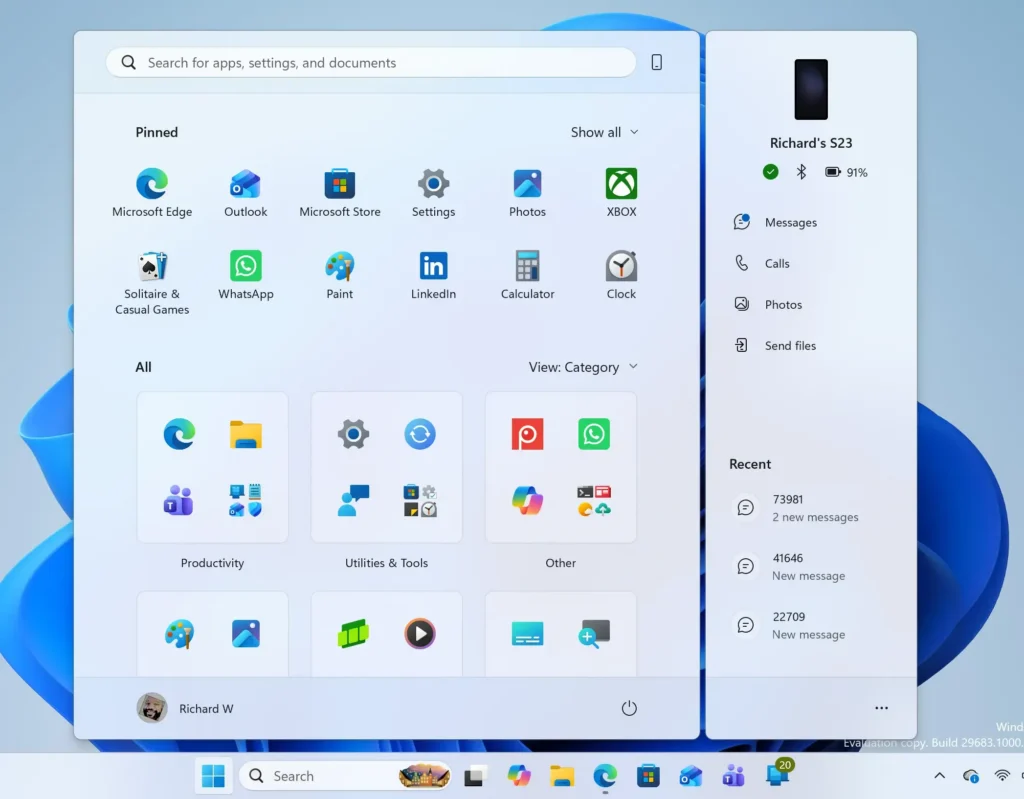
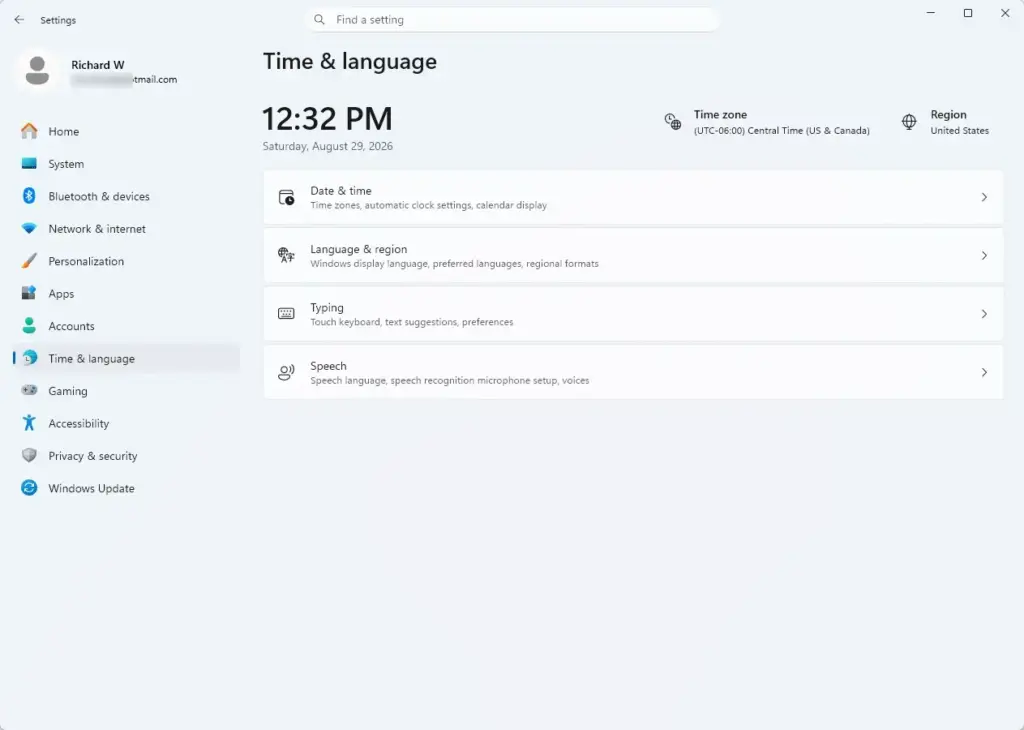
- Select Time & language. This category holds the clock, region and language options. The page now shows links for Date & time, Language & region and other clock settings.
- Select Date & time. The path is Settings Time & language Date & time. The page shows your current time, a Set time zone automatically toggle and a Time zone drop-down list.
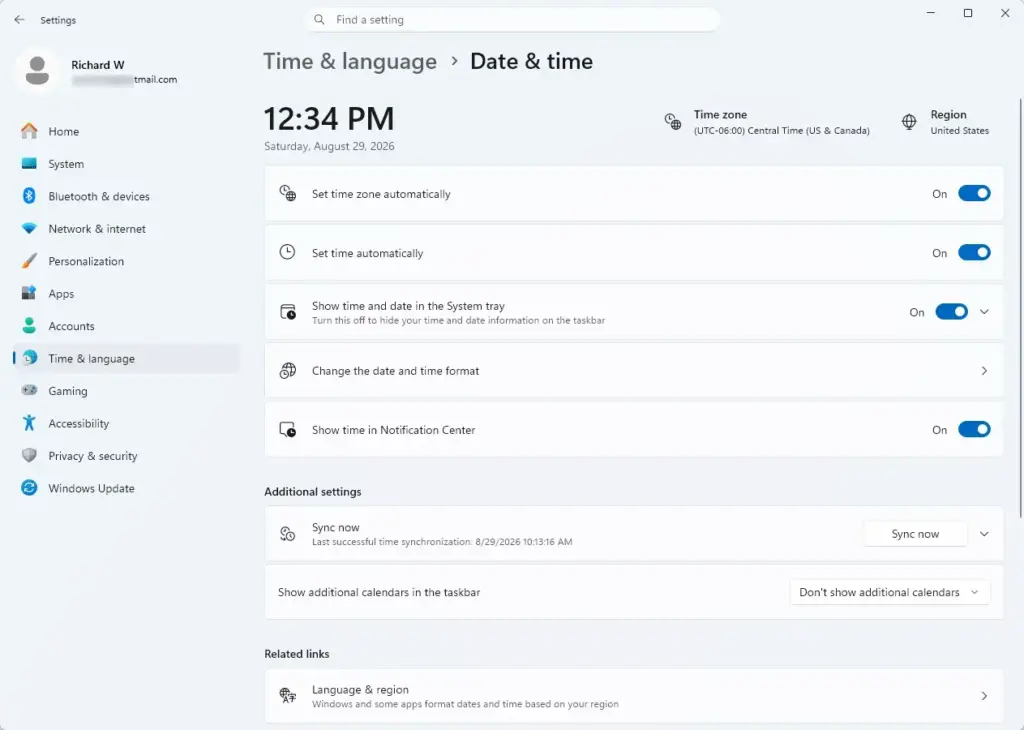
- Note the Set time zone automatically toggle. When it is on, Windows picks the zone from your location, and the Time zone list is greyed out. When it is off, you choose the zone yourself.
- Read the Time zone entry. For Morocco, look for Casablanca. On a PC with the update installed, the entry should show UTC+00:00 in its label. The exact wording in the list can vary slightly between Windows 11 builds.
- Compare the displayed time with a trusted source. Check a reliable world clock or your phone. After the transition date, the time on your PC should match the current local time in Morocco.
- Open Windows Update. Go to Settings Windows Update. This page shows whether updates are waiting and when Windows last checked.
- Select Check for updates. Windows downloads anything available. Wait until the status says you are up to date, or that a restart is needed. Installing updates requires administrator privileges.
- Select Update history. It sits further down the Windows Update page, under More options. The list shows installed updates with their KB numbers.
- Look for KB5124008 in the list. It normally appears under Quality updates. A newer cumulative update (a bundle that includes earlier fixes) can replace it, so the KB number you see may differ. If a later cumulative update is installed, the Morocco change should be part of it, but confirm this on Microsoft’s support page for that update.
- Restart the PC if Windows asks. Save your work, then select Restart now. Windows installs the remaining update steps while it restarts, which can take several minutes.
- Return to Date & time. Open Settings Time & language Date & time again and confirm the Time zone entry still shows Casablanca.
- Select Sync now. It sits under Additional settings. Windows contacts its time server and updates the clock. A message beneath the button shows the time of the last successful sync.
That’s it. You have checked your time zone, confirmed the Morocco update is installed, and synced the clock against Windows’ time server.
If a step does not behave as described, the next sections cover the common causes.
What you should see when it is set correctly
On a correctly configured PC, the Time zone setting shows Casablanca, and the clock matches local time in Morocco. The taskbar clock in the bottom-right corner uses the same zone. Update history lists KB5124008, or a newer cumulative update that replaces it.
Check the time zone from Command Prompt
The Settings app is the main route, but a command gives you the exact zone name Windows uses. It is a quick way to confirm Morocco Standard Time is the active zone. The command only reads the setting, so it needs no administrator privileges.
- Open Command Prompt. Press Win+R to open the Run box, type
cmd, then press Enter. A black Command Prompt window opens. - Type the command to show the time zone. Type the command below and press Enter:Code
tzutil /g - Read the result. The window prints the time zone name. For Morocco, it prints
Morocco Standard Time. Any other name means the PC uses a different zone.
That’s it. You now know which zone name Windows is using, without changing anything.
This check shows the zone name only. It does not show whether the update with the new UTC+00:00 rules is installed. Use Update history for that.
If the Time zone list is greyed out
A greyed-out Time zone list is normal when Set time zone automatically is on. Windows is choosing the zone for you, so it locks the list. To pick Morocco yourself, turn the toggle off, then select Casablanca from the list. Changing the time zone may need administrator privileges on your account.
If the toggle itself is greyed out or shows a message about your organization, an administrator has locked the setting. Ask your IT team to change it. You cannot override the lock from your own account.
For a step-by-step guide to choosing the zone yourself, read How to Configure Manual Time Zone Overrides in Windows 11 Date and Time Settings.
If Casablanca is not in the list or the time is wrong
Most problems fall into one of the cases below. Each one points to a different cause, so check them in order.
The update is not installed
If Update history does not list KB5124008 or a newer cumulative update, the PC still uses the old rules for Morocco Standard Time. That can leave the displayed time off by an hour after the transition. Run Check for updates as in the steps above and restart when asked.
Windows Update shows no update available
Updates reach PCs in stages, so yours may not receive it the day it is released. If an organization manages your PC, the administrator may also delay updates. In either case, check again later.
Do not download the update from third-party sites. Check the Microsoft support page for KB5124008 to see whether it is available for your PC.
The zone is right but the clock is off
The time zone and the clock are separate settings. A correct zone with a clock that has drifted can come from a failed sync. Select Sync now under Settings Time & language Date & time Additional settings.
If the sync fails, the time server (the computer that supplies the correct time) may be unreachable. Trying a different one can help. How to Change System Date and Time Synchronization Servers in Windows 11 shows how.
Automatic detection picks the wrong zone
With Set time zone automatically on, Windows relies on location data. If location access is off or inaccurate, it may select a different zone. Turn the toggle off and choose Casablanca yourself. This gives a fixed result that does not depend on your location.
How to undo the change
Checking the setting changes nothing. If you did change the zone and want to go back, return to Settings Time & language Date & time. Choose your previous zone from the Time zone list, or turn Set time zone automatically back on so Windows picks it again.
Changing the zone does not remove the Morocco rules, and you should not need to. The update only adjusts how Morocco Standard Time behaves. Other time zones are unaffected unless you select Casablanca.
What to do next
After September 20, 2026, compare your PC’s clock with a trusted Morocco time source once, to confirm the transition applied. If it is still wrong, recheck Update history and run Sync now. If your Windows 11 PC is set to Morocco and you also need another city’s time, add a second clock rather than changing your main zone.
Frequently asked questions
What time is it in morocco?
Morocco is on UTC+01:00 for most of the year, one hour ahead of UTC. This page cannot show the live time, because the clock changes every second. To see the current time, search for the time in Casablanca, or check the clock on your Windows taskbar, which shows your own time zone.
What time is it in morocco right now?
This page cannot show the live time in Morocco. Morocco normally uses UTC+01:00, and it switches to UTC+00:00 during Ramadan. From September 20, 2026, Morocco stays on UTC+00:00 all year. For the current time, search for the time in Casablanca.
What time in morocco?
Morocco's local time follows Casablanca, which uses UTC+01:00 for most of the year. To see the live clock, search for the time in Casablanca. If your Windows clock shows a different time, check your time zone in Settings under Time & language.
What is the time in morocco?
Morocco is one hour ahead of UTC for most of the year, on UTC+01:00. Starting September 20, 2026, it stays on UTC+00:00 all year, matching UTC. This page cannot show the current time. Search for the time in Casablanca for a live clock, and your Windows clock should match once the update is installed.
Still have a question?
Answered by AI from this guide. Good questions may be added to this page — please don't include personal details.
Did this guide fix your problem?

About the Author
Richard
Tech Writer, IT Professional
Richard is a writer at Geek Rewind who turns complex IT tasks into clear, step-by-step guides. He draws on years of hands-on experience in system administration and enterprise IT operations, focusing on Windows, Linux and WordPress: the problems people actually run into, and the fixes that work. His server and WordPress guides come from systems he runs himself. Richard builds and maintains the platform behind Geek Rewind, from its Ubuntu servers and Nginx configuration to its custom WordPress plugins. Many new tutorials start with readers' questions, and he's always glad to answer them in the comments.
No comments yet — be the first to share your thoughts!