How to Check Which Wi-Fi Types Your Windows 11 Computer Supports


Your computer’s wireless adapter decides which Wi-Fi standards it can use. Knowing them tells you whether the machine can take advantage of a newer router, or why it connects slower than other devices in the house. This guide shows how to check which standards the Wi-Fi adapter in your Windows 11 or Windows 10 computer supports. The steps are the same on Home and Pro editions, and nothing you do here changes any settings.
Open Windows Terminal and run the command `netsh wlan show capabilities`. Look under the “Wireless Radio Types Supported” section to see which Wi-Fi standards your adapter supports, listed as 802.11a, b, g, n, ac, ax, or be. Your adapter’s driver determines what appears.
What is Wi-Fi Radio Type?
Your computer’s Wi-Fi radio type is the set of Wi-Fi standards its adapter can use to connect. It affects three things you will notice day to day:
- Speed: newer standards allow higher maximum transfer rates.
- Range and signal quality: some standards handle distance, walls and crowded airspace better than others.
- Features: access to the 5 GHz band, and on newer hardware the 6 GHz band, plus better handling of many devices on one network.
Think of radio types as the generation of wireless technology your hardware handles. They are labelled with IEEE designations: 802.11a, b, g, n, ac, ax and be. Newer adapters are normally backward compatible, so an adapter that supports 802.11ax can also connect using the older standards.
Here is how the designations map to the names you see on routers and boxes. Speeds are theoretical maximums, and real-world speeds are always lower:
- 802.11b: 2.4 GHz, up to 11 Mbps. Very old.
- 802.11a: 5 GHz, up to 54 Mbps.
- 802.11g: 2.4 GHz, up to 54 Mbps.
- 802.11n (Wi-Fi 4): 2.4 GHz and 5 GHz, up to 600 Mbps.
- 802.11ac (Wi-Fi 5): 5 GHz, with maximums in the multi-gigabit range.
- 802.11ax (Wi-Fi 6 and 6E): 2.4 GHz and 5 GHz, with Wi-Fi 6E adding the 6 GHz band.
- 802.11be (Wi-Fi 7): 2.4, 5 and 6 GHz, with higher maximums again.
First, what your adapter reports depends on both the hardware and the installed driver, so an out-of-date or generic driver can make a capable adapter look older than it is. Second, you only get the best standard when the router supports it too. A Wi-Fi 6 laptop on a Wi-Fi 5 router will connect using Wi-Fi 5.
Summary
Checking these standards reveals what speeds and features your hardware handles. Newer iterations like Wi-Fi 6 and Wi-Fi 7 manage heavy device traffic much better than older hardware.- Wi-Fi types are different versions of Wi-Fi technology with different speeds and ranges.
- Newer Wi-Fi types like Wi-Fi 6 and Wi-Fi 7 are faster and better for many devices.
- Your computer might support several Wi-Fi types. Checking helps you know what speeds and features you can get.
- You can easily check this using a simple command in Windows Terminal.
- Future Wi-Fi types like Wi-Fi 8 are coming with even more improvements.
- Knowing your Wi-Fi types can help you decide if you need a new router or adapter for faster internet.
More Info
Learn more about Wi-Fi standards on Wikipedia – IEEE 802.11
Or explore Wi-Fi technologies at the Wi-Fi Alliance website
Common Wi-Fi Types You Might See
Common Wi-Fi types you'll find on a Windows 11 computer include 802.11a, 802.11b, 802.11g, 802.11n, and 802.11ac. Different Wi-Fi standards offer varying speeds and ranges for your network, directly affecting how fast and reliable your connection is.| Wi-Fi Type | What It Means |
|---|---|
| 802.11a | 802.11a Works on 5 GHz band. Speed up to 54 Mbps. Has shorter range than 2.4 GHz types. |
| 802.11b | 802.11b Works on 2.4 GHz band. Speed up to 11 Mbps. Good range and can go through walls. |
| 802.11g | 802.11g Also 2.4 GHz. Faster, up to 54 Mbps. Compatible with 802.11b. |
| 802.11n | 802.11n (Wi-Fi 4) Works on 2.4 & 5 GHz. Speeds up to 600 Mbps. Better range and speed. |
| 802.11ac | 802.11ac (Wi-Fi 5) Mainly 5 GHz. Speeds over 1 Gbps. Supports many devices at once. |
| 802.11ax (Wi-Fi 6) | 802.11ax (Wi-Fi 6 / 6E) Works on 2.4, 5 & 6 GHz (6E only). Speeds up to 9.6 Gbps. Great for busy networks. |
| 802.11be (Wi-Fi 7) | 802.11be (Wi-Fi 7) Upcoming standard. Super fast (up to 46 Gbps). Can use multiple bands at once. |
How to Check Your Wi-Fi Types on 🪟 Windows 11
Follow these steps:
Step 1Open Windows Terminal
- Click the Start button (Windows icon) or press the Win key.
- Type
Windows Terminal. - Click on Windows Terminal to open it.
Step 2Choose PowerShell or Command Prompt
In Windows Terminal, click the down arrow next to the tab and pick Windows PowerShell or Command Prompt.
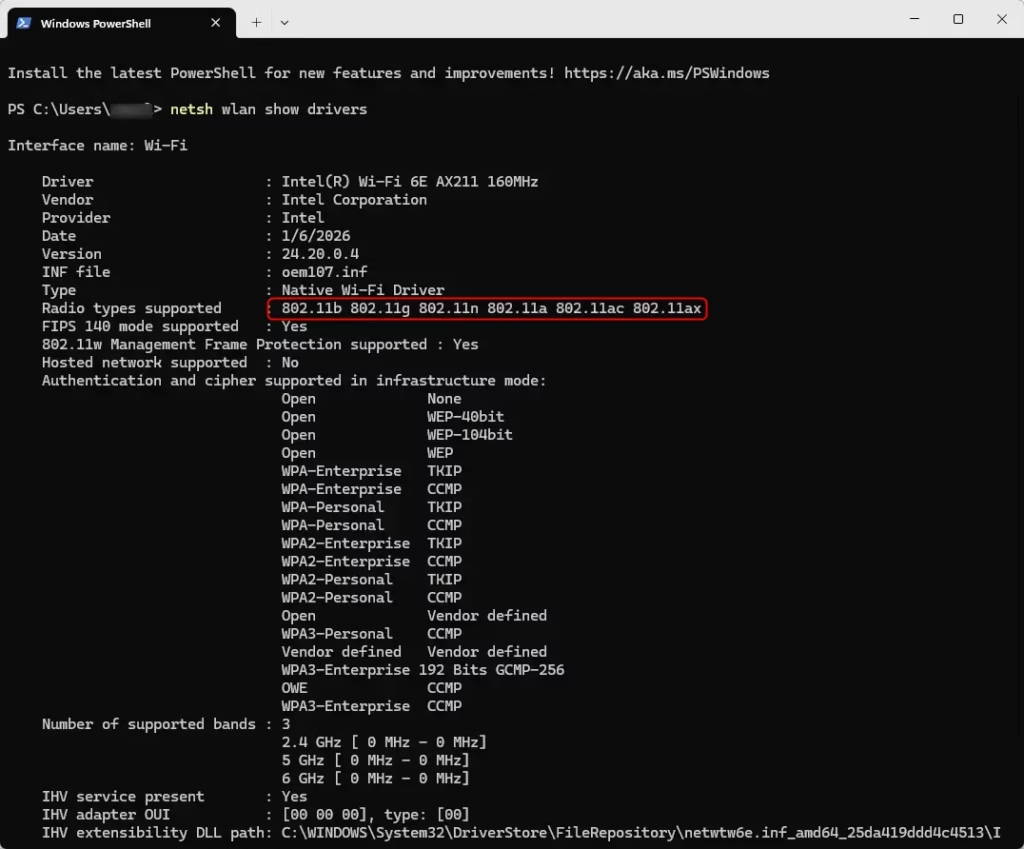
Step 3Run the Command
Type this command and press Enter:
netsh wlan show driversThis command displays information about your wireless adapter.
Step 4Look for Radio Types Supported
Find the line that says "Radio types supported." It lists all the Wi-Fi types your computer's adapter can use.
Example:
Summary
Checking these standards reveals what speeds and features your hardware handles. Newer iterations like Wi-Fi 6 and Wi-Fi 7 manage heavy device traffic much better than older hardware.- Wi-Fi types are different versions of Wi-Fi technology with different speeds and ranges.
- Newer Wi-Fi types like Wi-Fi 6 and Wi-Fi 7 are faster and better for many devices.
- Your computer might support several Wi-Fi types. Checking helps you know what speeds and features you can get.
- You can easily check this using a simple command in Windows Terminal.
- Future Wi-Fi types like Wi-Fi 8 are coming with even more improvements.
- Knowing your Wi-Fi types can help you decide if you need a new router or adapter for faster internet.
More Info
Learn more about Wi-Fi standards on Wikipedia - IEEE 802.11
Or explore Wi-Fi technologies at the Wi-Fi Alliance website
Was this guide helpful?

About the Author
Richard
Tech Writer, IT Professional
Richard is a writer at Geek Rewind who turns complex IT tasks into clear, step-by-step guides. He draws on years of hands-on experience in system administration and enterprise IT operations, focusing on Windows, Linux and WordPress: the problems people actually run into, and the fixes that work. His server and WordPress guides come from systems he runs himself. Richard builds and maintains the platform behind Geek Rewind, from its Ubuntu servers and Nginx configuration to its custom WordPress plugins. Many new tutorials start with readers' questions, and he's always glad to answer them in the comments.




No comments yet — be the first to share your thoughts!