How to Recover & Repair Windows 11 System Problems

System Protection in Windows 11 saves snapshots of your system files and registry settings. These snapshots are called restore points, and you can roll your PC back to one when errors appear. On many PCs this feature is off for the 📁C:\
With System Protection on, you can create a restore point before you install risky apps, drivers or updates. If a bad driver later crashes the computer, you can use the restore point to undo the broken changes. Your personal documents and photos are not touched.
Two things to know before you start:
- System Protection works per drive. You choose how much disk space it may use, and older restore points are deleted when that space fills up.
- Restore points cover system files, drivers and installed programs. They are not a backup of your documents, so keep a separate backup of anything you cannot replace.
Open Settings System System Protection, turn on System Protection for the 📁C:\
Get Ready to Recover Your PC
Preventing trouble beats chasing it. This section covers setting up the tools you need to fix your system if it becomes unstable or refuses to start. Do this while the PC still works, because most of these tools are hard to set up once Windows will not boot.
Work through the next steps in order:
- Sign in with an administrator account. Standard accounts cannot change System Protection settings.
- Turn on System Protection for the 📁C:\
drive and set a disk space limit. A modest limit is usually enough for several restore points. - Create a restore point manually and give it a name you will recognize, such as the date and the change you are about to make.
- Check that the new restore point appears in the list. If it does, the setup worked.
If the System Protection options are greyed out, you are probably not signed in as an administrator. A device managed by an organization can also block them through policy.


Fix Common Startup Problems
Startup errors often resolve without a full reinstall. The diagnostic utilities below target common boot failures and aim to get your desktop running again.
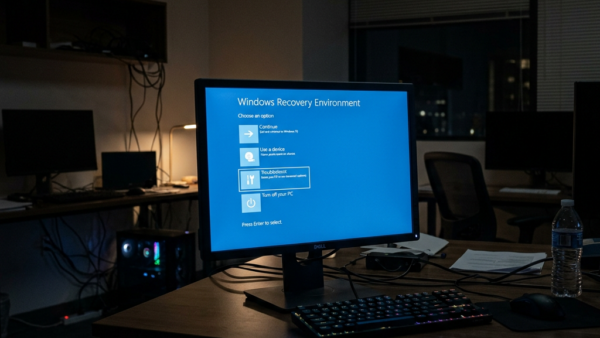
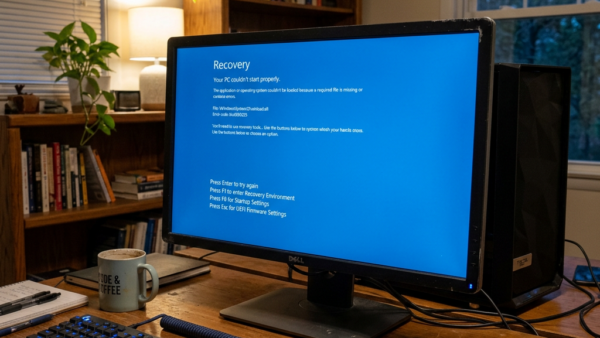
When Windows cannot start, it usually offers the recovery environment on its own after a couple of failed boots. If it does not, you can start the PC from a recovery drive or installation media instead. Once you are in the recovery environment, follow this general pattern:
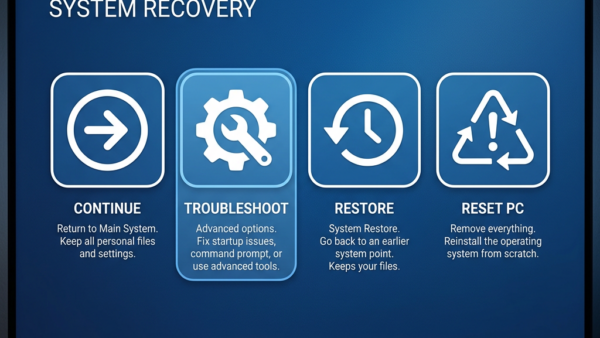
- Pick the troubleshooting option from the recovery menu.
- Open the advanced options. You should see a list of repair tools.
- Choose the tool that matches your problem, such as Startup Repair for a PC that will not boot.
- Select your account and enter the password if asked. The tool then starts scanning and shows its progress.
- Wait for it to finish and for the PC to restart. Do not switch the machine off partway through.
If the first tool fails, the next ones in the list are worth trying, since each targets a different cause. Note the exact wording of any error message, because it helps you search for a fix.
Restore Your PC to an Earlier State
Reverting to an earlier state fixes instability caused by bad software updates or corrupted drivers. The rollback undoes harmful changes without touching your personal data.
Here is how a restore usually goes:
- Start the System Restore wizard, from within Windows if it still boots or from the recovery environment if it does not.
- Choose a restore point from before the problem began. You should see a list with dates and descriptions.
- Scan for affected programs if the wizard offers it. This shows which apps and drivers will be removed or put back.
- Confirm your choice and start the restore. The PC restarts and shows a progress screen.
- Sign in again. Windows should tell you whether the restore succeeded.
You can usually undo a restore from the same wizard, and you can pick a different restore point if the first one did not help. If no restore points are listed, System Protection was off when the problem started, and you will need one of the other repair options.
Reinstall Windows When Other Options Fail
Severe system corruption requires a fresh start. Reinstalling Windows 11 resets your machine to a clean state. Use it when the earlier repairs have failed, since it takes the most time.
Before you begin, do the following:
- Back up your documents, photos and anything else you cannot replace to an external drive or cloud storage.
- Note your Microsoft account details and any software licence keys you will need again.
- Plug a laptop into power so the process is not interrupted.
- Choose the reinstall path that fits your situation. Some paths keep your files and others wipe the drive, so read each option's description before you confirm.
The PC restarts several times during the reinstall. Afterwards, reinstall your apps and drivers and restore your files from the backup.
Common questions
What is a restore point?
What is a restore point? A restore point is a saved state of critical system files at a given moment. It lets you back out of software conflicts, such as a bad driver or update, while keeping your documents untouched. Windows can create restore points automatically before some changes, and you can create one yourself at any time.
Do I need a recovery drive if I have a restore point?
Each tool serves a different phase of troubleshooting. Restore points undo recent software changes inside an operating system that still works. A recovery drive uses external media, usually a USB stick, to boot a PC whose operating system is broken. Make the recovery drive before you need it, on a working PC. Plan on a USB stick that you can erase, because creating the drive wipes it.
Will reinstalling Windows delete my personal files?
Documents and pictures remain intact during an in-place upgrade, but you should still keep external backups. Any reinstall can go wrong, and a full reset or clean install removes your files.
How long does Startup Repair take?
How long Startup Repair takes depends on the damage. Expect anything from a quick five-minute scan to an hour-long overhaul if system files need deep repair. Be patient and let it finish, even if the screen looks idle for a while. If it is still running after several hours with no change in the disk activity light, the repair has likely stalled, and you should try another tool from the recovery menu.
Have a question about this guide?
Answered by AI from this guide. Good questions may be added to this page — please don't include personal details.
Did this guide fix your problem?

About the Author
Richard
Tech Writer, IT Professional
Richard is a writer at Geek Rewind who turns complex IT tasks into clear, step-by-step guides. He draws on years of hands-on experience in system administration and enterprise IT operations, focusing on Windows, Linux and WordPress: the problems people actually run into, and the fixes that work. His server and WordPress guides come from systems he runs himself. Richard builds and maintains the platform behind Geek Rewind, from its Ubuntu servers and Nginx configuration to its custom WordPress plugins. Many new tutorials start with readers' questions, and he's always glad to answer them in the comments.
No comments yet — be the first to share your thoughts!