How to Find Dropbox Linked Devices on Your Account

Dropbox linked devices are the computers, phones, and tablets currently signed in to your cloud storage account. Checking this list helps you find lost hardware and stop unauthorized access to your files.
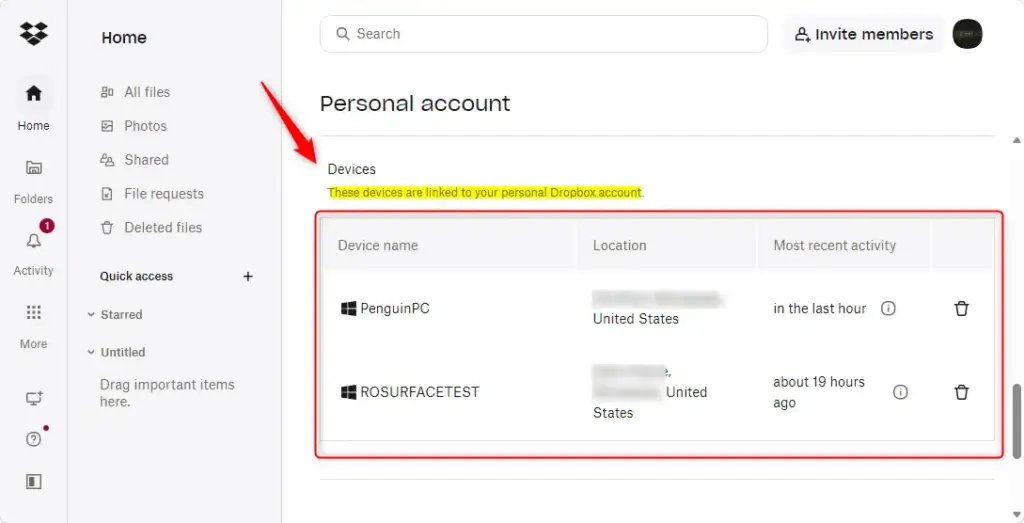
Free Dropbox Basic accounts allow up to 3 connected devices at the same time. Paid plans let you link as many computers and mobile devices as you want. If a Basic account suddenly refuses to link a new device, an old or forgotten device on the list is the usual cause. Open your account security settings on the web to see every active session and remove any device you no longer recognize.
Log In to See Device Details
Your Dropbox linked devices are listed on the Dropbox website once you sign in. You do not need the desktop app for this, and it works from any browser on any computer. Follow these steps to reach the list.
- Open your web browser and go to dropbox.com.
- Enter your email address and password, then sign in. If you have two-step verification turned on, enter the code when asked. You should now see your Dropbox file list.
- Find your profile picture or initials in the bottom-left corner of the screen and click it. Dropbox has moved this control between layouts, so if it isn’t there, check the top-right corner.
- Click Settings in the menu that appears. The Settings page opens with a row of tabs across the top.
- Click the Security tab (Settings Security). Scroll down to the device list. It shows every computer, phone, and tablet connected to your account.
Look through the list and note any device name you don’t recognize, or one you stopped using long ago. Names usually come from the device itself, so your own gear should look familiar.
Find the IP Address
The IP address for any linked device is shown in the same security settings, and it takes only a few seconds to find.
- On the Security tab, locate the computer or phone in your device list.
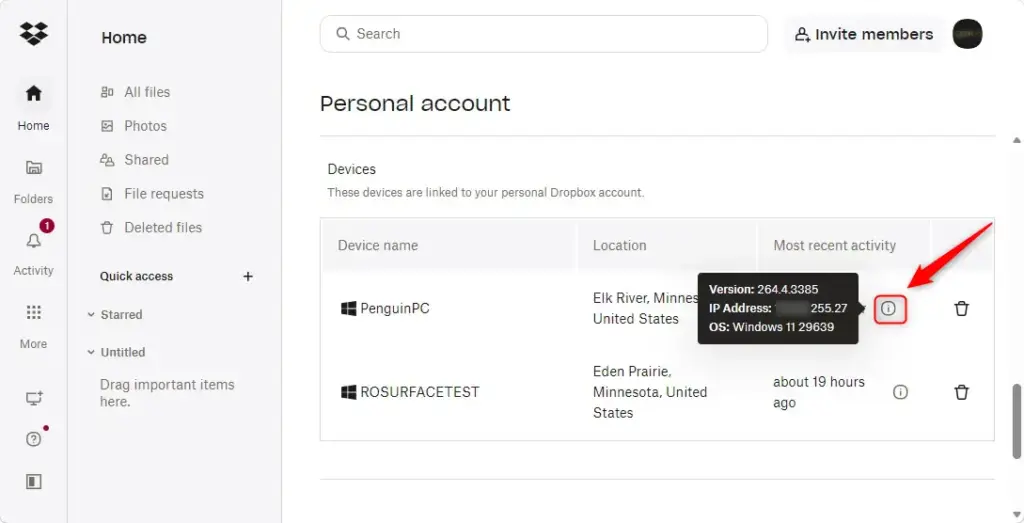
- Find the small information icon next to its name.
- Hover your mouse pointer over the icon. A pop-up box appears with the last known IP address and location for that device.
The box shows the last recorded IP address for that device. You can use that address to work out roughly where the device connected from. Keep in mind that an IP address gives an approximate location, often only the city or the internet provider’s region, not a street address. The address updates each time the device connects to the internet while logged in to Dropbox. So it shows the most recent connection, not the first one.
Compare the address and location with where you and your devices actually were. If a device shows a place you have never been, treat it as suspicious.
Knowing the IP address is a key first step. It gives you the information you need to decide whether to take further action to secure your account.
Then change your account password, since anyone who was signed in may have known it. Unlinking a device ends its access to your account. If a device is only old or unused, unlinking it also frees up a slot on a Basic account.
References:
https://help.dropbox.com/security/unknown-device-linked
Summary
Managing your Dropbox linked devices helps keep your files safe. You can check for unusual activity and remove old hardware you no longer use. All connected computers and phones appear under the Security tab on the Dropbox website. From there you can view last active dates, check locations using IP addresses, and unlink any device that should not have access to your files. Make this check part of your routine, and run it right away if you lose a phone or laptop.
Have a question about this guide?
Answered by AI from this guide. Good questions may be added to this page — please don't include personal details.
Did this guide fix your problem?

About the Author
Richard
Tech Writer, IT Professional
Richard is a writer at Geek Rewind who turns complex IT tasks into clear, step-by-step guides. He draws on years of hands-on experience in system administration and enterprise IT operations, focusing on Windows, Linux and WordPress: the problems people actually run into, and the fixes that work. His server and WordPress guides come from systems he runs himself. Richard builds and maintains the platform behind Geek Rewind, from its Ubuntu servers and Nginx configuration to its custom WordPress plugins. Many new tutorials start with readers' questions, and he's always glad to answer them in the comments.
No comments yet — be the first to share your thoughts!