How to Keep Declined Meetings in Outlook

Do you ever decline a meeting but later need to check the details, shared documents, or chat history attached to it? By default, Outlook removes these from your view once you say no. This guide shows you how to keep those events on your calendar so you can refer back to them whenever you need.
Why keep declined meetings?
Keeping declined meetings acts as a reference point. Even if you cannot attend, the meeting invite often contains important files or conversation threads that are useful to have at your fingertips.
What happens when you are done?
Once you enable this setting, any meeting you decline will stay on your calendar. You will be marked as “free” during that time, so others can still book you, but the meeting details will remain visible.
The new Outlook app supports many features, including subscription management, email forwarding, setting default From address, backing up your mailbox, changing the reading pane, opening a new window for a message, language translations, turning text predictions on or off, switch primary account, sharing a calendar, changing language, date, and time format, public a calendar, show week numbers in Outlook calendar, deleting your search history, export your search history, add or remove events from emails to your Calendar, switch to dark mode, link preview, sound alerts for notifications, turn on or off notifications when Outlook is closed, turn on or off incoming email alert sounds, customizing Calendar alerts, and sharing your work hours and location.
Steps to keep declined meetings
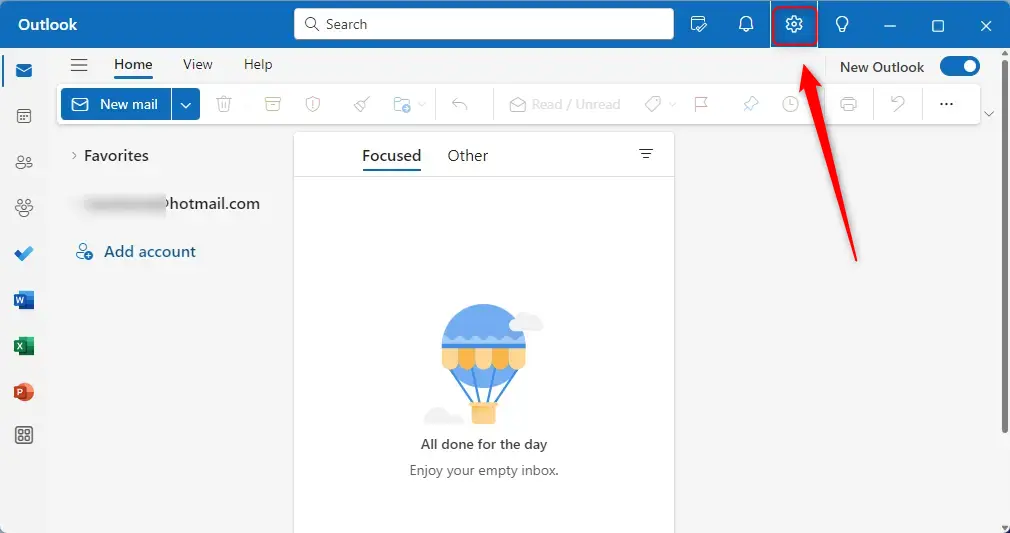
- Open the Outlook app from your Start menu.
- Click the Settings gear icon located at the top right of the screen.
- Select Calendar from the menu on the left.
- Click on Events and Invitations in the side panel.
- Look for the section labeled Save declined events.
- Check the box that says “Show declined events on your calendar – you will show as being free.”
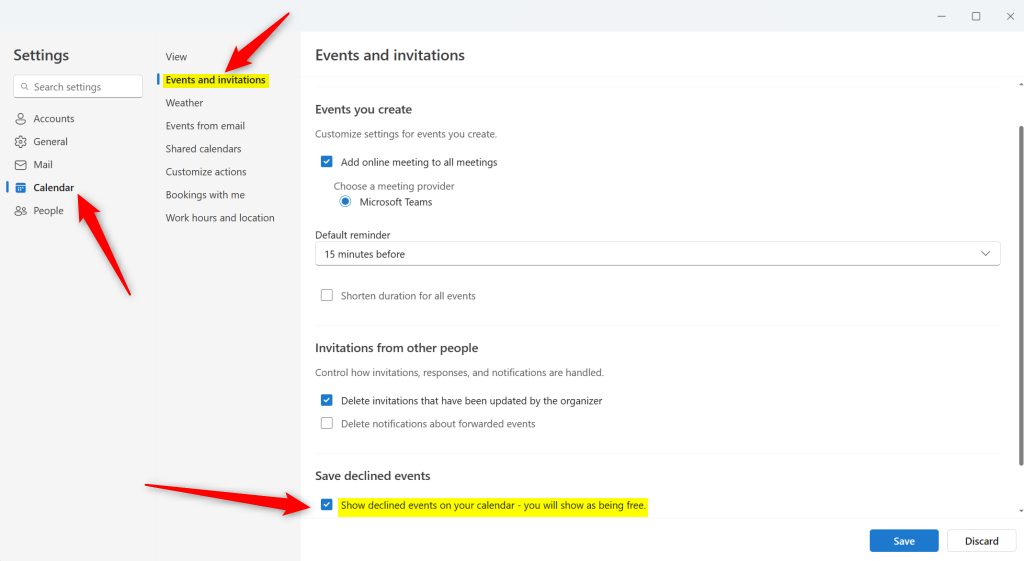
- Click the Save button to apply your changes.
If you ever want to hide these meetings again, simply follow these steps and uncheck the box.
Summary
You can easily keep track of declined meetings in Outlook by adjusting your Calendar settings. This ensures that important documents and meeting notes remain accessible in your calendar view even if you do not attend the event. For more details on managing your schedule, you can visit the official Microsoft.com.
How can I keep declined meetings on my Outlook calendar?
What happens when I decline a meeting in Outlook?
Can I disable the feature to keep declined meetings on my calendar?
Why would I want to keep declined meetings on my calendar?
Is the process to keep declined meetings the same on all versions of Outlook?
Was this guide helpful?





Leave a Reply Cancel reply