How to Share Your Calendar in Outlook for Windows 11

You share your calendar in Outlook for Windows 11 to give others permission to view or edit your schedule.
This allows colleagues or family to easily check your availability, saving you the trouble of constant back-and-forth communication about your commitments.
Sharing your calendar in Outlook 365, for example, helps prevent scheduling conflicts and ensures everyone has accurate information. You can grant different levels of access, from showing only your free/busy times to revealing full appointment details.
Open Outlook, click the Settings gear icon, and select Calendar then Shared calendars. Choose your account, enter the recipient’s email, select their permission level (view or edit), and click Share.
How to share your calendar on Windows
Sharing your Outlook calendar on Windows 11 is straightforward using the desktop app. You can easily control who sees your schedule and what they can view, making it simple to collaborate or let others know your availability.
- Open the Outlook app on your computer.
Open the new Outlook app in Windows 11 - Click the Settings gear icon in the top right corner.

Add Gmail to Outlook app in Windows 11 - Click the Calendar tab, then select Shared calendars.
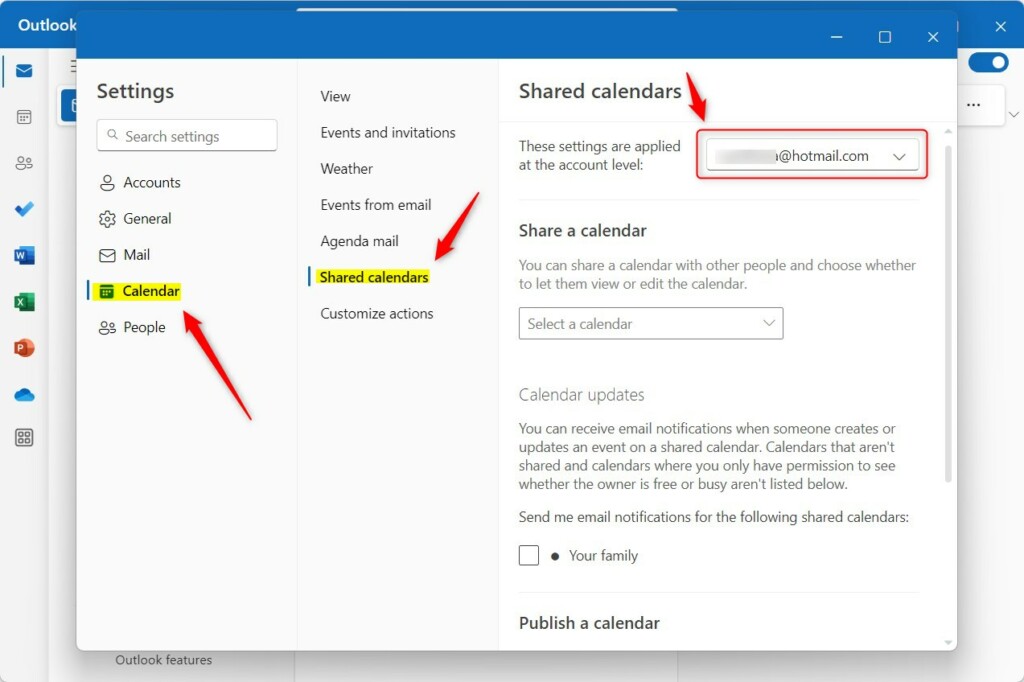
Share a calendar in Outlook on Windows 11 - Select your email account and the specific calendar to share.
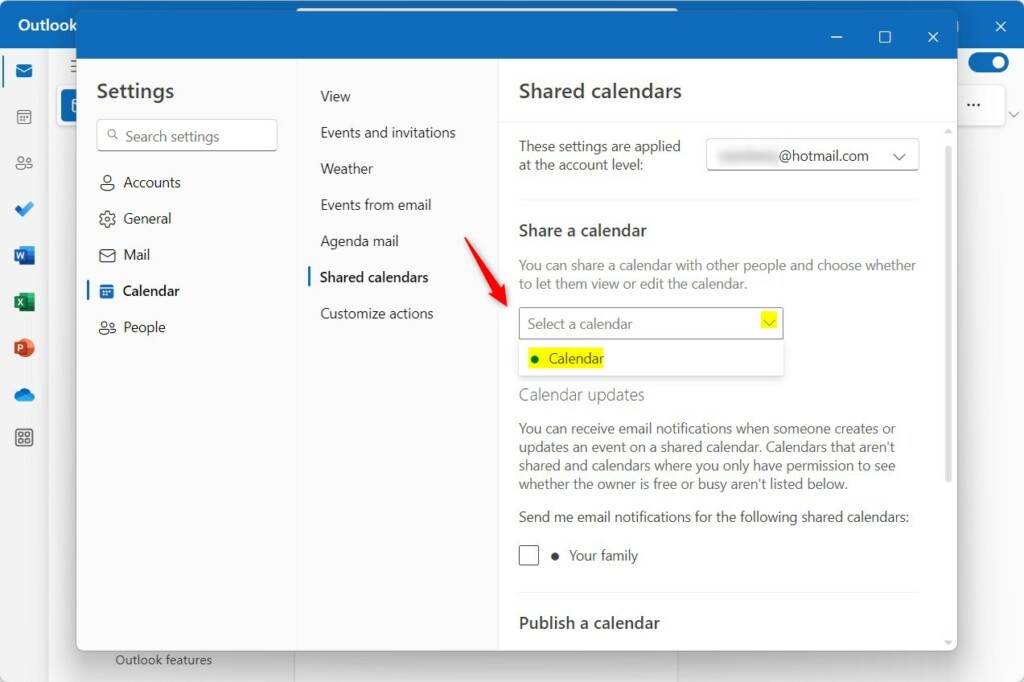
Share a calendar in Outlook on Windows 11 - Enter the recipient’s email address.
- Choose a permission level: Can view all details (read-only) or Can edit (full access).
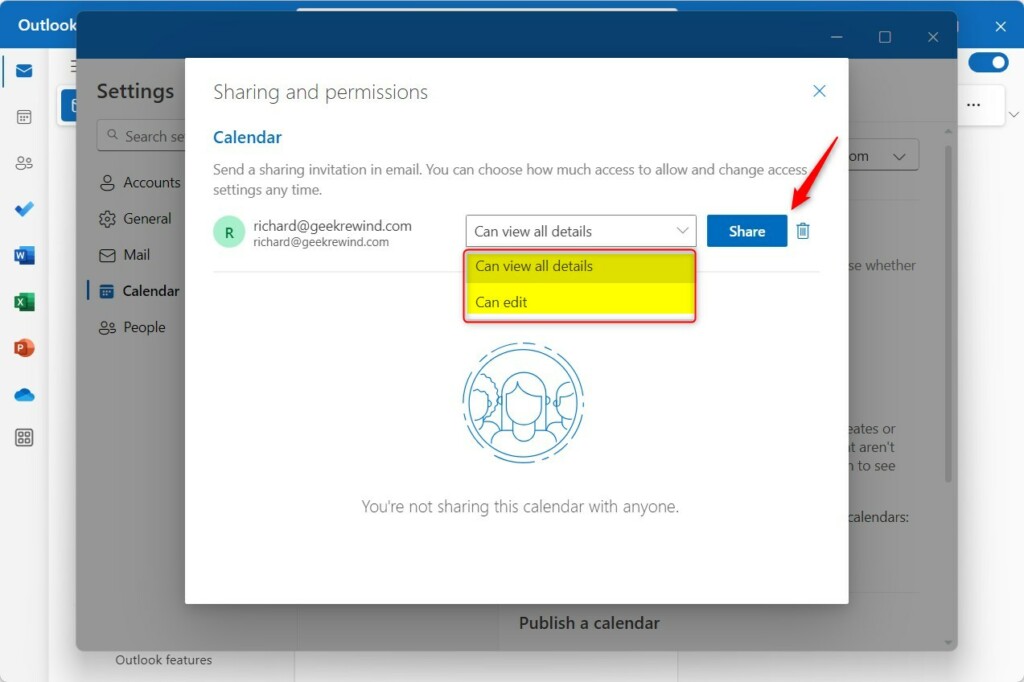
Share a calendar in Outlook on Windows 11 - Click Share.
Sharing across platforms
If you use Outlook Web or Outlook.com, the process is similar. Log in to your account, go to the Calendar view, click Share in the top right, and enter the email address. For mobile users, calendar sharing is often managed through the account settings within the Outlook app.
Understanding permission levels
- Can view all details: The user sees your event titles and times.
- Can edit: The user can add, change, or delete events.
- Delegate access: This allows someone to act on your behalf, often used for assistants to manage meetings.
Troubleshooting common issues
If you’re having trouble sharing your Outlook calendar, like the share button not showing up, it’s usually due to a few common reasons. Checking your account type, specific permissions, or potential sync problems can often fix the issue quickly.
- Account type: Some work or school accounts restrict sharing outside your organization.
- Permissions: Ensure your administrator has not disabled calendar sharing via Microsoft support policies.
- Sync issues: If changes do not appear, try restarting the app or checking your internet connection.
Note: If you are in a corporate environment, some settings may require admin privileges to change.
How to stop sharing
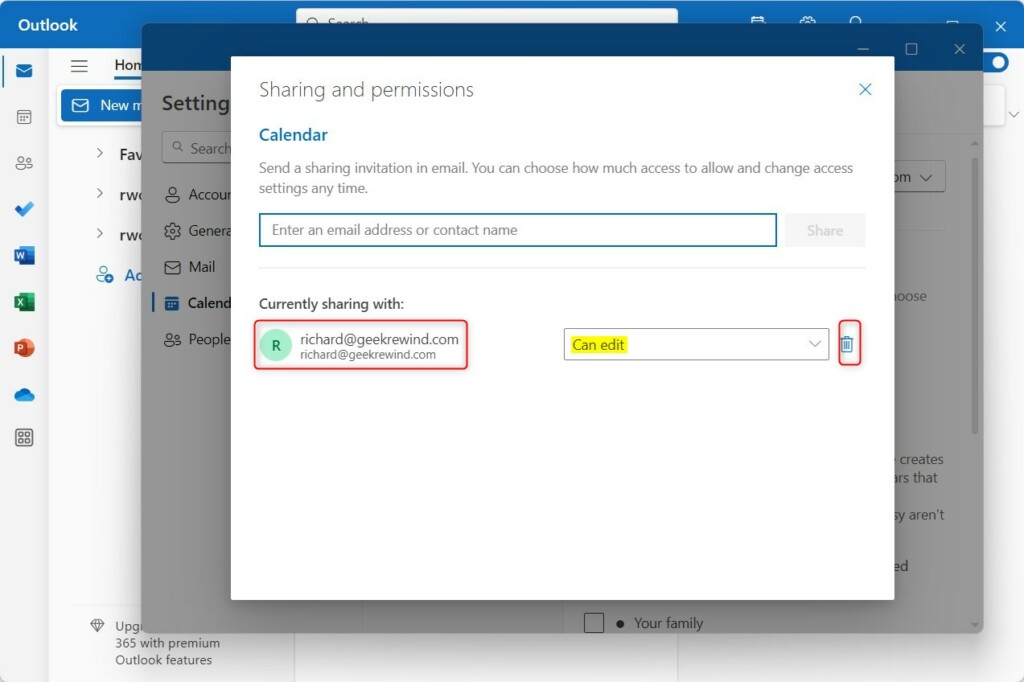
To stop sharing, return to the Shared calendars settings menu. Find the person you shared with and click the trash bin icon to remove their access.
Summary
Sharing your calendar in Outlook is a simple way to improve team coordination. By choosing the right permission levels and knowing how to troubleshoot, you can manage your schedule effectively across all your devices. Always remember to review your shared calendars periodically to ensure your privacy settings remain correct.
How do I share my calendar with someone outside my organization?
To share with external users, ensure your organization’s admin has enabled external sharing. In the sharing settings, enter the external email address. If permitted, the recipient will receive an ICS link or a direct invitation to view your calendar via the web.
What is the difference between sharing and delegating?
Sharing allows others to view or edit your calendar items. Delegating is more advanced; it gives a person permission to send and respond to meeting requests on your behalf, which is common for executive assistants managing a manager’s schedule.
Was this guide helpful?

About the Author
Richard
Tech Writer, IT Professional
Richard, a writer for Geek Rewind, is a tech enthusiast who loves breaking down complex IT topics into simple, easy-to-understand ideas. With years of hands-on experience in system administration and enterprise IT operations, he’s developed a knack for offering practical tips and solutions. Richard aims to make technology more accessible and actionable. He's deeply committed to the Geek Rewind community, always ready to answer questions and engage in discussions.




[…] a message, language translations, turning text predictions on or off, switch primary account, sharing a calendar, changing language, date and time format, public a calendar, show week numbers in Outlook […]
[…] translations, turning text predictions on or off, switch primary account, sharing a calendar, changing language, date and time format, public a calendar, show week numbers in […]
[…] a message, language translations, turning text predictions on or off, switch primary account, sharing a calendar, changing language, date and time format, public a calendar, show week numbers in Outlook […]
[…] a message, language translations, turning text predictions on or off, switch primary account, sharing a calendar, changing language, date, and time format, public a calendar, show week numbers in Outlook […]
[…] translations, turning text predictions on or off, switch primary account, sharing a calendar, changing language, date, and time format, public a calendar, show week numbers in […]
[…] translations, turning text predictions on or off, switch primary account, sharing a calendar, changing language, date, and time format, public a calendar, show week numbers in […]
[…] translations, turning text predictions on or off, switch primary account, sharing a calendar, changing language, date, and time format, public a calendar, show week numbers in […]
[…] app has many features, including support for sharing a calendar, changing language, date, and time format, public a calendar, showing week numbers in Outlook […]
[…] app has many features, including support for sharing a calendar, changing language, date, and time format, public a calendar, showing week numbers in Outlook […]
[…] a message, language translations, turning text predictions on or off, switch primary account, sharing a calendar, changing language, date and time format, public a calendar, show week numbers in Outlook […]
[…] translations, turn text predictions on or off, switch primary account, sharing a calendar, and […]
[…] translations, turning text predictions on or off, switch primary account, sharing a calendar, changing language, date and time format, publishing a calendar, and […]
[…] for a message, language translations, turning text predictions on or off, switch primary account, sharing a calendar, changing language, date and time format, public a calendar, show week numbers in Outlook […]