How to Change the Display Language of Copilot

Go to copilot.microsoft.com or open the Copilot app on Windows 11, sign in with your Microsoft account, click Preferences, select your language from the Language drop-down menu, then click Restart in the app. The interface switches to your chosen language immediately on the website.
What Is Microsoft Copilot?
You can change the display language for Copilot on the web and in the Windows 11 app. It takes a few clicks, and the setting lives in the same place in both.
This tutorial covers both versions. You only need to do it once per place you use Copilot, unless you are signed in and your settings sync.
Understanding Display Language
Microsoft Copilot is an AI assistant built to speed up workflows in Windows and online. You can use it without an account, but signing in with a Microsoft account has two benefits. Your chat history saves and syncs across all your devices when you sign in with the same account. You also get personalized recommendations.
If you use Copilot on more than one PC, sign in on each one. That keeps your preferences and history consistent.
How to Change Copilot’s Display Language
The display language controls all the text, menus and buttons you see throughout the Copilot interface. Copilot supports over 40 languages, so most users can run it in their own.
The display language is not the same as the language you speak or type to Copilot. Copilot recognizes over 40 spoken and typed languages, so you can keep chatting in one language while the interface shows another.
For a complete list of supported regions and languages, check the “Supported regions and languages in Microsoft Copilot” page on Microsoft Support. If your language is missing from the drop-down menu, check that page first. It may not be available in your region yet.
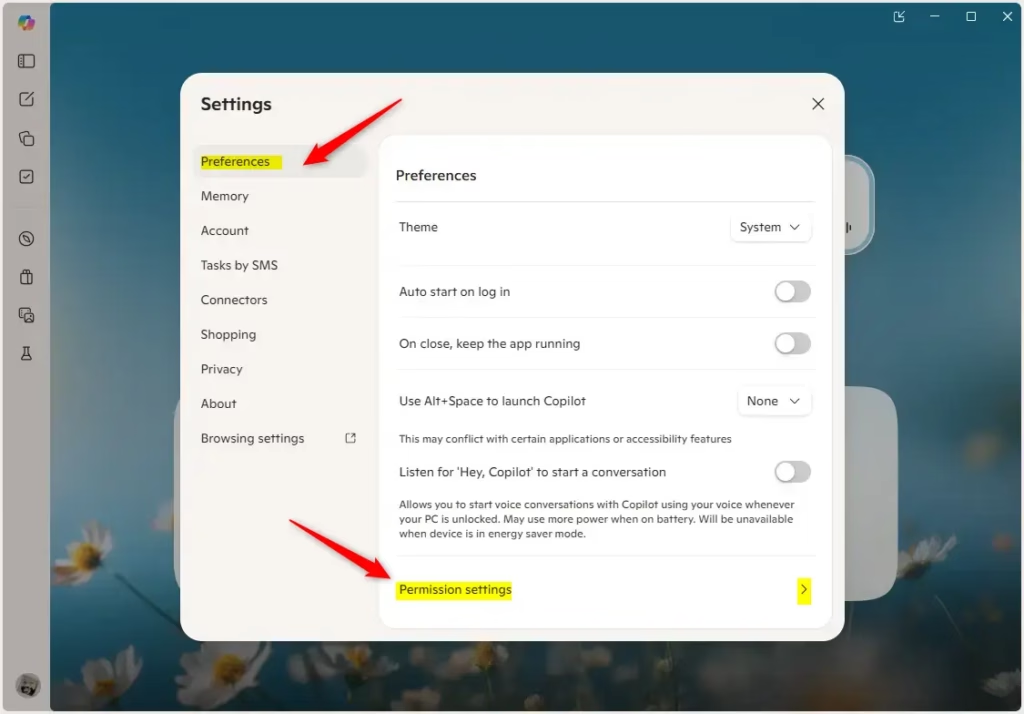
- Open the copilot.microsoft.com site in your browser, or open the Copilot app on Windows 11. You should see the Copilot chat screen with a sidebar on the left.
- Sign in with your Microsoft account if you want the setting to sync. In the app, click the Account button on the sidebar, then click Sign in. Once you are signed in, your name or account picture should appear in place of the sign-in prompt.
- Click Preferences on the left side. The Preferences page opens with a list of settings.
- Find the Language drop-down menu and select the language you want Copilot to use. On the website, the interface should switch to the new language.
- If you are using the Copilot app on Windows 11, click Restart to apply the changes. The app closes and reopens with the new language. The website needs no restart.
If you cannot read the new language, look for the same position in the menu. The Preferences entry sits in the same spot in the sidebar, and the Language drop-down is on that page.
The layout of the Copilot app and site changes from time to time. If an option sits in a slightly different place on your version, look for the same names: Preferences, then Language.
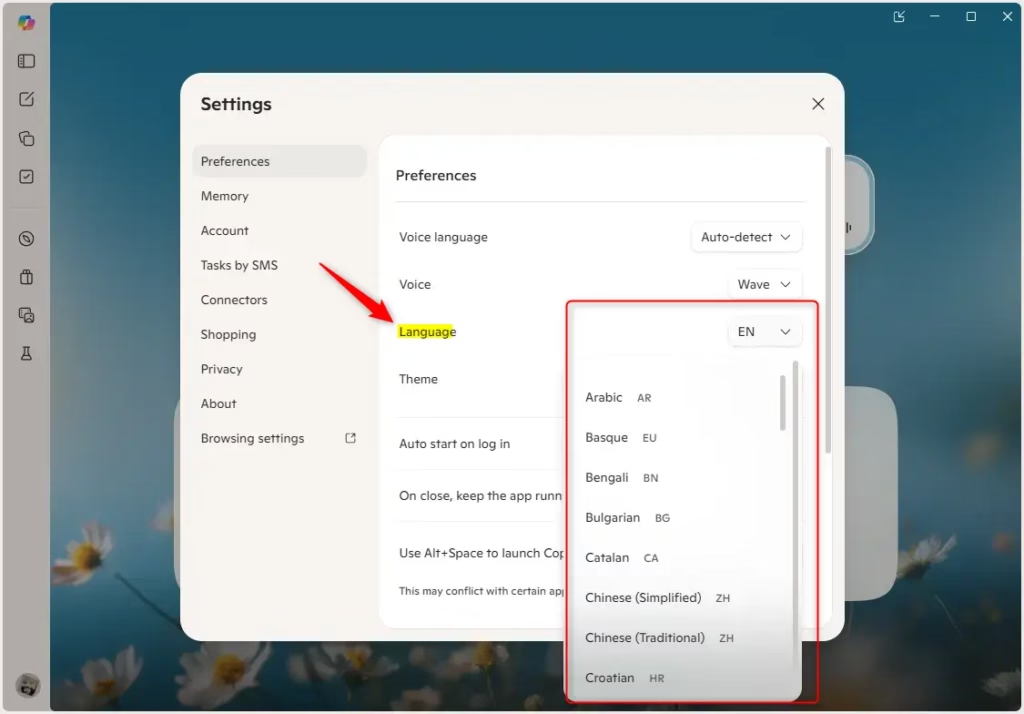
Sign in so your preferences sync, click Preferences in the left menu, and pick a new language from the Language drop-down list. In the Windows app, finish by clicking Restart.
That is all it takes to update your language settings.
Summary
Changing Copilot's display language is a quick process. Sign in, go to Preferences, and choose the language you want from the menu. When you use the Windows 11 app, restart it so Copilot displays everything in the new language. If you change your mind later, repeat the steps and choose another language.
Have a question about this guide?
Answered by AI from this guide. Good questions may be added to this page — please don't include personal details.
Did this guide fix your problem?

About the Author
Richard
Tech Writer, IT Professional
Richard is a writer at Geek Rewind who turns complex IT tasks into clear, step-by-step guides. He draws on years of hands-on experience in system administration and enterprise IT operations, focusing on Windows, Linux and WordPress: the problems people actually run into, and the fixes that work. His server and WordPress guides come from systems he runs himself. Richard builds and maintains the platform behind Geek Rewind, from its Ubuntu servers and Nginx configuration to its custom WordPress plugins. Many new tutorials start with readers' questions, and he's always glad to answer them in the comments.
No comments yet — be the first to share your thoughts!