How Do I Enable Spotify Focus Sessions on Windows 11?

Spotify Focus Sessions link your Spotify account to the built-in Clock app, which handles timers, alarms and focus time. Once linked, you can play background music during a work session without switching apps. The feature pairs a countdown timer with your playlists.
Setup takes a few clicks on any Windows 11 PC. After you connect your account, your music can start when you begin a focus timer in the Clock app. You will need a Spotify account (the app can sign you in with an existing one). Spotify’s own rules still apply, so a free account may play ads and limit what you can choose.
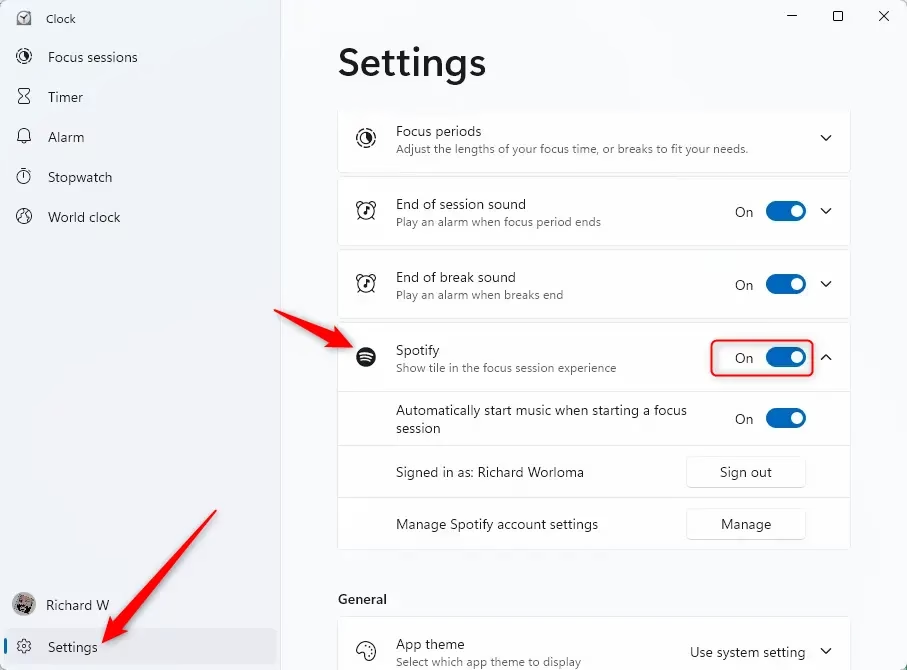
Open the Clock app, click Settings in the left pane, find the Spotify option, and turn it on. The Spotify tile appears on the Focus page, letting you play music during timed work sessions without switching apps.
What is Focus and Why Use It?
Focus is a built-in Windows 11 tool that cuts down on notifications so you can work without interruptions. You start it from the Clock app, where it runs as a timed session with breaks. It is the same tool that Spotify plugs into.
Why Connect Spotify to Focus Sessions?
While a focus session runs, your chosen music plays in the background, and many people find that helps them concentrate on complex tasks. You do not have to start a playlist yourself each time. The Clock app handles it.
What Happens When You Turn Spotify On or Off?
That tile controls audio playback during your scheduled work periods. Turning the feature off removes the tile completely, so you can switch it on and off at any time. Nothing is uninstalled, and your Spotify account is not deleted.
How to Turn Spotify On or Off in Focus Sessions
- Open the Clock app. You can also find it by typing its name into the Start menu search box . The Clock app window should open with a navigation pane on the left.
- Click or tap Settings in the left pane of the Clock app. The Settings page should open.
- Find the Spotify option and turn it on or off, depending on what you want. It is on by default, so you may not need to change anything. When it is on, the Spotify tile appears on the Focus page. When it is off, the tile is gone.
No restart is needed. To undo the change, go back to the same page and flip the toggle the other way. If the tile does not appear right away, close the Clock app and open it again. If the Spotify option is missing altogether, update the Clock app through the Microsoft Store, since older versions may not include it.
Summary
Windows 11’s Focus feature helps you concentrate by cutting down on digital distractions. Connecting Spotify lets background music play continuously during your scheduled work periods, so the timer and the soundtrack stay together in one place.
Have a question about this guide?
Answered by AI from this guide. Good questions may be added to this page — please don't include personal details.
Did this guide fix your problem?

About the Author
Richard
Tech Writer, IT Professional
Richard is a writer at Geek Rewind who turns complex IT tasks into clear, step-by-step guides. He draws on years of hands-on experience in system administration and enterprise IT operations, focusing on Windows, Linux and WordPress: the problems people actually run into, and the fixes that work. His server and WordPress guides come from systems he runs himself. Richard builds and maintains the platform behind Geek Rewind, from its Ubuntu servers and Nginx configuration to its custom WordPress plugins. Many new tutorials start with readers' questions, and he's always glad to answer them in the comments.
No comments yet — be the first to share your thoughts!