How to Remove a Passkey from Your Microsoft Account


Removing a passkey from your Microsoft account deletes that sign-in method. That passkey can no longer be used to sign in to your Microsoft 365 or Copilot apps. Before you start, make sure you have another way in, such as your password or an authenticator app. A passkey is a hardware-backed security key or a phone lock (fingerprint, face scan or PIN) that lets you sign in without typing a password.
You should remove a passkey if you lose your security key, misplace your phone, or think someone else has gained access to your hardware. You can also remove one you no longer use, for example after replacing a phone. Removing a passkey does not delete your account or your files. It only removes one way of signing in.
Open the Microsoft account security page in your browser, expand Ways to prove who you are, then select Use a passkey, choose the passkey you want to remove and click Remove. The passkey stops working for sign-in straight away. Your account and files stay untouched, but make sure another sign-in method, such as your password or an authenticator app, works first.
Why Remove a Passkey?
Act quickly if hardware goes missing or you think someone else could have used it. A lost phone or key that still has a working passkey is a live way into your account. The phone’s own screen lock is the only protection, and you shouldn’t rely on that alone. The sooner you revoke the passkey, the smaller the window for misuse.
Revoking the compromised credential straight away blocks that passkey from signing in to the connected Microsoft services. If you think the account itself was exposed, and not just the device, also change your password afterwards and review your recent sign-in activity. Do this even if the lost device was locked. It costs a few minutes and closes off the other ways in.
How to Remove a Passkey from Your Microsoft Account
You will need to sign in with another method. Microsoft may also ask you to verify your identity first with a code or an authenticator prompt. The steps below show how to remove a passkey from your Microsoft account.
- Open the Advanced Security Options page in your browser. This is the security page for your Microsoft account, and it works in any current browser on a PC, phone or tablet.
- Sign in if asked. Use your password or another method that is not the passkey you are about to remove. Microsoft may ask you to verify your identity with a code or an authenticator prompt. Complete that check, and the security page should then load.
- Find the Ways to prove who you are section. It lists the sign-in and verification methods on your account. If you don’t see it right away, scroll down the page.
- Expand the Use a passkey tile. You should now see the passkeys registered to your account. If the tile is missing, check that you are signed in to the right Microsoft account and that the page has fully loaded.
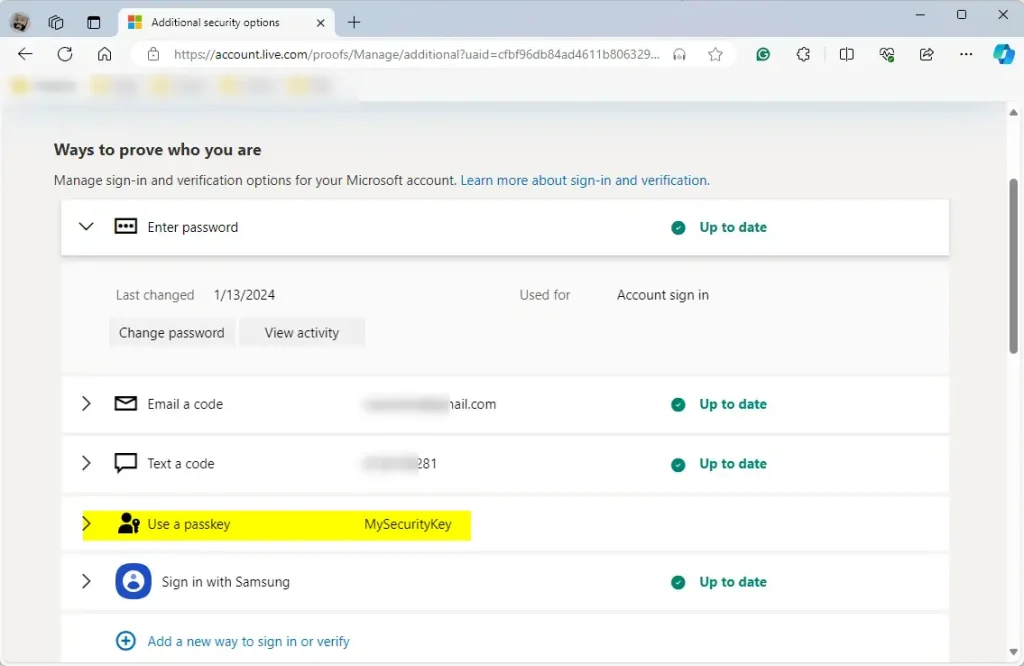
- Select the passkey you want to remove. If you have several, check the name shown for each one so you pick the lost or compromised device and not the one you still use.
- Click Remove. This starts the removal of the passkey you selected.
- Confirm the removal if Microsoft asks. Once you do, the passkey disappears from the list. If it is still listed, refresh the page and check again.
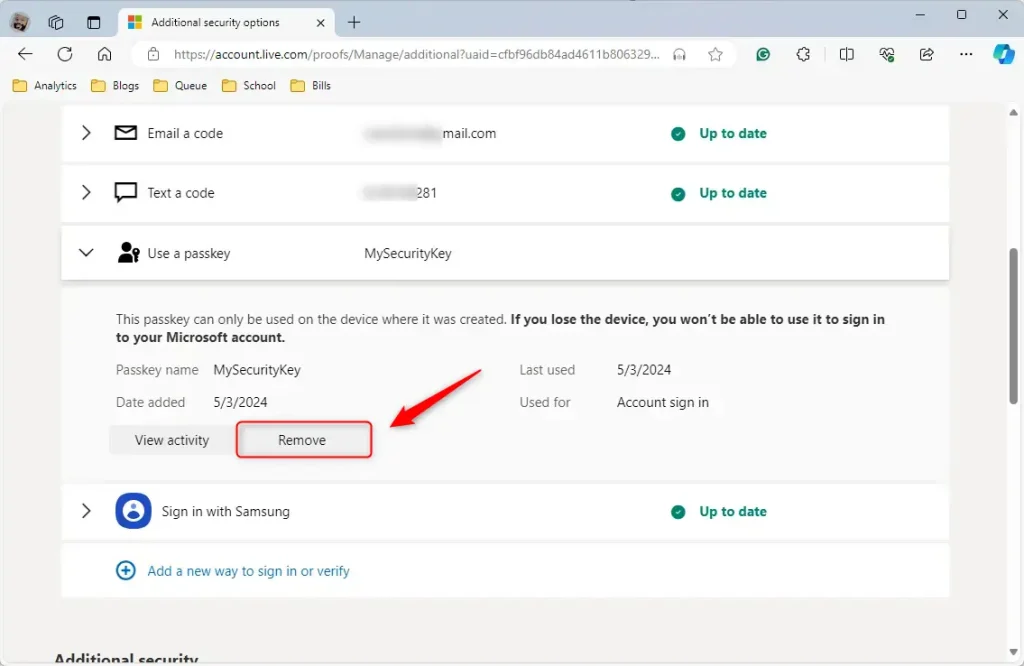
Revocation is now complete. The passkey is gone from your Microsoft account. If you still have the device, the passkey may remain stored on it, so delete it there as well, using the device’s own passkey or password settings, so it doesn’t linger. If you want to use passkeys again later, you can register a new one from the same security page.
What Happens When You Remove a Passkey?
That could be your password, a code sent to your email or phone, or an authenticator app. Check that at least one of these is set up and working before you sign out, so you don't lock yourself out. If none of them work, you would have to go through Microsoft's account recovery process, which can take time.
Summary
Clearing out unused or missing passkeys safeguards your profile against unauthorized sign-in attempts. Make it a habit to review the list on your security page now and then, and remove anything you no longer recognize or use. A quick check after you replace a phone or security key is a good time to do it.
Have a question about this guide?
Answered by AI from this guide. Good questions may be added to this page — please don't include personal details.
Did this guide fix your problem?

About the Author
Richard
Tech Writer, IT Professional
Richard is a writer at Geek Rewind who turns complex IT tasks into clear, step-by-step guides. He draws on years of hands-on experience in system administration and enterprise IT operations, focusing on Windows, Linux and WordPress: the problems people actually run into, and the fixes that work. His server and WordPress guides come from systems he runs himself. Richard builds and maintains the platform behind Geek Rewind, from its Ubuntu servers and Nginx configuration to its custom WordPress plugins. Many new tutorials start with readers' questions, and he's always glad to answer them in the comments.
I’ve heard people remove their passkeys then can’t get into their own accounts. Removing the passkey does not stop them from requiring authentication.