How to Control Text Message Notifications in Windows 11 Phone Link


Phone Link is a built-in Windows 11 tool that mirrors text messages, calls, and app alerts from your phone directly to your computer screen. Controlling text message notifications in Phone Link lets you stop constant pop-ups and sounds from breaking your concentration while you work on your PC.
You can adjust these settings in the Phone Link app to hide message previews, block specific contacts from interrupting you, or turn off all text alerts at once. A few quick changes in the app settings help you keep your workflow smooth and uninterrupted.
Control text message notifications in Windows 11 Phone Link by opening the app, clicking Settings, selecting Features, and toggling the Messages section on or off. You can also manage banner and sound settings in Windows System Settings for direct replies.
Why Control 🪟 Windows 11 Phone Link Notifications?
Minimizing text message pop-ups helps maintain focus throughout the workday.
How to Configure Text Message Notifications
- Open the Phone Link app on your PC.
- Click the Settings (gear icon) at the top right.
- Select the Features tab.
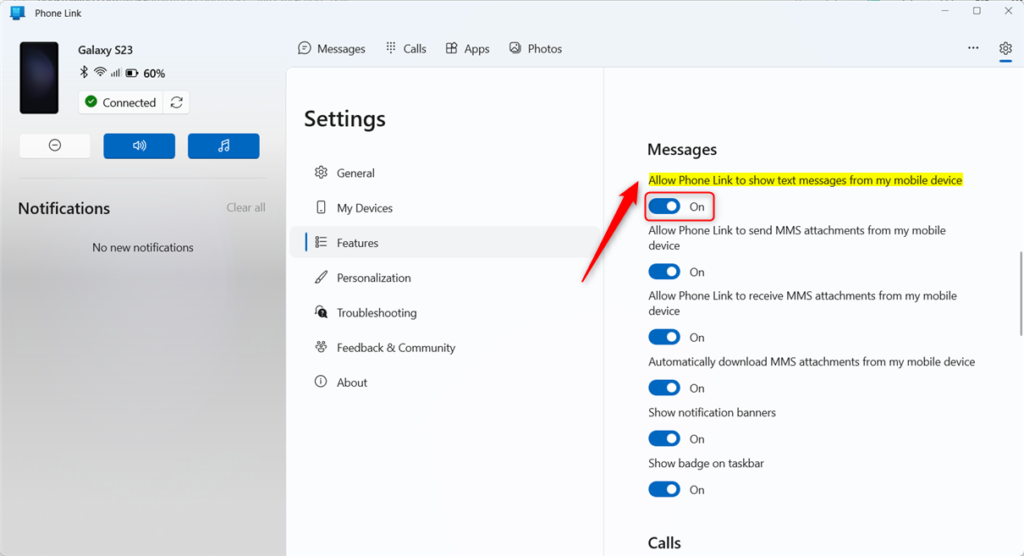
- Locate the Messages section.
- Toggle the switch for Allow this app to show text messages from my phone to On or Off.
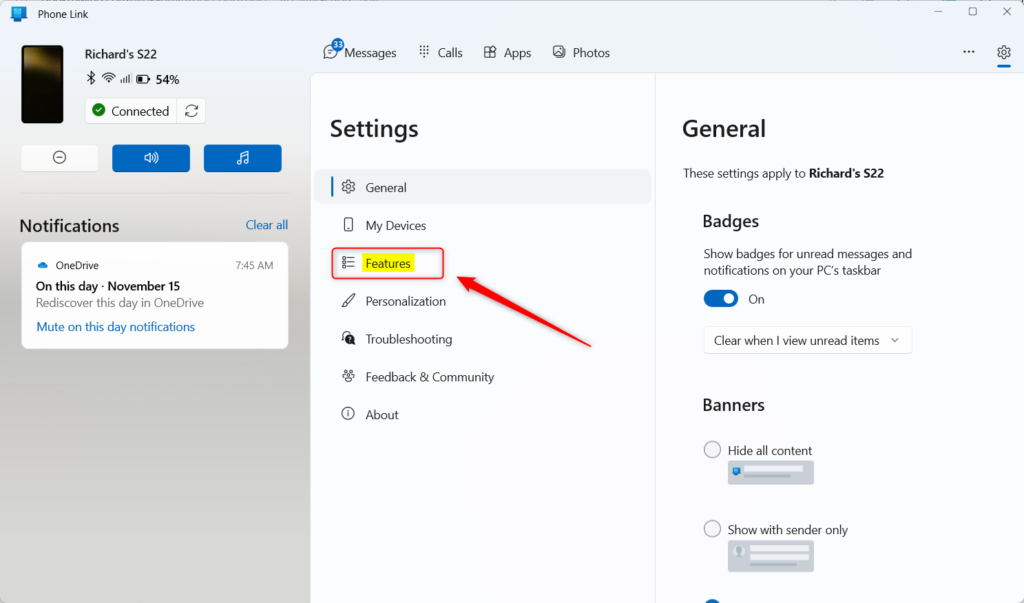
Windows 11 Phone Link notifications let you see and reply to text messages directly on your computer screen. You can control these alerts by opening the Phone Link app, heading to the settings menu, and turning the message notifications switch on or off under the features tab.
Troubleshooting Phone Link Sync Issues
If messages are not syncing, start by checking your phone’s battery settings. Aggressive power-saving modes frequently delay incoming alerts.
Checking Android Notification Access
Proper functionality requires granting permission to read text message notifications. Android users grant this access by opening Phone Link settings and enabling the "Notifications" toggle.
- Open Settings on your phone.
- Search for Special App Access.
- Tap Notification Access.
- Ensure Link to Windows is toggled On.
Advanced Notification Management
Advanced notification management in Windows 11 Phone Link handles how alerts display inside the Action Center while supporting direct replies from pop-up banners.
Summary
Adjusting these specific settings and permissions keeps notifications manageable without losing touch.
Why are my 🪟 Windows 11 Phone Link notifications delayed?
Windows 11 Phone Link notifications are often delayed because Android's battery optimization settings can restrict background app activity.
How do I clear all notifications from Phone Link at once?
Clearing all Phone Link alerts simultaneously happens through the 'Clear all' button located inside the application or the Windows 11 Action Center.
Was this guide helpful?

About the Author
Richard
Tech Writer, IT Professional
Richard, a writer for Geek Rewind, is a tech enthusiast who loves breaking down complex IT topics into simple, easy-to-understand ideas. With years of hands-on experience in system administration and enterprise IT operations, he’s developed a knack for offering practical tips and solutions. Richard aims to make technology more accessible and actionable. He's deeply committed to the Geek Rewind community, always ready to answer questions and engage in discussions.




[…] your mobile devices from your PC instantly. This feature comes in handy when transferring files, sending messages, or receiving notifications from your phone while working on your […]