How to Manage Meeting Start Notifications in Microsoft Teams


Meeting start notifications in Microsoft Teams are popup reminders that appear on your screen shortly before a scheduled call begins. Per the original guide, they show up between 1 and 15 minutes ahead. They help you stay on time, but constant pings can break your focus in the middle of a task.
You can turn these popups on or off in the settings menu of the Microsoft Teams app. This guide shows the steps in the current Teams app on Windows 11. Turning the alert off stops the surprise interruptions, and you can turn it back on at any time.
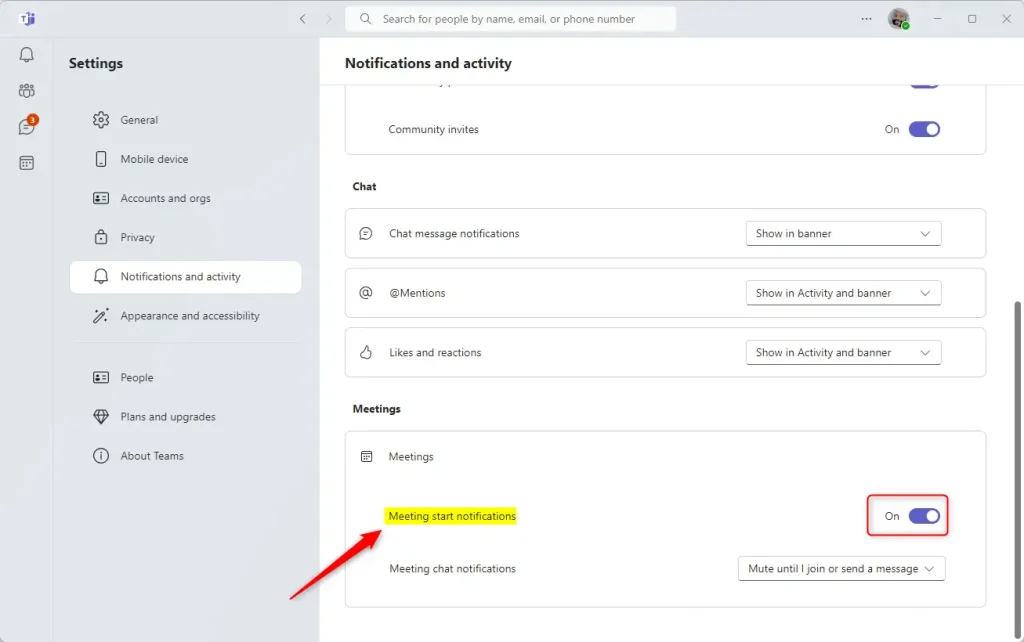
Open Microsoft Teams, click the Settings and more (…) button next to your profile picture, then select Settings. Choose Notifications and Activity, find the Meetings section, click Meeting start notifications, and flip the switch to Off. The change applies immediately, with no restart or sign-out needed.
Enable or disable meeting start notifications in Teams
Microsoft Teams shows these notifications in the corner of your screen right before a call starts, so you don’t miss it. If you find them distracting, you can switch them off. If you keep missing calls, you can switch them back on. The setting lives inside Teams itself, so you do not need an administrator account to change it.
The steps below start with opening the app and end with the switch itself.
- Click the Start button.
- Click All apps and scroll down to Microsoft Teams.
- Click Microsoft Teams. The Teams app opens, and from there you can reach the meeting notification settings.

Launching the app from the Taskbar or Taskbar overflow works as well. Use whichever way you normally open Teams. The result is the same.

If you see one, click the expansion button on its menu bar. The full Teams window should now open, with the left-hand app bar and the search box at the top. You need this full window to reach Settings.

- Click the Settings and more (…) button next to your profile picture, at the top right of the Teams window.
- Select Settings from the menu. The Settings page opens, with a list of categories down the left side.

- Choose the Notifications and Activity tab on the left side of the Settings page. A list of notification groups appears on the right.
- Locate the Meetings section.
- Click the Meeting start notifications tile. Its options expand or open.
- Toggle the switch to On or Off. Set it to Off to stop the popup reminders, or to On to get them again.
The change should apply right away, and you do not need to restart Teams or sign out. To undo it, return to the same tile and flip the switch back.
Also check that Teams is up to date. A missing or greyed-out option on a work or school account can be a policy set by your organization, and only your IT administrator can change that.
Windows also has its own notification controls. If popups still appear or never show after you change this switch, check your Windows notification and focus settings as well.
That completes the setup process.
Conclusion:
- We've covered how to enable or disable the "Meeting start notifications" feature in Microsoft Teams, helping you manage your alerts for a more focused workday.
- By customizing your Teams notifications, you can ensure you only receive alerts that matter, reducing distractions and boosting productivity.
- The step-by-step guide illustrated how to access the "Meeting start notifications" setting in Teams and toggle it on or off based on individual preferences.
- If you encounter any errors or have additional information to contribute, feel free to use the comments section below.
Have a question about this guide?
Answered by AI from this guide. Good questions may be added to this page — please don't include personal details.
Did this guide fix your problem?

About the Author
Richard
Tech Writer, IT Professional
Richard is a writer at Geek Rewind who turns complex IT tasks into clear, step-by-step guides. He draws on years of hands-on experience in system administration and enterprise IT operations, focusing on Windows, Linux and WordPress: the problems people actually run into, and the fixes that work. His server and WordPress guides come from systems he runs himself. Richard builds and maintains the platform behind Geek Rewind, from its Ubuntu servers and Nginx configuration to its custom WordPress plugins. Many new tutorials start with readers' questions, and he's always glad to answer them in the comments.
[…] @mentions notifications banners on or off, turn notifications for likes and reactions on or off, turn meeting start notifications on or off, and […]