How to Manage Your Microsoft Account Subscriptions

Microsoft account services and subscriptions are managed on the Services & subscriptions page of your Microsoft account dashboard. Sign in with the account that made the purchase, open that page, and pick the plan you want to check, pay for differently, or cancel.
Subscriptions cover paid services such as Microsoft 365, Xbox Game Pass, and extra OneDrive storage. The page shows each plan’s next billing date, the payment method on file, and its status.
To stop a plan from renewing, turn off recurring billing before the renewal date. In most cases you keep access until the end of the period you already paid for, so your apps do not stop working right away. Check the end date on the plan’s page to be sure.
To manage Microsoft subscriptions, sign in at the Microsoft account page, click Subscriptions in the left menu, and select Manage next to the plan. You can change its payment method or turn off recurring billing there. Turn off renewal before the renewal date; you keep access until the paid period ends.
Why Manage Your Subscriptions?
Managing your subscriptions helps you control your spending. You can update a payment method when a card expires, stop a service you no longer use, and restart a plan later if you change your mind. All of this happens in a web browser, so you do not need to install anything.
A quick review every few months is enough to catch plans you forgot about. Set a reminder in your calendar if that helps. The check takes a few minutes, and it saves you from having to dispute a charge for a service you stopped using.
What You Need to Know
- Sign in with the Microsoft account tied to the subscription you want to manage. Many people own more than one account, for example a personal address and an older Outlook or Hotmail address, so check which one made the purchase. The wrong account shows no subscriptions, which can look as if the plan has vanished. Sign out and try the other address before you assume anything is wrong.
- Change your payment method at any time. Do it before a card expires, because a failed renewal can put the service on hold. Changing the card does not cancel the plan or change its renewal date.
- Cancel or turn off automatic payments whenever you want. Do it before the renewal date, or the next charge may already be processed. Cancelling does not reverse a payment that has already gone through.
If a subscription is shared through a Microsoft 365 Family plan, only the person who set up the plan (the organizer) can change billing for it. Other members do not see the same options.
Accounts issued by a work or school are different. The organization's administrator manages those, not this page.
Steps to View and Manage Your Microsoft Subscriptions
These steps open your Microsoft account services & subscriptions so you can review, change, or cancel any plan.
- Open Microsoft Account page in your browser. This is the Microsoft account sign-in address. If you are already signed in, you go straight to your account dashboard.
- Sign in to your Microsoft account. Enter your email and password or PIN. If you use two-step verification, approve the sign-in on your phone or enter the code when asked. You should land on your account dashboard with your name at the top.
- Click Subscriptions in the menu on the left. On a narrow browser window the menu may appear along the top or behind a menu button instead. The page that opens lists the services connected to your account.
- Find the plan you want to change. Each active Microsoft subscription is listed with its status and its next renewal or expiry date. If the plan is missing, you are probably signed in with a different account, so sign out and try your other address.
- Select Manage next to the plan. This opens the plan's details. The exact button names can vary slightly by service. From there you can choose any of these options:
- View the details of each subscription, including the plan name, the price, and the next billing date.
- Change the payment method, for example by switching to a new card or adding one.
- Cancel the plan or turn off recurring billing. Follow the on-screen prompts and read the confirmation page, which states when your access ends.
- Resubscribe if you want to restart a subscription. This option appears on plans that you have already cancelled or that have expired. It is also the way to undo a cancellation.
After you cancel, reload the Services & subscriptions page. The plan should now show an end date instead of a renewal date.
If it still shows a renewal date, the cancellation did not go through. Repeat the steps and read the confirmation page before you close it.
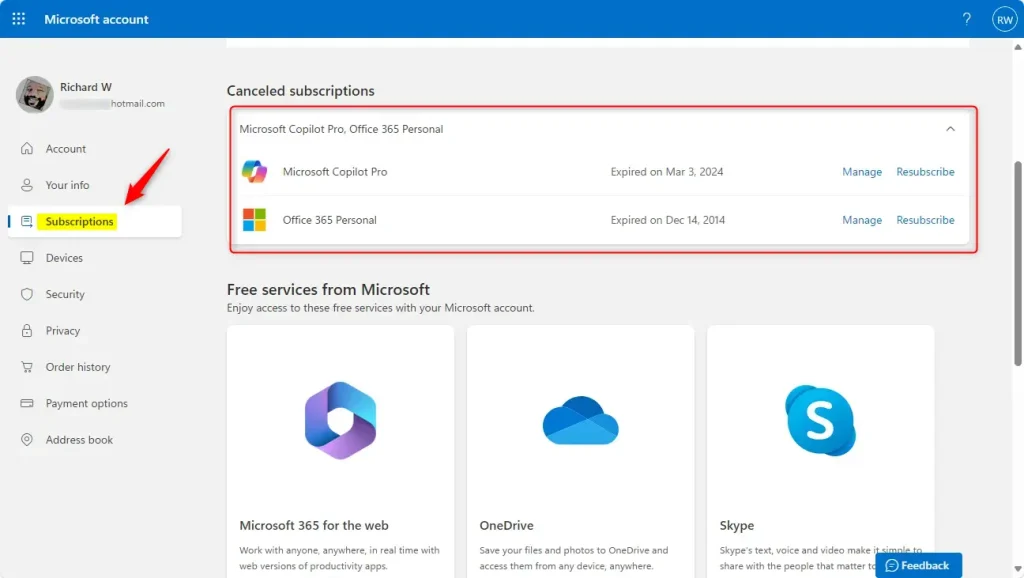
You can manage Microsoft subscriptions by signing in to the official Microsoft account dashboard and opening the Services & subscriptions page from the menu. This screen lets you check active plans, update your credit card or other payment details, and cancel recurring services you no longer need before the next billing date arrives.
If a plan you expect is missing, you are most likely signed in with a different account. Sign out and try the other address.
Summary
Checking your account profile helps you manage Microsoft subscriptions by keeping all active plans in one place. Reviewing these details regularly stops unexpected credit card charges and lets you update payment methods before they cause a failed renewal. Always sign in with the exact email address linked to your purchases so you do not miss anything.
Microsoft also sends receipts and renewal reminders to that address. If you cannot remember which account holds a plan, search your inboxes for those emails. The address they were sent to is the account to sign in with.
- Always sign in with the right Microsoft account linked to your subscription.
- Use the Services & subscriptions page to see and change your plans, and check it before each renewal date.
- Stop or start subscriptions whenever you want. Cancelling normally keeps your access until the paid period ends.
- Update your payment methods online, and do it before the old card expires.
Detailed guidance remains available on Microsoft's official support page: Change your Microsoft subscription payment method and options. It is worth a look if your plan was bought through a third party, such as an app store or a mobile carrier, because those plans are sometimes billed outside the Microsoft account.
In that case, you may need to manage the plan with the store or carrier that bills you.
Completing these steps puts your billing plans under your own control. Active management covers plans like Microsoft 365 Family, which supplies 1TB of OneDrive storage per person.
If you change your mind later, use Resubscribe on the plan's page to restart it.
Have a question about this guide?
Answered by AI from this guide. Good questions may be added to this page — please don't include personal details.
Did this guide fix your problem?

About the Author
Richard
Tech Writer, IT Professional
Richard is a writer at Geek Rewind who turns complex IT tasks into clear, step-by-step guides. He draws on years of hands-on experience in system administration and enterprise IT operations, focusing on Windows, Linux and WordPress: the problems people actually run into, and the fixes that work. His server and WordPress guides come from systems he runs himself. Richard builds and maintains the platform behind Geek Rewind, from its Ubuntu servers and Nginx configuration to its custom WordPress plugins. Many new tutorials start with readers' questions, and he's always glad to answer them in the comments.
No comments yet — be the first to share your thoughts!