How to Check for Neural Processing Units in Windows 11


A Neural Processing Unit (NPU) is a specialized chip designed to accelerate artificial intelligence tasks. Check whether your Windows 11 computer includes one in a few moments.
Open Task Manager and go to the Performance tab to see an NPU section. Alternatively, open Device Manager and look for a “Neural processors” category. If you have a compatible chip, ensure your manufacturer drivers are installed.
What is a Neural Processing Unit?
A Neural Processing Unit, or NPU, is a specialized chip designed to accelerate Artificial Intelligence (AI) tasks. It acts as a dedicated helper for functions like voice commands or image enhancements. Unlike a CPU or GPU that handles general workloads, an NPU focuses strictly on AI math.
Performance uses TOPS (Trillions of Operations Per Second) as a metric. Higher numbers mean faster local AI processing.
An NPU makes a PC run AI features much faster and consume less battery by offloading work from the main processor. This offloading proves vital for AI features like real-time translation and advanced photo editing, particularly those found in Copilot+ PCs.
Quick Check: Do You Have an NPU?
Windows 11 includes built-in tools to verify if this specialized chip is present. Checking the processor name offers a solid starting point, alongside Task Manager or Device Manager. These methods reveal whether the hardware includes this dedicated AI accelerator.
- Check your CPU: Look for Intel Core Ultra (AI Boost), AMD Ryzen 8000/9000 series (Ryzen AI), or Qualcomm Snapdragon X series.
- Task Manager : Open it to see if an ‘NPU’ tab exists under Performance.
- Device Manager: Check for a ‘Neural processors’ category.
Updating drivers resolves the issue if a supported chip remains hidden.
How to Check for NPU Using Task Manager
- Open Task Manager by pressing
Ctrl+Shift+Esc. - Click the Performance tab.
- If your PC has an NPU, you will see an NPU section showing its name and current usage.
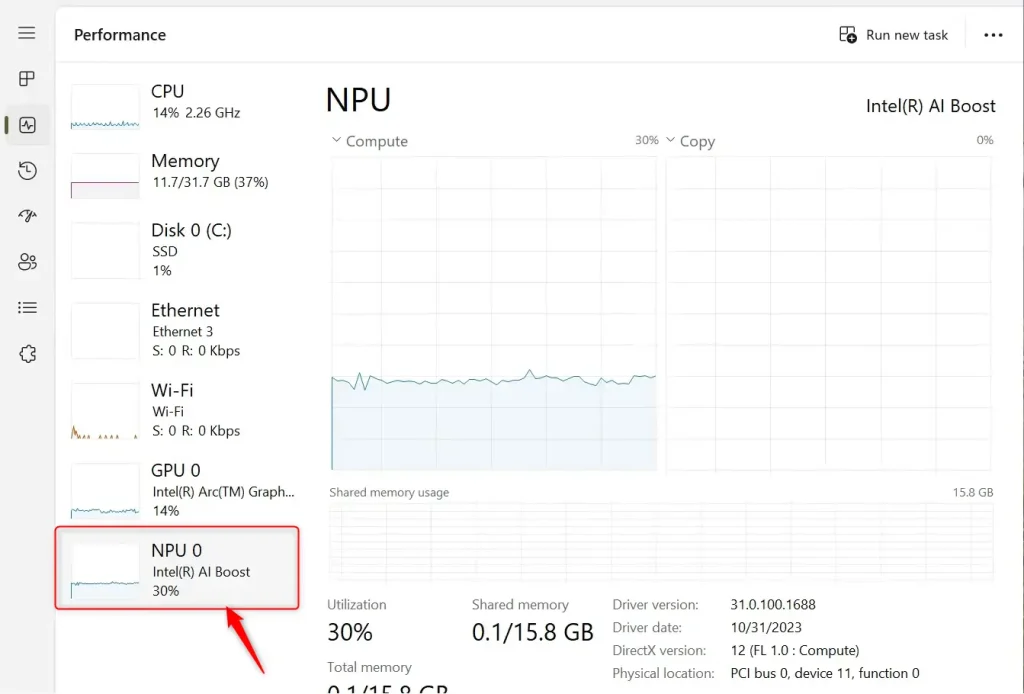
How to Check for NPU Using Device Manager
⚙️ Admin Required: Administrator rights are necessary to view system hardware details.
- Press
Win + Xand select Device Manager or typedevmgmt.mscin the search bar. - Look for a category named Neural processors.
- Expand this section to see your specific hardware, such as Intel AI Boost or Qualcomm Hexagon.
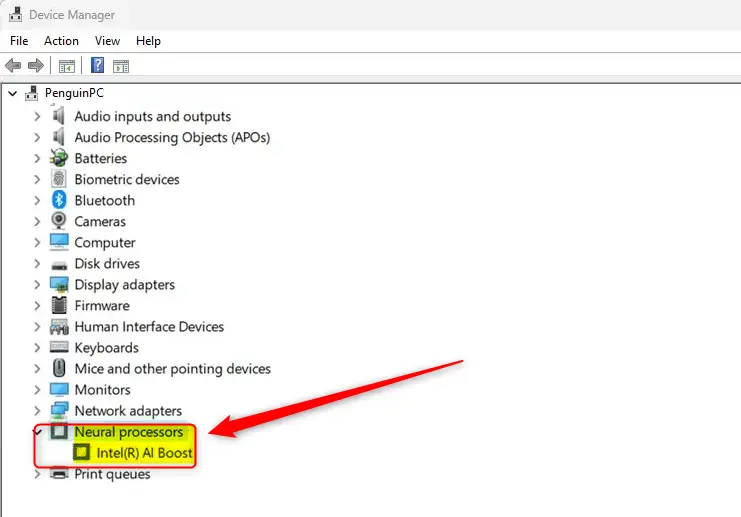
Hardware-Specific Verification
Because hardware manufacturers use different naming conventions for their AI accelerators, checking official product pages helps confirm exact specifications. For example, Intel officially labels its AI accelerators as "Intel Movidius VPU" on product specification pages.
Summary
Confirming NPU presence helps determine readiness for modern AI features. Task Manager provides a quick look at hardware usage, while Device Manager validates the exact processor model. Current drivers ensure Windows 11 recognizes the NPU correctly.
Does my NPU improve battery life?
An NPU helps preserve battery life. It assumes AI workloads from the CPU and GPU, which consume more power. Laptops can consequently run AI features for longer periods before needing a charge, yielding much higher efficiency during heavy AI usage.
How do I know if my NPU drivers are installed correctly?
Properly installed drivers cause the NPU to appear in Device Manager under 'Neural processors'. An 'Unknown Device' listing or missing category despite a compatible CPU indicates a need to visit the manufacturer support website for the latest chipset and NPU-specific drivers.
What is the difference between a GPU and an NPU for AI tasks?
While both a GPU and an NPU can process AI tasks, a GPU targets general-purpose parallel jobs like gaming. An NPU, conversely, is built specifically for the efficient, low-power math required by artificial intelligence workloads.
Was this guide helpful?

About the Author
Richard
Tech Writer, IT Professional
Richard, a writer for Geek Rewind, is a tech enthusiast who loves breaking down complex IT topics into simple, easy-to-understand ideas. With years of hands-on experience in system administration and enterprise IT operations, he’s developed a knack for offering practical tips and solutions. Richard aims to make technology more accessible and actionable. He's deeply committed to the Geek Rewind community, always ready to answer questions and engage in discussions.


[…] use Windows Studio Effects with Voice Focus, the device must have a neural processing unit (NPU) in the new Windows Copilot+ […]
[…] feature uses the Neural Processing Unit (NPU) to generate images locally on your […]
[…] version: Uses smart AI technology on a special chip called a Neural Processing Unit (NPU) for even better noise […]