
Edge swipe between pages is a built-in browser gesture. It lets you move back and forward through your browsing history by swiping left or right on a touchscreen or touchpad. Swiping one way takes you to the previous page, and swiping the other way takes you forward again, the same as the back and forward arrows in the toolbar.
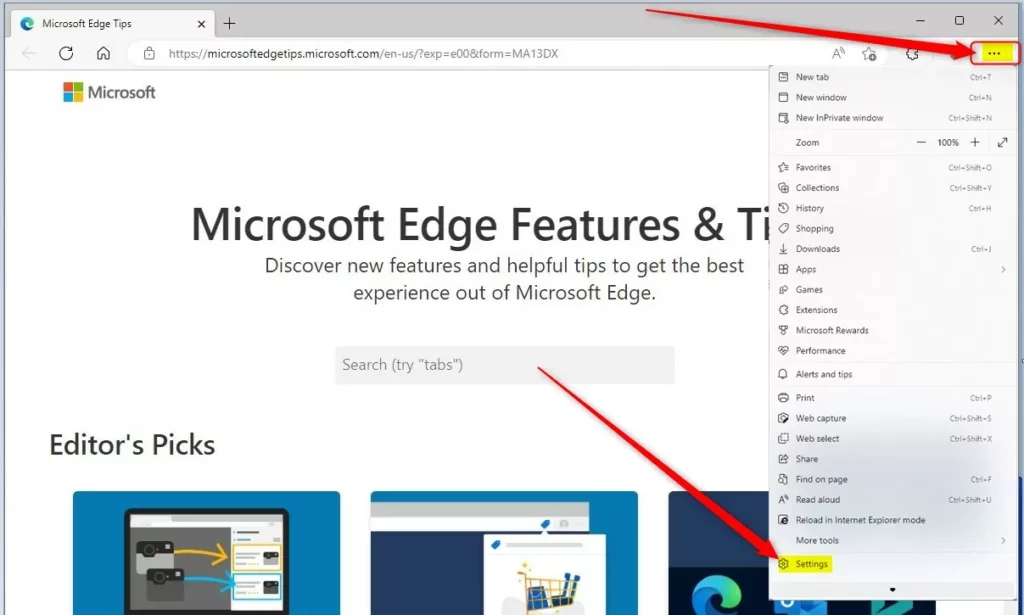
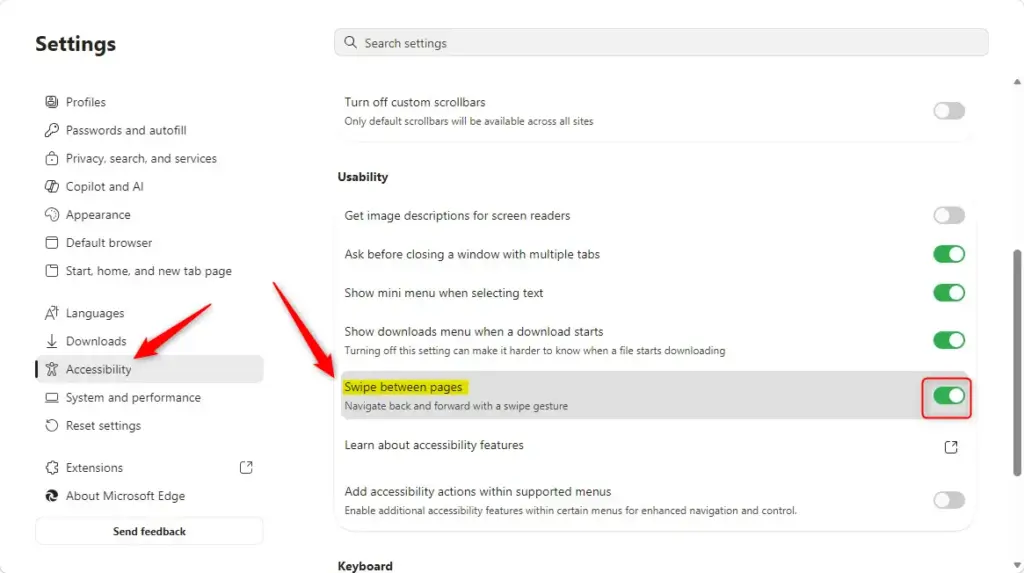
Open Microsoft Edge, click the three dots menu, select Settings, then Accessibility, and toggle the “Swipe between pages” switch on or off. The change takes effect immediately without restarting the browser.
The gesture works in Microsoft Edge on Windows and macOS. It saves you from reaching for the arrows or the keyboard when you are reading or browsing with one hand. It is most useful on tablets, 2-in-1 laptops and devices with a precision touchpad.
The same convenience can get in the way. A sideways swipe on a touchscreen can trigger it by accident while you scroll a wide table, drag a map or move a slider. You then land on the previous page and may lose your place. It can also simply stop responding. In either case you can turn the gesture on or off at any time, and the change is easy to undo.
A few things are worth knowing before you start:
- The gesture only affects pages inside Edge. It does not change how your touchpad or touchscreen behaves in other apps.
- If the gesture does nothing, check that you are swiping in a way your device supports. Touchscreens, precision touchpads and Mac trackpads can each respond differently.
- Edge updates often, so the name or position of a setting may differ slightly between builds. The steps in this guide are written for the current version of Edge.
- Turning the gesture off does not remove the back and forward buttons. You can still use them, and the keyboard shortcuts, as before.
How to Enable or Disable Swipe Between Pages in Microsoft Edge
To enable or disable edge swipe between pages in Microsoft Edge, open the browser, click the three dots menu in the top right corner, and go to Settings. From there, head to the Accessibility or Cookies and site permissions page to find the touchpad gesture settings, where you can switch the feature on or off depending on whether you want to swipe left and right to navigate through your browsing history. You can turn the gesture on or off in a few clicks. Microsoft Edge allows you to toggle this navigation feature on or off at any time. This lets you swipe left or right on your touchpad or screen to go back or forward between web pages. Here’s how to change this setting.- Open Microsoft Edge.
- Click the three dots (…) button in the top right corner. This is labeled “Settings and more.” Then, click “Settings.”
- In the left-hand menu, click “Accessibility.”
If you don’t see a menu on the left, click the three lines (☰) button in the top left corner, or make the Edge window wider. - Look for “Swipe between pages” under the “Usability” settings. Turn the switch ON to enable it, or OFF to disable it.
- You can now close the Settings tab.
Summary
To manage the swipe feature in Microsoft Edge:
- Open Edge.
- Go to Settings (three dots > Settings).
- Click Accessibility.
- Find “Swipe between pages” and turn it on or off.
Have a question about this guide?
Answered by AI from this guide. Good questions may be added to this page — please don't include personal details.
Did this guide fix your problem?

About the Author
Richard
Tech Writer, IT Professional
Richard is a writer at Geek Rewind who turns complex IT tasks into clear, step-by-step guides. He draws on years of hands-on experience in system administration and enterprise IT operations, focusing on Windows, Linux and WordPress: the problems people actually run into, and the fixes that work. His server and WordPress guides come from systems he runs himself. Richard builds and maintains the platform behind Geek Rewind, from its Ubuntu servers and Nginx configuration to its custom WordPress plugins. Many new tutorials start with readers' questions, and he's always glad to answer them in the comments.
No comments yet — be the first to share your thoughts!