How to Check If Your Windows 11 PC Is Protected by LSA

Local Security Authority (LSA) protection stops malware and rogue apps from stealing your passwords and sign-in details on Windows 11. It guards the part of the operating system that handles your sign-in information and user accounts.
You can check whether it is active in under a minute. The quickest look is in the Windows Security app: open Windows Security Device security Core isolation details and find the Local Security Authority protection switch. For firm proof, Event Viewer shows whether Windows actually started the process in protected mode, and the steps below walk through that check. Turning on LSA protection adds a layer of defense against credential theft.
Open Event Viewer by pressing Win+R, typing eventvwr.msc and pressing Enter. Filter System logs for Event ID 12 from Wininit source. If an entry shows “LSASS.exe was started as a protected process with level 4”, LSA Protection is active on your Windows 11 PC.
What is LSA Protection?
LSA Protection (Local Security Authority Protection) is a Windows 11 security feature that stops malicious programs from stealing your passwords and account details. It locks down a core system process, so unauthorized apps and attackers cannot read or tamper with your stored login credentials.
The process in question is LSASS (Local Security Authority Subsystem Service). It checks your sign-in, enforces security policy, and keeps credentials in memory while you are logged on. That makes it the first target for most credential-stealing tools.
LSA Protection runs the Local Security Authority process in a special protected mode. In this mode, Windows refuses to let unauthorized programs read the process’s memory or inject code into it. Only properly signed code is allowed to load into it. This makes it much harder for an attacker to tamper with the computer’s security functions or pull secrets out of LSASS.
Be aware that the protection works at the process level. It does not replace antivirus software or good password habits. Think of it as one more lock on the door.
Windows also has another protection called Core Isolation, which works in a similar way to keep your PC safe. The two features complement each other, so it is worth knowing about both.
How to Check if LSA Protection is On
Open the Start menu, type eventvwr.msc, and press Enter. Once the tool opens, filter the System log for the specific startup event that LSA Protection writes. This works on both Home and Pro editions, and you need no special tools. Windows writes the event during startup, so what you see reflects how the PC booted.
- Open Event Viewer: Click the Start button, type
eventvwr.msc, and press Enter. The Event Viewer window opens, with a folder tree on the left. If Windows asks for permission, approve it.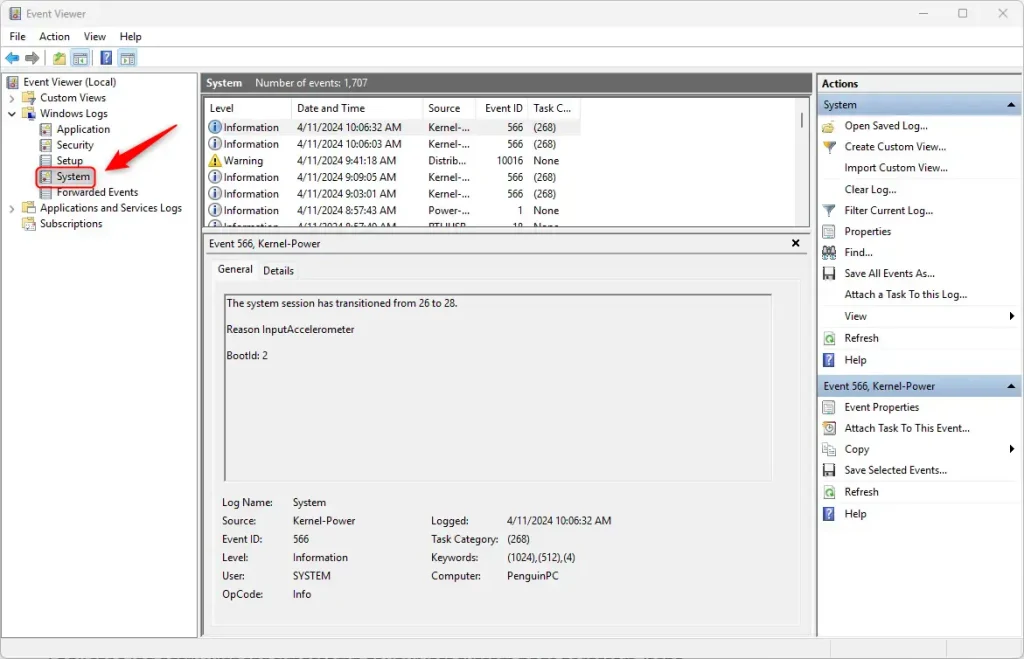
Event Viewer System View - Find System Logs: In the left panel, click the arrow next to Windows Logs to expand it. Then click System. The list of system events appears in the middle pane.
- Filter the Logs: Right-click System and choose Filter Current Log.... A filter window opens. The System log can hold thousands of entries, so filtering saves you a lot of scrolling.
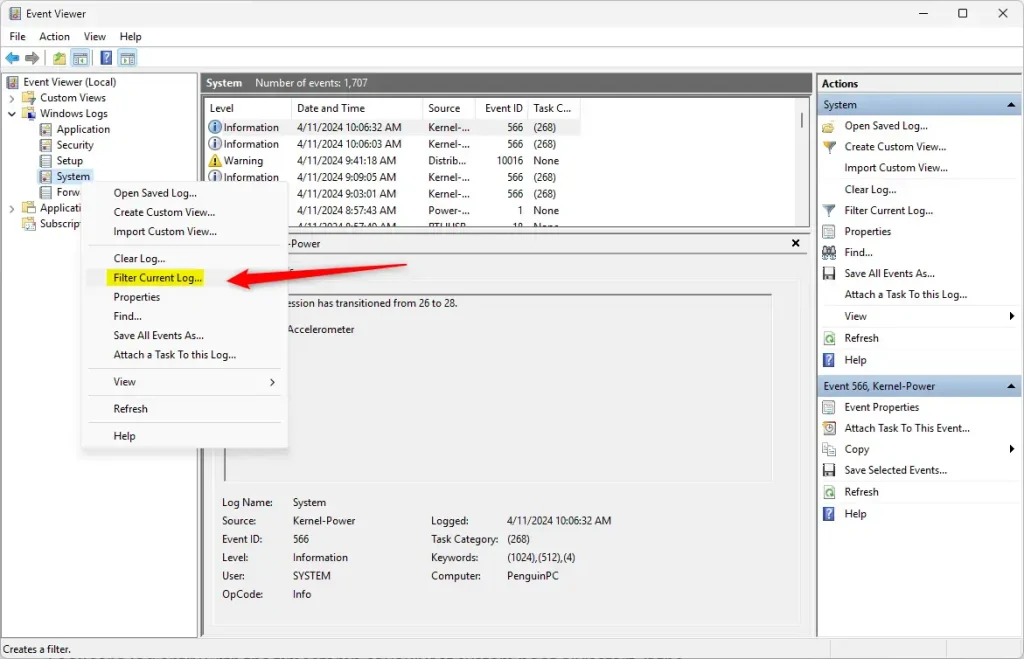
Filter Current Log in Event Viewer - Enter Filter Details: In the Event IDs box, type
12. Then click the dropdown for Event sources and select Wininit. Click OK. The list now shows only the matching events.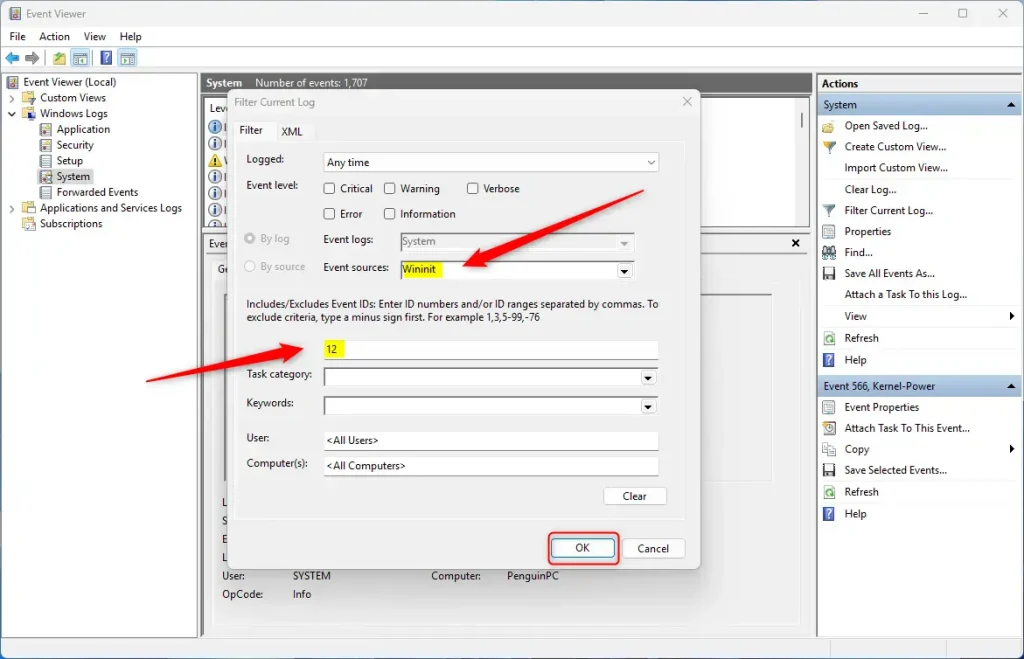
Set Event ID and Source Filter - Check the Log Message: Click an entry in the list and read the message in the General tab below it. Look for this text: "LSASS.exe was started as a protected process with level 4". This message means LSA Protection is active on your PC. If the list is empty, the event was not logged, which usually means LSA Protection is off. It can also mean the log has been cleared or has rolled over since the last restart.
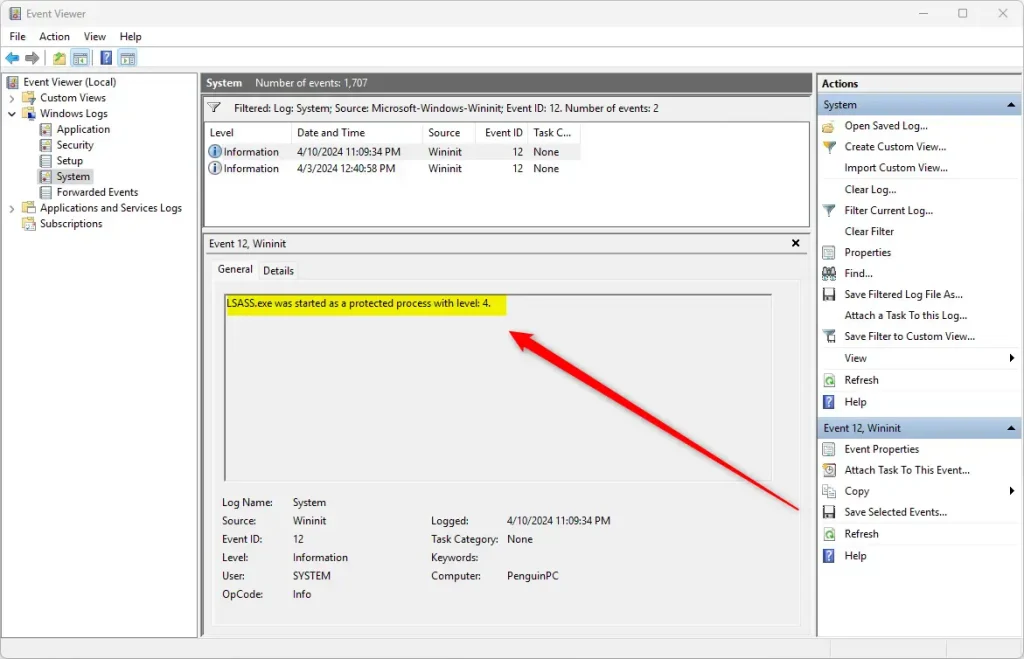
LSASS Protected Process Log
Local Security Authority (LSA) protection safeguards your computer from attacks that target the security process. If you see the confirmation message, your Windows 11 PC has this protection active, which helps prevent unauthorized access to sensitive security information.
Restart the PC for the change to take effect. If the switch is missing or greyed out, the device may be managed by an organization or may not meet the requirements. In that case, ask your administrator. To undo the change later, switch it off again and restart. Newer clean installs of Windows 11 may already have it enabled, but upgraded PCs often do not, so check rather than assume.
Why Does This Matter?
LSA Protection matters because credential theft is one of the most common ways attackers take over computers. Keeping it active stops malicious software from grabbing your password hashes out of computer memory. Once an attacker has those hashes, they can often move to other machines on the same network, so protecting one PC helps protect the rest.
Checking this yourself gives you confidence that your PC is secure. Make it a habit to review your security features regularly, and check again after major Windows updates or after changing security settings.
Windows security features offer protection through safeguards like Core Isolation. Core Isolation, a feature introduced with Windows 10 and present in Windows 11, creates a secure area in your computer's memory using virtualization-based security. This protected memory prevents malware from accessing sensitive data. LSA protection is listed on the same Core isolation page in Windows Security, so you can review the related settings in one place.
Summary
LSA Protection is a vital Windows security feature that shields your passwords and login details. You can confirm it is active using Event Viewer, and if it is off, you can turn it on in Windows Security and restart your PC.
Have a question about this guide?
Answered by AI from this guide. Good questions may be added to this page — please don't include personal details.
Did this guide fix your problem?

About the Author
Richard
Tech Writer, IT Professional
Richard is a writer at Geek Rewind who turns complex IT tasks into clear, step-by-step guides. He draws on years of hands-on experience in system administration and enterprise IT operations, focusing on Windows, Linux and WordPress: the problems people actually run into, and the fixes that work. His server and WordPress guides come from systems he runs himself. Richard builds and maintains the platform behind Geek Rewind, from its Ubuntu servers and Nginx configuration to its custom WordPress plugins. Many new tutorials start with readers' questions, and he's always glad to answer them in the comments.
No comments yet — be the first to share your thoughts!