Download Microsoft Safety Scanner for Windows 11

Microsoft Safety Scanner is a free, portable malware removal tool you can download and run on Windows 11.
This on-demand scanner helps find and remove viruses, spyware, and other malicious software when you suspect your PC is compromised.
Unlike Microsoft Defender Antivirus that runs constantly, you manually launch Safety Scanner, making it perfect for situations where malware might disable your primary security.
It’s a vital backup because this portable tool runs independently to clean your system even if your main antivirus is offline. Download version 1.395.525.0 for the latest updates.
Visit the official Microsoft Safety Scanner download page and select the correct version for your system. After downloading msert.exe, right-click it and choose “Run as administrator” to start the scan.
System Requirements and Expiration
To use this tool, your Windows 11 PC must meet standard hardware requirements. It is available for both 32-bit and 64-bit architectures. Crucially, the tool expires 10 days after download. This expiration policy ensures you always use the latest threat definitions. You must download a fresh copy of msert.exe from the official Microsoft website before every scan.
How to Download and Use Microsoft Safety Scanner
- Visit the official Microsoft Safety Scanner download page.
- Choose the version matching your system architecture (64-bit is standard for Windows 11).
- Locate the downloaded msert.exe file in your folder.
- Right-click the file and select Run as administrator. Requires admin privileges.
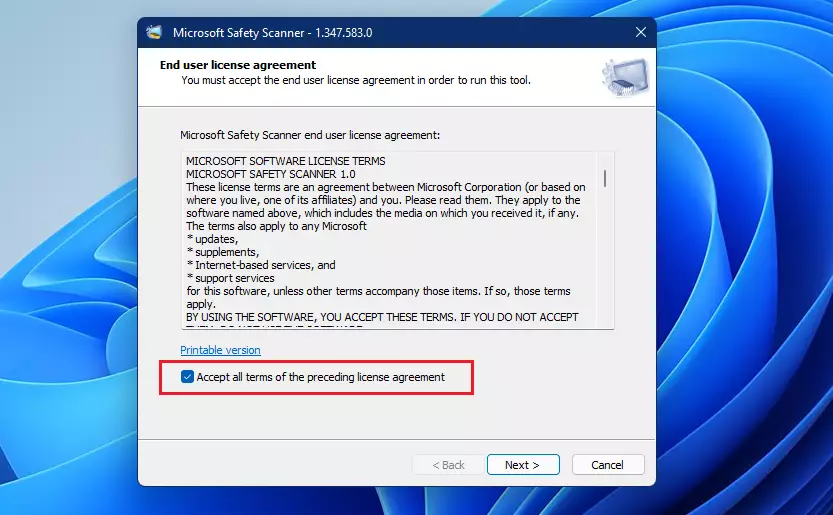
- Accept the license agreement to proceed.
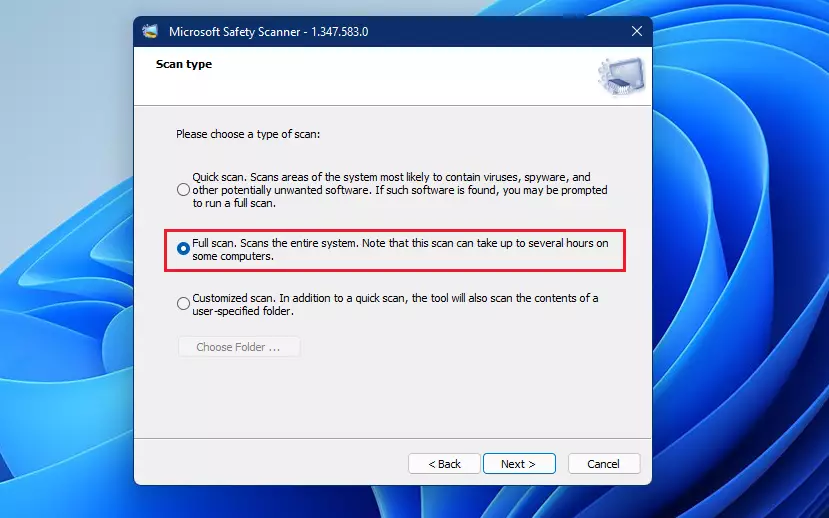
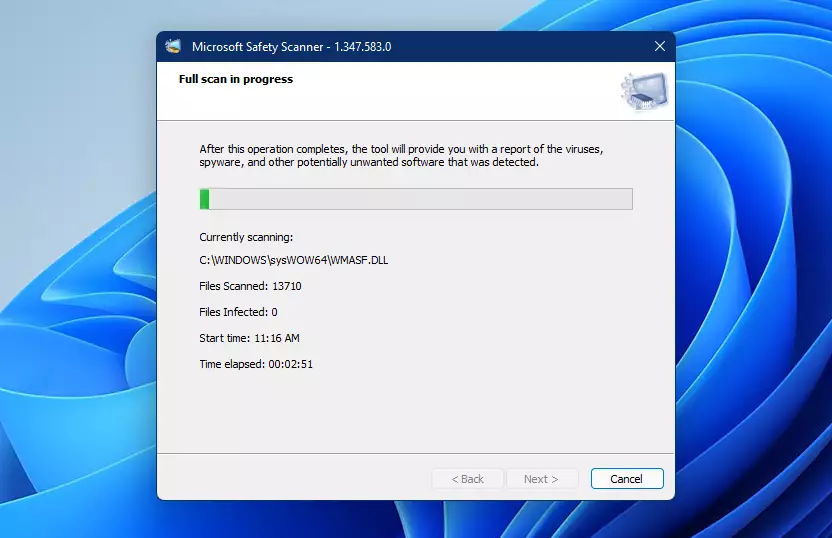
Once open, you can choose between a Quick scan, Full scan, or Customized scan. A Full scan is recommended for thorough threat detection.
If you need to verify the file integrity, you can check the SHA-256 signature provided on the download page. Advanced users can also use command-line parameters like /f:y to force a full scan automatically.
Troubleshooting Common Errors
If the tool fails to launch, ensure you have administrative rights. If the scan hangs, try running it in Safe Mode. Always check the log file at 📁C:\Windows\debug\msert.log if you encounter unexpected behavior or if the tool closes prematurely.
Summary
The Microsoft Safety Scanner is an essential, free, and portable tool for Windows 11 users. It provides a powerful way to remove malware when your primary antivirus is blocked. Remember that it is not a replacement for real-time protection, it expires every 10 days, and it requires administrative access to function correctly. Always download the latest version to ensure your system stays secure.
Does Microsoft Safety Scanner replace my antivirus?
No, it does not. Microsoft Safety Scanner is an on-demand tool meant to supplement your existing security. It lacks real-time protection features, meaning it cannot prevent new infections. Always keep Microsoft Defender Antivirus or another reputable security suite running for continuous, active protection against incoming threats.
Is Microsoft Safety Scanner free for 🪟 Windows 11?
Yes, the Microsoft Safety Scanner is completely free for all Windows 11 users. It is provided by Microsoft as a portable utility to help users clean their systems. You do not need a subscription or a license to download and run the tool for personal use on your devices.
Was this guide helpful?

About the Author
Richard
Tech Writer, IT Professional
Richard, a writer for Geek Rewind, is a tech enthusiast who loves breaking down complex IT topics into simple, easy-to-understand ideas. With years of hands-on experience in system administration and enterprise IT operations, he’s developed a knack for offering practical tips and solutions. Richard aims to make technology more accessible and actionable. He's deeply committed to the Geek Rewind community, always ready to answer questions and engage in discussions.
No comments yet — be the first to share your thoughts!