Use Your Android Camera as a Webcam on Windows 11


Using your Android camera as a webcam on Windows 11 lets you send clear video from your phone straight to your PC for Zoom calls and video chats. The feature links your phone and computer wirelessly through the Mobile devices settings page on Windows 11 build 22635 or later. Phone cameras usually beat built-in laptop webcams, especially in low light.
Once the camera link is on, you can swap between the front and back lenses, pause the video feed, and use phone filters and effects. The settings live in Settings Bluetooth & devices Mobile devices
Before you start, check three things:
- Your PC runs Windows 11 build 22635 or later. To check, press Win+R, type winver, and press Enter.
- Your phone is already linked to your PC. If the Mobile devices page does not list it, add it first.
- Your phone and PC are on the same network, with Bluetooth turned on for both.
Connect your Android phone to your Windows 11 PC via Wi-Fi . Open the Link to Windows app on your phone and the Cross-device experience host on your PC. Select your phone as the camera source in your video conferencing app.
Let Windows use your mobile device’s camera as a webcam
To use your phone as a webcam, you link it to your PC from the Bluetooth & devices page in Settings, then turn on mobile device access. Here is how to set it up.
- Open the Settings app. The quickest way is to press Win+I.
- If you prefer the mouse, click the Start menu and select Settings. Or press the keyboard shortcut (Windows key + I) to launch the Settings app . The Settings window should now be open.
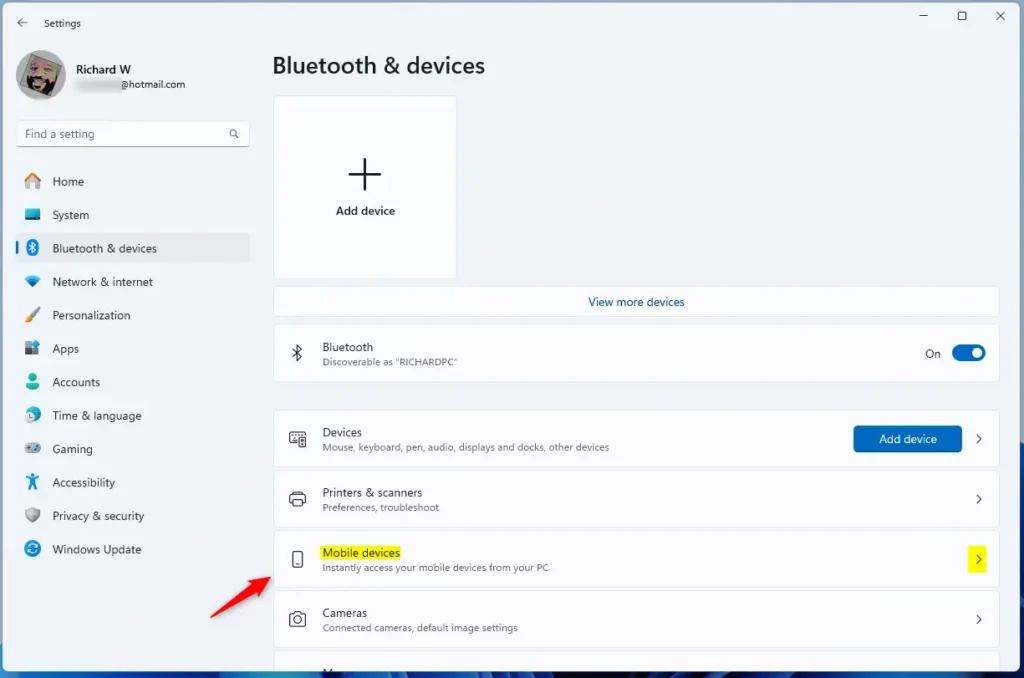
- In the Settings app, click the Bluetooth & devices button in the left sidebar. The page on the right changes to your Bluetooth and device options.

- On the right, find the Mobile devices tile under Bluetooth & devices and select it to expand it. If you do not see the tile, your build is probably older than 22635, or the feature has not reached your PC yet. See the note at the end of this article.
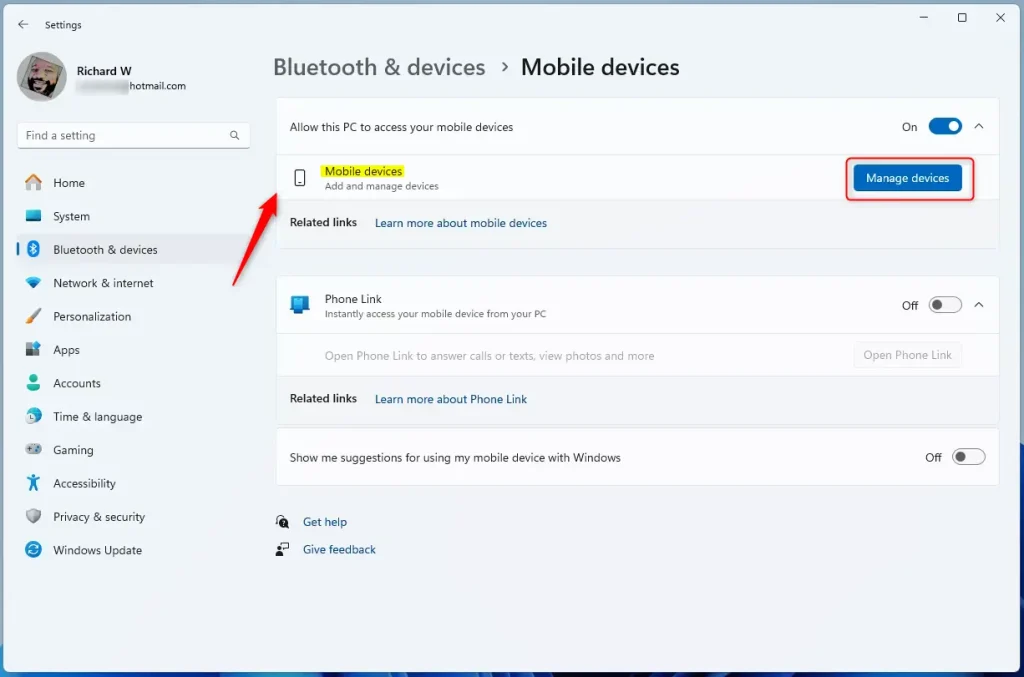
- Select the Manage devices button under Allow this PC to access your mobile device. A page opens with the phones and tablets linked to this PC.
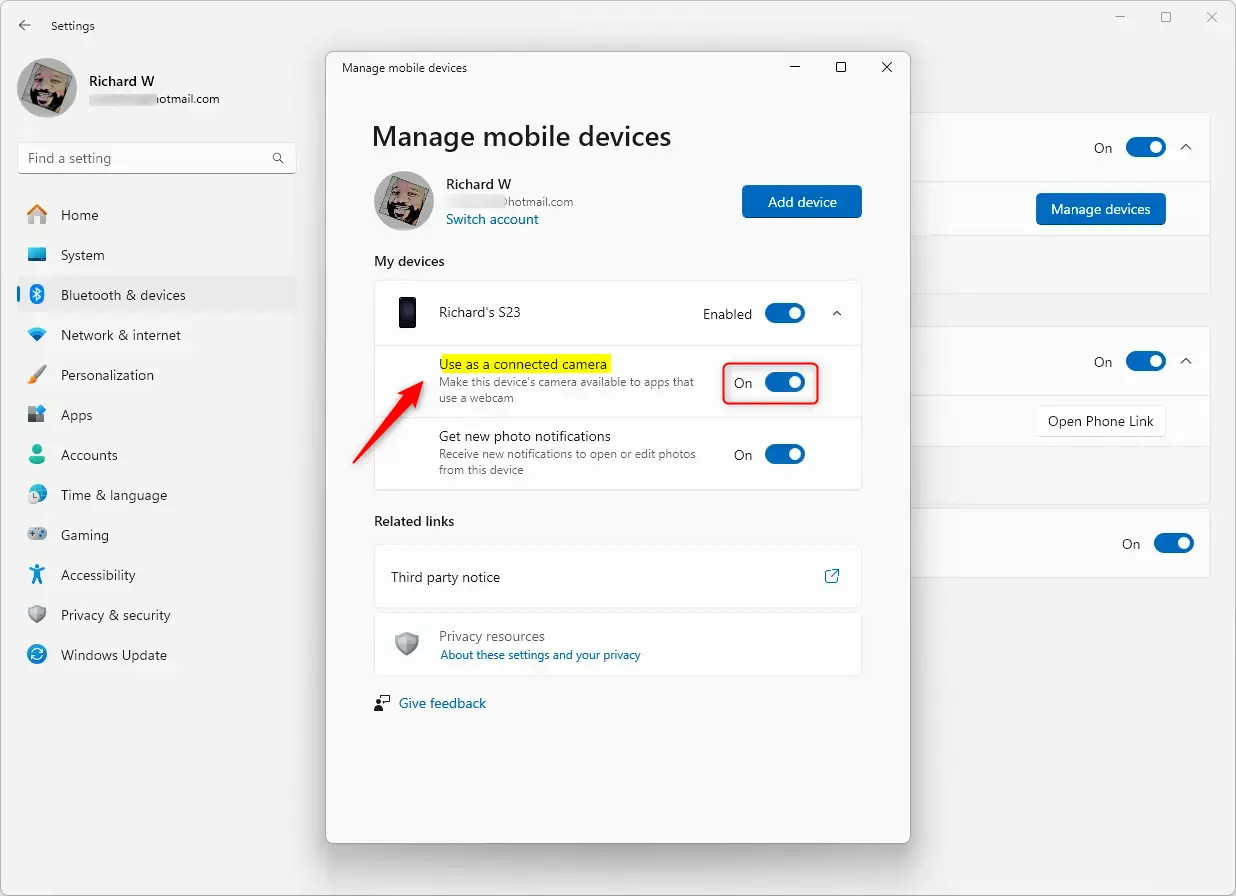
- Select the Use as a connected camera tile, then move its switch to the On position.
If the option is greyed out or missing, the phone is probably not linked or not connected right now. Check the phone’s connection first, then reopen the page.
To undo this later, return to the same page and move the switch to Off. You do not need to restart your PC for either change.
Once the feature is on, your phone shows up as a connected camera alongside the other cameras on your PC. Open your video app, go to its camera settings, and pick the phone from the list. If it does not appear, close and reopen the app, because some apps only scan for cameras when they start.
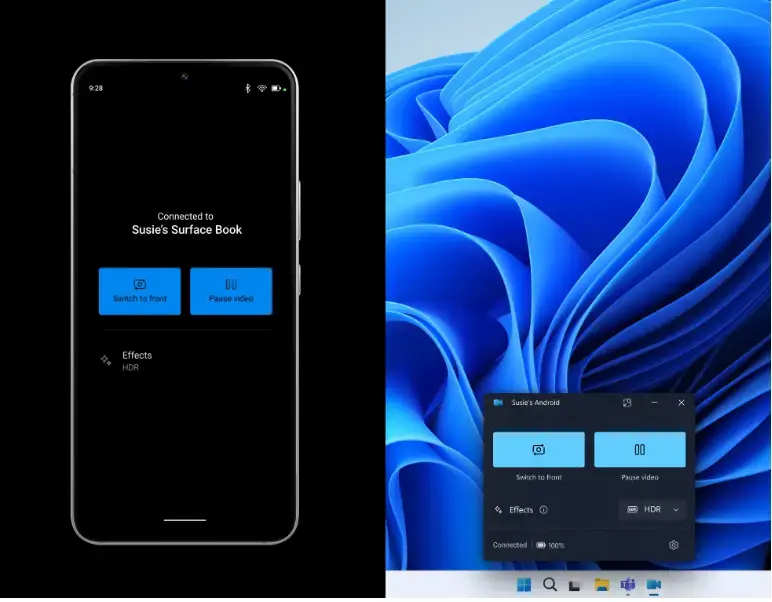
That completes the configuration. From here, you control the front and back lenses, pausing, and effects through the feature’s options.
Reference:
Because the phone works as a normal camera source, you can use it in any desktop video app without installing extra software on the PC. Here is what to know about the feature:
- The Mobile devices feature in Windows 11 lets you use your Android phone or tablet camera in any video application on your PC.
- It also lets you access and edit the most recent photos and screenshots from your mobile device on your Windows 11 PC.
- Using the phone's high-quality camera wirelessly gives you flexibility. You can switch between the front and back cameras, pause the stream, and use the phone's effects.
- The feature is being rolled out to Windows Insiders and is not yet available on all Windows PCs. For more details, see the Microsoft blog and the references it provides.
Have a question about this guide?
Answered by AI from this guide. Good questions may be added to this page — please don't include personal details.
Did this guide fix your problem?

About the Author
Richard
Tech Writer, IT Professional
Richard is a writer at Geek Rewind who turns complex IT tasks into clear, step-by-step guides. He draws on years of hands-on experience in system administration and enterprise IT operations, focusing on Windows, Linux and WordPress: the problems people actually run into, and the fixes that work. His server and WordPress guides come from systems he runs himself. Richard builds and maintains the platform behind Geek Rewind, from its Ubuntu servers and Nginx configuration to its custom WordPress plugins. Many new tutorials start with readers' questions, and he's always glad to answer them in the comments.
No comments yet — be the first to share your thoughts!