How to Only Show Images, No Videos on Bing Homepage

Turning off videos on the Bing homepage stops the background clips from playing, so you see only the static daily photo. By default Bing can show a still photo or a moving clip. The clips use extra data and can distract you. Showing a still image keeps the page cleaner and can help it load faster. The setting lives in your browser, so it works the same on Windows 10 and Windows 11.
The short version:
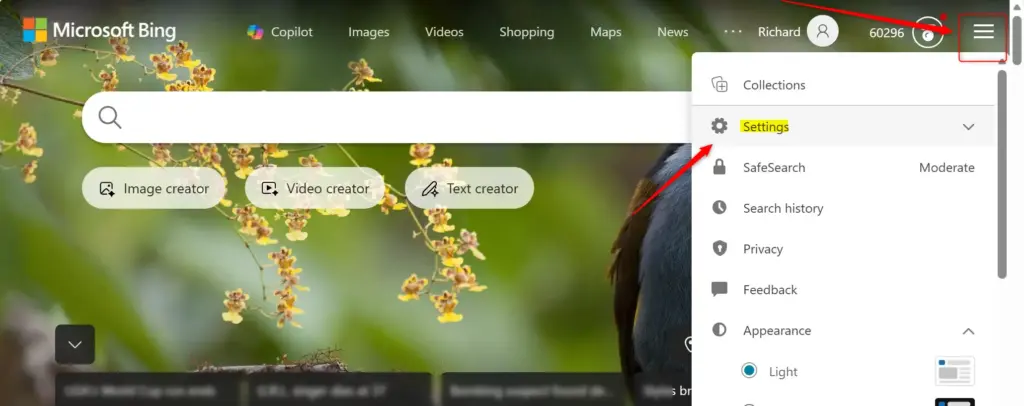
- Go to Bing.com and click the gear icon in the top-right corner to open the settings panel.
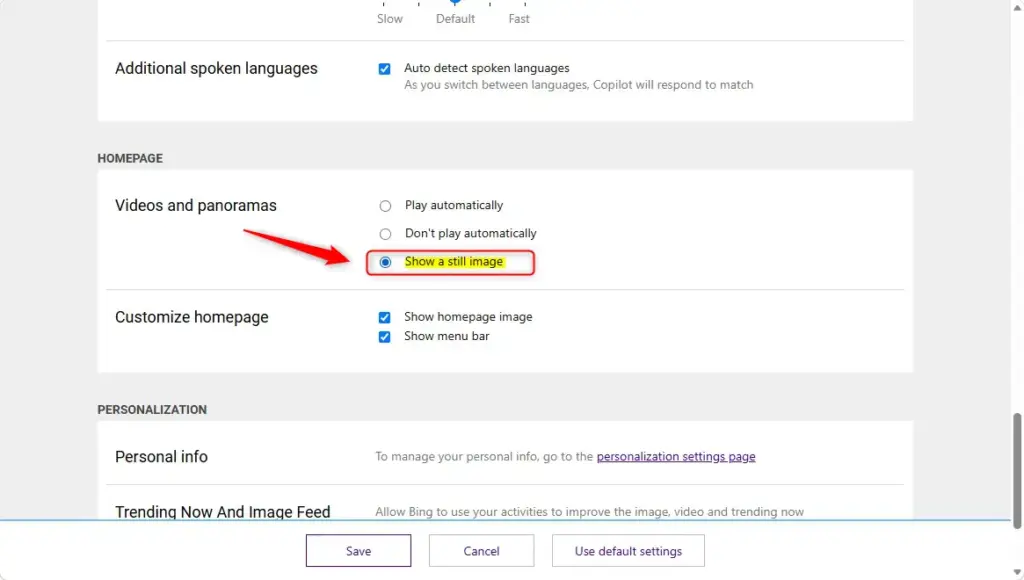
- Find the Videos and panoramas section.
- Choose Show a still image (or Still image only, depending on the wording you see).
- The change saves on its own, and the homepage now shows a static image instead of videos.
The steps below cover each part in more detail.
Go to Bing.com, click the gear icon in the top-right corner, find the Videos and panoramas section, and select Show a still image. The homepage now displays only a static photo with no videos playing, and the change saves automatically.
Making Your Bing Homepage Simple
Bing defaults to a mix of pictures and motion clips. Changing this preference stops videos from playing, so you decide how the page looks each time you open it. You do not need an extension or any change in Windows itself. It is a setting on the Bing page.
Step 1Find Bing Settings
To make Bing show only images, start by opening the settings panel on the Bing homepage. This panel is where you change how the background displays. Any current browser works, including Edge, Chrome and Firefox.
- Open your web browser. Edge, Chrome and Firefox all work.
- Go to the Bing website. Type
bing.cominto the address bar and press Enter. You should see the Bing homepage with the daily background. - Look for the settings menu in the top-right corner of the page. It is an icon that looks like a gear or three horizontal lines.
- Click the settings icon. A panel or menu opens with options for how the homepage looks. If you do not see it right away, make sure the browser window is wide enough. On a narrow window the page can collapse its controls into the three-line menu.
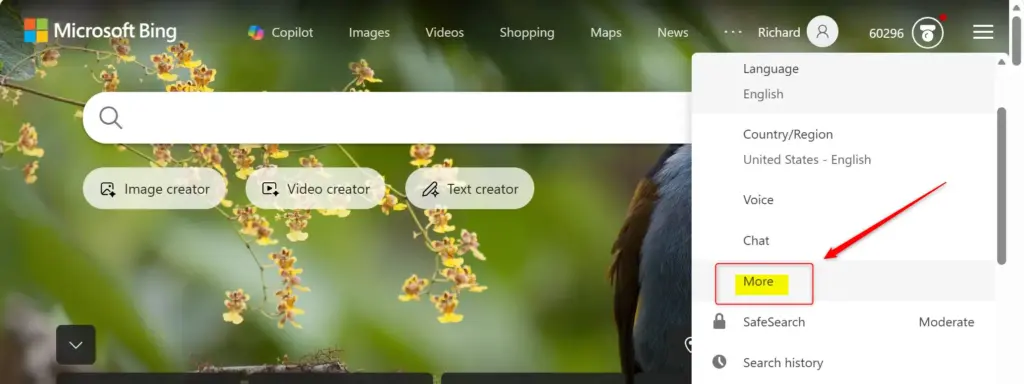
Step 2Choose Still Images Instead of Videos
Next, find the Videos and panoramas section in the settings panel and pick the still-image option. This keeps the background on static photography each time you open Bing in this browser.
- Go to the Videos and panoramas section in the Bing settings. If you closed the settings menu, repeat the steps above to open it again.
- Select Show a still image. Some versions of the page word this as Still image only. Choose whichever one is there.
- Check the homepage. Your change should save automatically, and Bing should now show a still picture with no videos playing. If the clip is still moving, refresh the page with F5.
The option may also not appear for some regions or accounts. Look for anything related to the homepage background or video. Bing keeps this preference in the browser, so clearing cookies or using a private window can bring the videos back. To undo the change, return to the same section and choose the option that allows videos again.
References:
https://support.microsoft.com/en-us/bing/turn-off-bing-homepage-image-or-video
Summary
With the still-image option selected, you see only photography. Keeping videos from loading also means less data used and a lighter, quicker page.www.bing.com
Have a question about this guide?
Answered by AI from this guide. Good questions may be added to this page — please don't include personal details.
Did this guide fix your problem?

About the Author
Richard
Tech Writer, IT Professional
Richard is a writer at Geek Rewind who turns complex IT tasks into clear, step-by-step guides. He draws on years of hands-on experience in system administration and enterprise IT operations, focusing on Windows, Linux and WordPress: the problems people actually run into, and the fixes that work. His server and WordPress guides come from systems he runs himself. Richard builds and maintains the platform behind Geek Rewind, from its Ubuntu servers and Nginx configuration to its custom WordPress plugins. Many new tutorials start with readers' questions, and he's always glad to answer them in the comments.
No comments yet — be the first to share your thoughts!