How to Turn On or off Bing Homepage Image


The Bing homepage image is the daily photo or video that shows up in the background when you open Bing.com. Turning it off hides the daily backdrop and gives you a clean search page. Microsoft includes a simple toggle in the website settings, so you don’t need an extension or any changes in Windows.
The steps below work in any current browser on Windows 11, including Edge, Chrome and Firefox. Bing changes its layout from time to time, so a label may differ slightly from what I describe. I note where that is likely.
Go to www.bing.com, click the settings icon in the top right corner, find “Show homepage image,” and toggle it off. The daily background disappears and the search page becomes a plain white background.
Turn Off Homepage Pictures
Removing the daily image makes the page quieter and helps you focus when you only want to search. It also loads a little lighter, which you may notice on a slow connection.
- Open your web browser.
- Go to www.bing.com.
You should now see the Bing search page with the daily image behind the search box.
Find the Settings Menu
- Look at the top right corner of the Bing page and find the menu icon. It usually looks like three horizontal lines, and on some layouts it is a gear symbol.
- Click the icon.
A panel opens on the right side of the page. This is where you change the Bing settings, including the background picture.
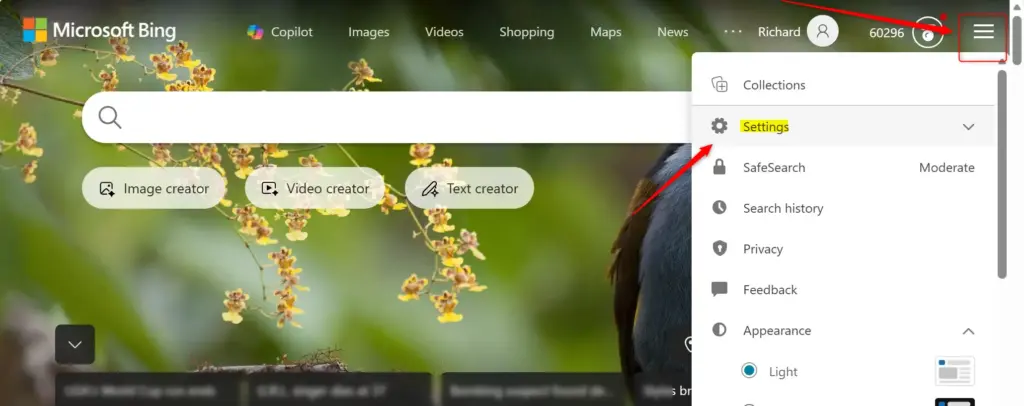
Even with minor visual differences, the settings remain in the same location. If you see a “Settings” entry in the panel, click it to open the full list of options.
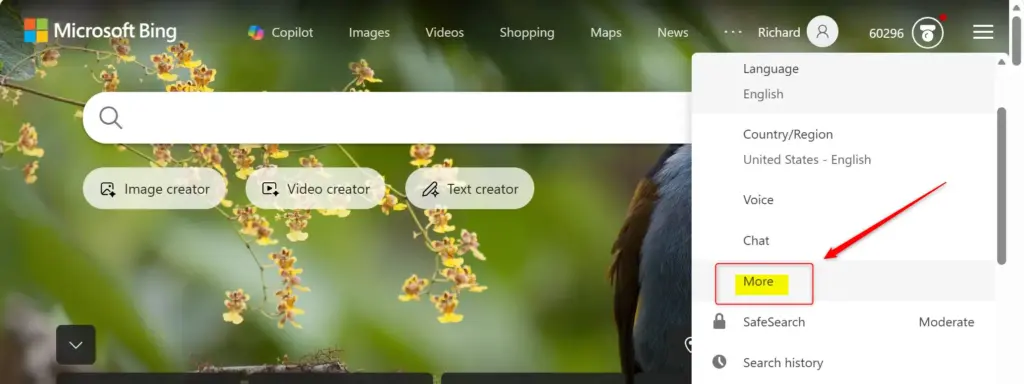
Find the Picture Setting
- Scan the menu that appears for the relevant option. Look for an entry such as "Show homepage image" or "Homepage background."
Microsoft sometimes changes the wording or moves the toggle between layouts, so look for anything that mentions the homepage image or background.
Turn Off the Pictures
- Click the switch next to Show homepage image (or the matching background setting) to turn it off.
- Reload the page if the background is still there.
The daily picture is now gone. The Bing search page has a plain white, minimalist background instead of artwork that changes every day.
To undo the change, open the same menu and switch the toggle back on. The image returns the next time the page loads.
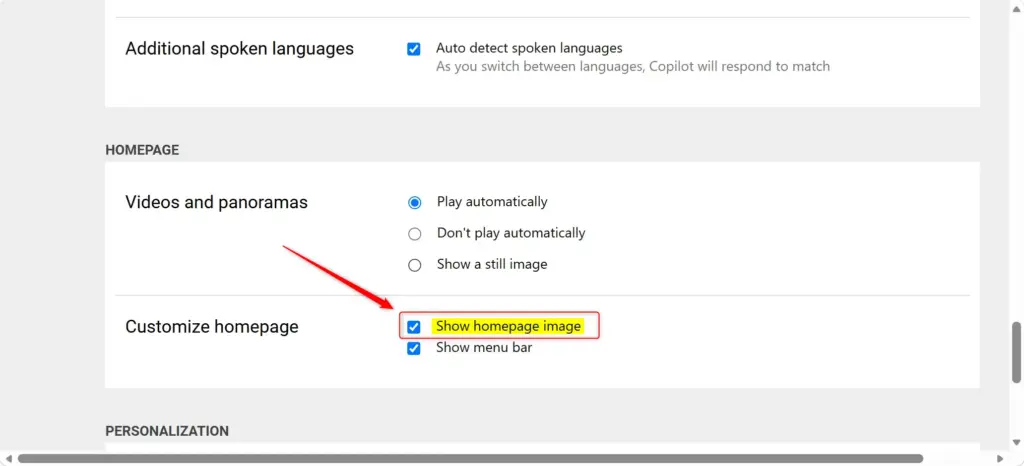
Disabling the background art gives the search page a minimalist look. The setting is tied to your browser, so if you also use Bing in another browser or on another device, you may need to repeat the steps there. If the image comes back after you clear your browser data, turn the toggle off again.
If you would rather keep some visual variety while reducing distractions, leave the image on and just ignore it. Or switch it off and back on whenever you want a change.
References:
https://support.microsoft.com/en-us/bing/turn-off-bing-homepage-image-or-video
Summary
Clearing away the daily background pictures takes very little effort. Visit Bing's website, open the settings menu in the top right, and turn off the "Show homepage image" option to simplify the page layout. To bring the image back, turn the same switch on again.
Have a question about this guide?
Answered by AI from this guide. Good questions may be added to this page — please don't include personal details.
Did this guide fix your problem?

About the Author
Richard
Tech Writer, IT Professional
Richard is a writer at Geek Rewind who turns complex IT tasks into clear, step-by-step guides. He draws on years of hands-on experience in system administration and enterprise IT operations, focusing on Windows, Linux and WordPress: the problems people actually run into, and the fixes that work. His server and WordPress guides come from systems he runs himself. Richard builds and maintains the platform behind Geek Rewind, from its Ubuntu servers and Nginx configuration to its custom WordPress plugins. Many new tutorials start with readers' questions, and he's always glad to answer them in the comments.
No comments yet — be the first to share your thoughts!