
Microsoft Edge Copilot focus settings control whether your cursor lands on the AI search box or the main address bar when you open a new tab in version 120 or later. Changing this option lets you type your AI prompt or web address right away, without clicking first.
You adjust this in the browser’s appearance settings. It takes under a minute, and it saves a click every time you open a new tab or window.
The option only appears in Edge builds that include it. If you can’t find it, check your version first. Open Settings About Microsoft Edge. Edge checks for updates there and installs one if it’s available. You may need to restart the browser to finish.
Open Microsoft Edge, click Settings and more (three dots) at the top right, select Settings, then click Appearance in the left sidebar. Find the setting for cursor focus on new tabs and choose either the address bar or Copilot search box based on your preference. Edge saves automatically.
Why do this?
By default, your browser might focus on the search box when you open a new tab. Changing this setting lets you decide whether you start typing a web address or go straight to the Copilot AI interface.
Here is how to make the change:
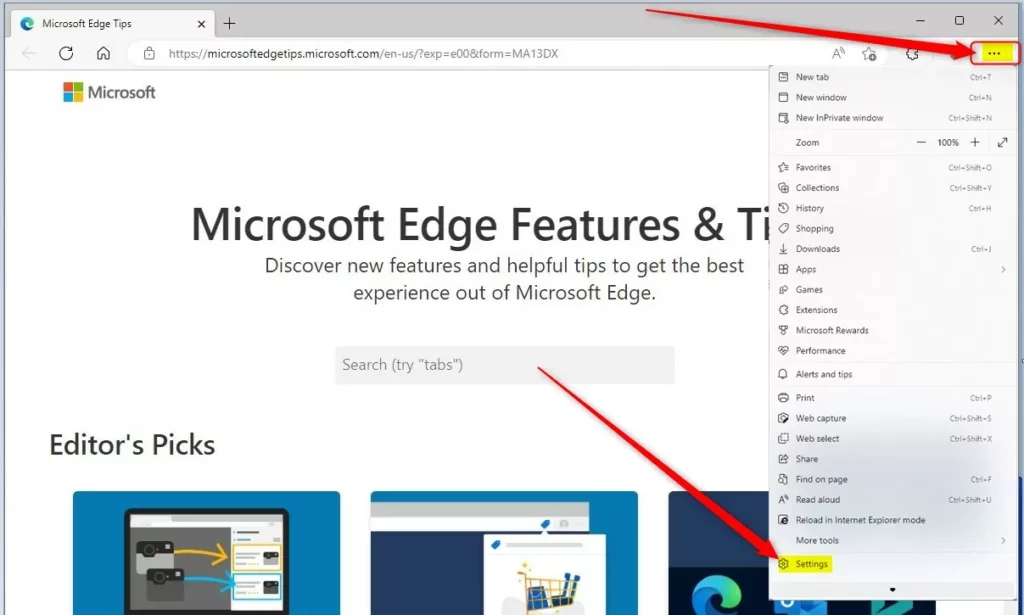
- Open Microsoft Edge and click the Settings and more button (the three dots) at the top right of the window.
- Click Settings. The Settings page opens in a new tab.
- Select Appearance in the left-hand list. The appearance options appear on the right.
- Look through the appearance options for the setting that controls where the cursor lands on a new tab. Choose the address bar if you mostly type URLs. Choose the Copilot or search box if you mostly start with AI prompts.
- Close the Settings tab. Edge saves the change automatically, so there is no Save button.
If the option isn’t in Appearance on your PC, update Edge as described above and look again. On a work or school PC, an administrator may manage the setting. In that case it can be greyed out or missing, and you’ll need to ask your IT team.
What happens when done?
Once you adjust this setting, your browser should behave the way you prefer every time you open a new tab. It saves you an extra click and keeps your workflow smooth.
To test it, follow these steps:
- Press Ctrl+T to open a new tab.
- Start typing without clicking anything.
- Check where the text appears. It should go into the box you chose.
Close and reopen Edge if the change still doesn't take effect. To undo it, return to the same option and select the previous choice. Nothing else is affected, and the setting works the same on Windows 11 Home and Pro.
How to change your settings
Edge Copilot focus settings let you control whether the AI assistant reads and responds to the content on your new tab page. You can change this behavior by opening the main menu in Microsoft Edge, going to your profile preferences, and turning off the switch that allows Copilot to use your current page context.- Open Microsoft Edge.
- Click the Settings and more menu (the three dots in the top right corner) and select Settings.
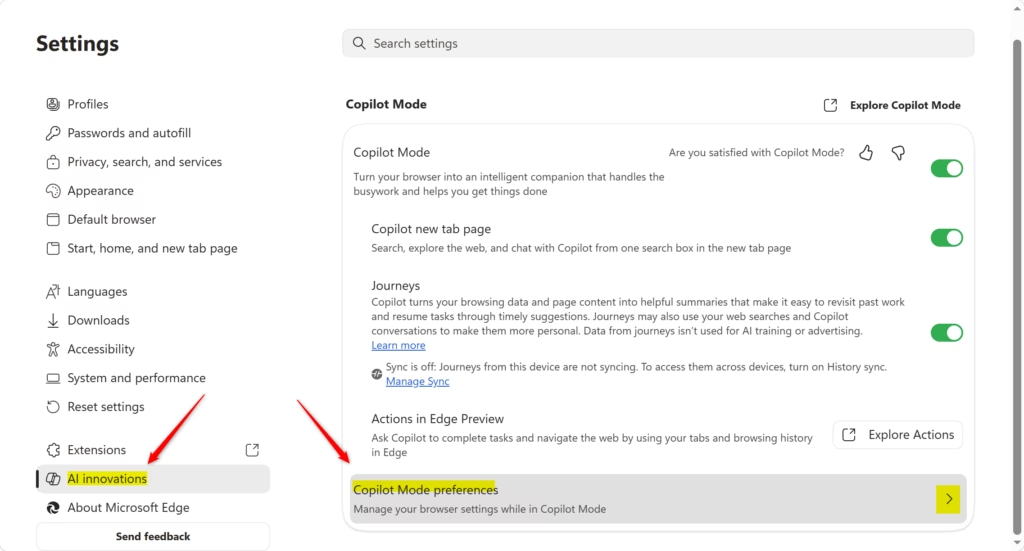
- Click on AI innovations on the left side of the screen. Then, click on Copilot Mode preferences on the right.
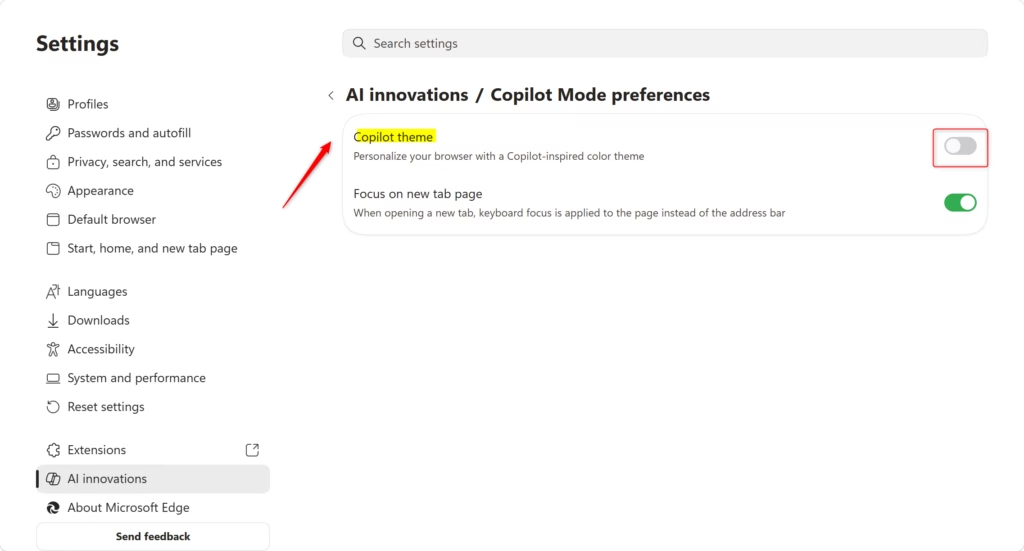
- Find the setting labeled Focus on new tab page. Toggle this switch On or Off based on your preference.
Note: This option is only available if you have the Copilot new tab page enabled. - You can now close the Settings tab.
References
Introducing Copilot Mode in Edge: A new way to browse the web
Summary
You can easily toggle the focus for your Copilot new tab page through the Edge settings menu. This ensures your cursor lands exactly where you want it every time you open a new tab, helping you browse faster and stay focused on your tasks.
Have a question about this guide?
Answered by AI from this guide. Good questions may be added to this page — please don't include personal details.
Did this guide fix your problem?

About the Author
Richard
Tech Writer, IT Professional
Richard is a writer at Geek Rewind who turns complex IT tasks into clear, step-by-step guides. He draws on years of hands-on experience in system administration and enterprise IT operations, focusing on Windows, Linux and WordPress: the problems people actually run into, and the fixes that work. His server and WordPress guides come from systems he runs himself. Richard builds and maintains the platform behind Geek Rewind, from its Ubuntu servers and Nginx configuration to its custom WordPress plugins. Many new tutorials start with readers' questions, and he's always glad to answer them in the comments.
No comments yet — be the first to share your thoughts!