Enable or Disable App Names in Outlook App

App names in the new Outlook app for Windows show the actual name of the app right next to incoming messages, instead of a generic sender icon. When an alert or message arrives, you can see which app sent it without opening it first.
The new Outlook hides these app names by default. You can turn them on in a few clicks if you want more detail in your inbox, and you can turn them off again the same way. The change affects only how Outlook looks. It does not touch your mail, your account or your other settings.
To show app names in the new Outlook for Windows, click the Settings gear in the top-right corner, then choose General, Appearance, and under Navigation bar turn on the Show app names switch. The change applies immediately, with no restart needed. Classic Outlook 2019 and 2016 do not have this option.
Latest Update
Microsoft pushes updates to the new Outlook for Windows that let you show app names next to your messages and notifications. This helps you see where emails come from right away, especially if you use team chat apps or task tools connected to your inbox.
If you can’t find it later in this guide, check that you are running the new Outlook and not classic Outlook. The new app is the one with the Settings gear in the top-right corner. Also make sure Outlook is up to date, because the option only appears once the update has reached your installation.
This setting helps you find the source of an email quickly, especially when you watch several connected services. Messages from Microsoft Teams, Planner or other integrated services arrive with clearer context.
Without app names, you have to work out the true origin from generic sender icons, and those look alike at a glance. If you get many notification emails a day, the extra label saves time.
Turn on or off "Show app names" in Outlook
The Show app names option is a switch in the Outlook settings. You can turn it on or off at any time, and it works the same on Windows 11 Home and Pro. The exact path can shift between Outlook builds, so if your screen differs a little from the steps below, look for the same names in nearby menus.
Here is the procedure for current desktop installations. You don't need administrator rights, because the setting belongs to your own Outlook profile.
- Launch the Outlook app from the Start menu or the taskbar search box. The new Outlook window opens with your inbox.
Latest Update
This guide focuses on the new Outlook for Windows. Classic Outlook builds (Outlook 2021, 2019, 2016, and earlier) manage navigation elements through older configuration panels rather than this sidebar.

- Click the Settings gear icon in the top-right corner of the window. The Settings panel opens, with a list of categories down the left side.

- In the Settings sidebar, click General to expand the menu.
- Select Appearance. The appearance options for Outlook appear on the right.
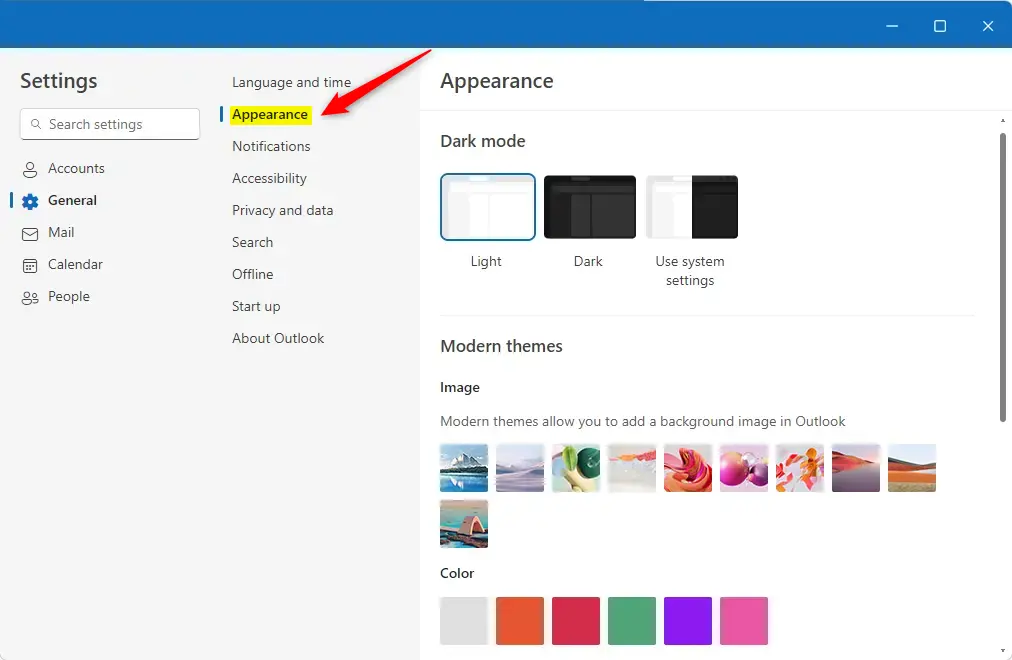
- Find the Navigation bar section under the Appearance settings. You may need to scroll down to reach it.
- Set the Show app names switch to On to display app names, or to Off to hide them. The switch moves right away to show its new state.
Here is the same path in short form, for when you only need a reminder:
- Click on
Settings(gear icon) in the top-right corner. - Select
Generalfrom the left-hand menu. - Choose
Appearance. - Under the
Navigation barsection, find the option forShow app names. - Toggle the switch to
OnorOffas desired.
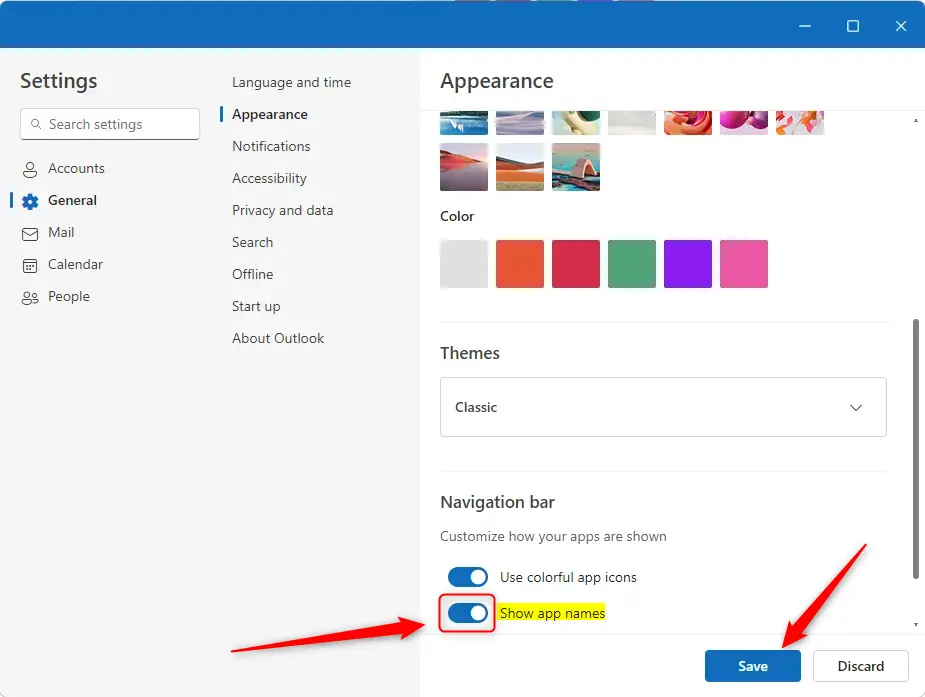
- Save the changes if the panel shows a save button, then close the panel. The new setting should apply straight away and needs no restart. If your inbox still looks the same, close Outlook completely and open it again.


That completes the setup. To undo it, repeat the steps above and flip the switch back to the other position.
Conclusion:
Personalizing your inbox takes only a few clicks. Once you update these display preferences, the new Outlook fits your workflow better, and you can change them again whenever your needs change.
Mobile Outlook users on iOS and Android manage layouts through different interface rules. Sender details appear prominently on mobile screens, but the mobile apps have no dedicated Show app names toggle in their menus. This guide applies only to the new Outlook for Windows.
- The "Show app names" feature makes it easier to recognize where messages come from in the Outlook app.
- You can toggle this feature in the Appearance settings, under the Navigation bar section.
- Settings are easy to reach through the gear icon in the top-right corner of the window.
- Remember to save your changes after adjusting the settings, if a save button is shown.
- Personalizing your Outlook experience can lead to better organization and usability.
Customizing the Navigation Bar
Inbox clean-up goes beyond sender names. Rearranging or hiding icons in the left-hand panel helps declutter the workspace. You can pin your favorite services or change the icon order through the same Settings > General > Appearance path, which speeds up daily navigation. If a change doesn't suit you, go back to the same place and reverse it.

No comments yet — be the first to share your thoughts!