How to Turn Off Custom Scrollbars in Edge

Edge (version 118 and later) lets websites draw their own custom scrollbars. These are the thin, coloured or hidden bars that some sites use in place of the normal Windows ones. You can turn them off so every page uses the standard Windows scrollbar, which looks the same on every site and matches the rest of your PC.
This is a normal browser setting. It works the same on Windows 10 and Windows 11, and on Home and Pro. If you can’t find it, check your Edge version first: open Settings and more > Help and feedback > About Microsoft Edge, and let it update if it is older than 118.
Go to Settings , then click “Accessibility” on the left side. Toggle the “Turn off custom scrollbars” setting to disable them. This restores the default scrollbar appearance.
Disable custom scrollbars in Edge
The setting is in Edge’s Accessibility settings. You don’t need to edit any registry key or experimental flag. The steps below show how to open it and switch it on, and the same toggle undoes the change.
- Open Edge, then click the three horizontal dots (Settings and more) in the top-right corner of the window. You can also press Alt+F. A drop-down menu appears.
- Select Settings from the menu. The Settings page opens in a new tab.

- On the Settings page, select Accessibility in the list on the left. The accessibility options appear on the right.
- Find Turn off custom scrollbars and switch the toggle on.
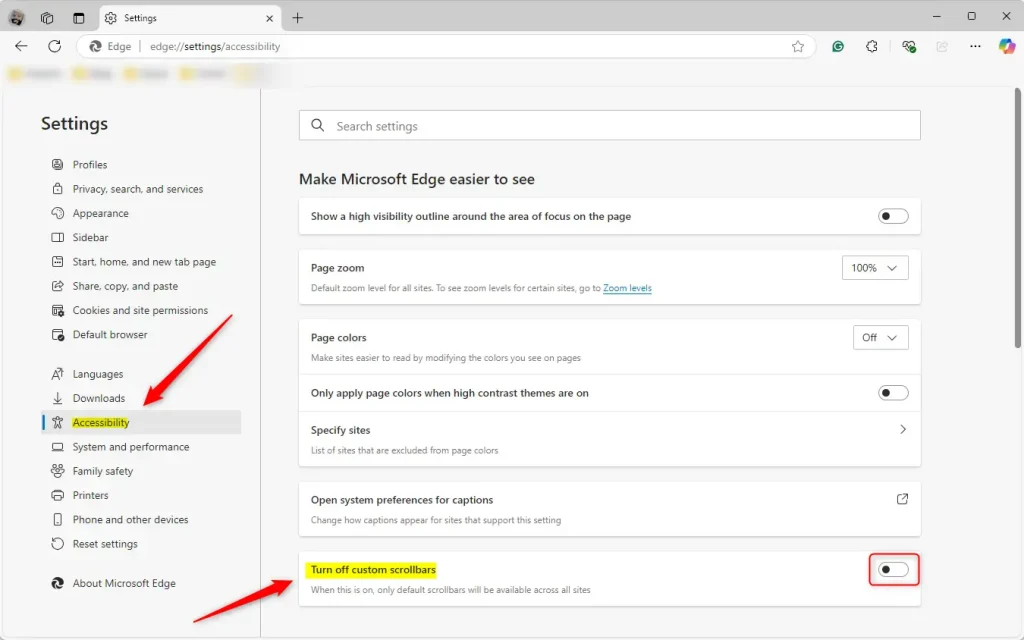
The change applies immediately, and you don’t need to restart Edge. Pages that were already open may keep their old scrollbars until you reload them, so press F5 on any tab that looks unchanged. From now on, sites that style their scrollbars will show the standard Windows ones instead.
To go back to the website’s own scrollbar designs, return to Settings Accessibility and switch the same toggle off.
Reference:
- Microsoft Edge allows web developers to customize scrollbars.
- Disabling custom scrollbars helps maintain uniformity and ease of use.
- Access the setting through the "Accessibility" section in Edge settings.
- The process is quick and straightforward, ensuring a smoother browsing experience.
Some Edge builds describe the same idea as a "System scrollbar style" setting. If you see it, set it to Windows. This brings back the familiar scrollbar look you may remember from earlier versions of Windows.
Have a question about this guide?
Answered by AI from this guide. Good questions may be added to this page — please don't include personal details.
Did this guide fix your problem?

About the Author
Richard
Tech Writer, IT Professional
Richard is a writer at Geek Rewind who turns complex IT tasks into clear, step-by-step guides. He draws on years of hands-on experience in system administration and enterprise IT operations, focusing on Windows, Linux and WordPress: the problems people actually run into, and the fixes that work. His server and WordPress guides come from systems he runs himself. Richard builds and maintains the platform behind Geek Rewind, from its Ubuntu servers and Nginx configuration to its custom WordPress plugins. Many new tutorials start with readers' questions, and he's always glad to answer them in the comments.
No comments yet — be the first to share your thoughts!