How to Enable QR Code in Microsoft Edge


QR code sharing in Microsoft Edge is a built-in browser tool that turns any web page address into a scannable black-and-white square for your phone. It lets you send a link from your PC to a mobile device without typing a long web address.
Depending on your Edge version and any policies applied to your PC, this tool can be switched off. You control it through the Registry Editor (the Windows database that stores system and app settings). The steps below show how to turn QR code generation off, and how to remove that setting so Edge goes back to its default behavior and the QR option returns.
Open Registry Editor as administrator, navigate to Computer\🗝️HKEY_LOCAL_MACHINE\
Enable or disable QR Code in Microsoft Edge
You manage the Edge QR code feature with a single value in the Windows Registry. This works the same on Windows 11 Home and Pro, because you edit the registry directly instead of using Group Policy. Before you start, save any work in Edge. You need an administrator account, because standard accounts cannot write to this part of the registry.
The steps below are small and reversible, but a wrong edit in the registry can cause problems.
- Close every Microsoft Edge window. Check the taskbar and the system tray so that no Edge process is still running in the background.
- Click Search on the taskbar and type Registry Editor.
- Right-click the Registry Editor result and select Run as administrator.
- Click Yes if User Account Control asks for permission. The Registry Editor window should now open, with a folder tree on the left and values on the right.
Now go to the registry key shown below. Expand the folders in the left pane one by one, or paste the path into the address bar at the top of the Registry Editor window and press Enter. When you reach the last folder, its contents appear in the right pane.
Computer\HKEY_LOCAL_MACHINE\SOFTWARE\Policies\Microsoft\Edge
Look in the right pane for QRCodeGeneratorEnabled. It is a DWORD value, a type of registry entry that stores a number. If you see it, double-click it. An Edit DWORD (32-bit) Value box should open with the current number in the Value data field.
In the Value data field, enter 0, then click OK. This disables the QR code generator option in Edge.
If the value is not there, you need to create it. That is normal, because the entry does not exist until someone sets a policy. Right-click an empty area of the right pane and select New DWORD (32-bit) Value. A new entry appears with its name highlighted and ready to edit.
Double-click it, enter 0 in Value data, and click OK to turn off QR code creation. Spell the name exactly as shown, because Edge ignores a value with a different name.
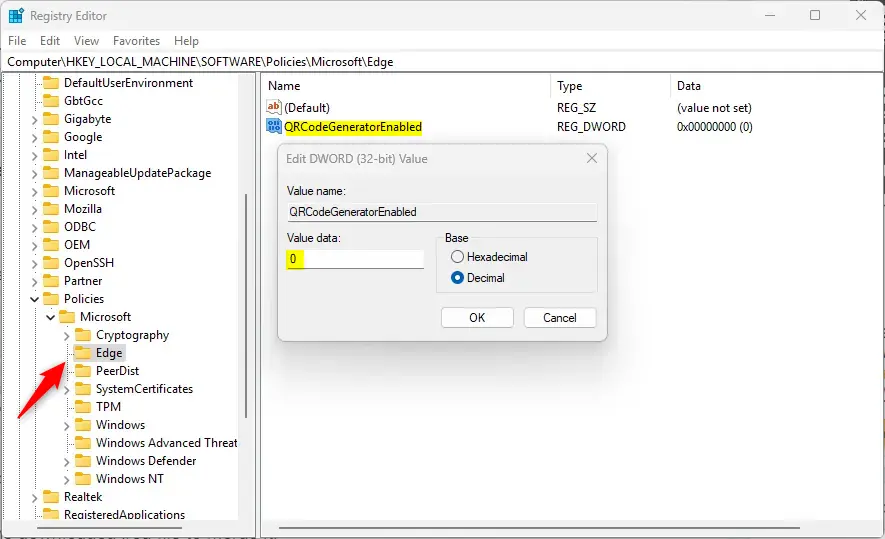
To restore the default behavior and generate QR codes again, right-click the "QRCodeGeneratorEnabled" item in the right pane, select Delete, and confirm with Yes. The value should disappear from the list. Edge then falls back to its default setting. If you only want to switch the feature back on, you can also leave the value in place and change its data, but deleting it is the cleaner undo.
Close the Registry Editor and reopen Edge. Edge reads this setting when it starts, so a full restart of the browser is usually enough. If the change does not show up, restart Windows. A reboot is not always needed, but it clears any Edge processes that are still running.
That completes the process. To check it, open any web page in Edge and look for the QR code option, either in the address bar or by right-clicking the page. If you disabled the feature, the option should be gone. If you deleted the value, it should be back.
Reference:
Conclusion:
- Turning the QR code generator in Microsoft Edge on or off takes one registry value, so you can adjust it in a few minutes.
- Follow the steps in order and run the Registry Editor as administrator. That gives you reliable control over whether Edge generates QR codes.
- The Edge QR code generator makes it quick to send a page from your PC to your phone, which is the main reason to keep it available.
- To go back to the default setting, delete the "QRCodeGeneratorEnabled" item you created, then restart Edge.
Have a question about this guide?
Answered by AI from this guide. Good questions may be added to this page — please don't include personal details.
Did this guide fix your problem?

About the Author
Richard
Tech Writer, IT Professional
Richard is a writer at Geek Rewind who turns complex IT tasks into clear, step-by-step guides. He draws on years of hands-on experience in system administration and enterprise IT operations, focusing on Windows, Linux and WordPress: the problems people actually run into, and the fixes that work. His server and WordPress guides come from systems he runs himself. Richard builds and maintains the platform behind Geek Rewind, from its Ubuntu servers and Nginx configuration to its custom WordPress plugins. Many new tutorials start with readers' questions, and he's always glad to answer them in the comments.
No comments yet — be the first to share your thoughts!