Richard

Richard✓ Verified Author

Richard

Tech Writer, IT Professional

Richard, a writer for Geek Rewind, is a tech enthusiast who loves breaking down complex IT topics into simple, easy-to-understand ideas. With years of hands-on experience in system administration and enterprise IT operations, he’s developed a knack for offering practical tips and solutions. Richard aims to make technology more accessible and actionable. He's deeply committed to the Geek Rewind community, always ready to answer questions and engage in discussions.

2465 Articles4 Topics
Windows 11Ubuntu LinuxCMSApps and Browsers
Browsers 2 min read
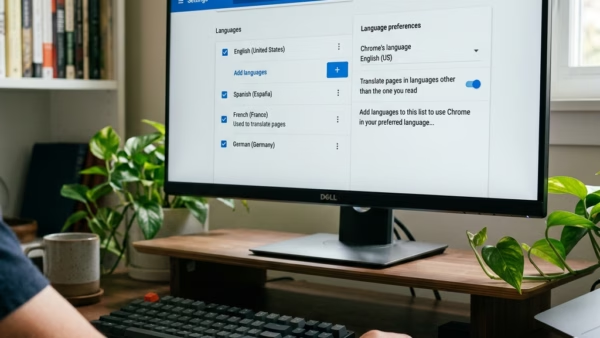
How to Enable Spell Check in Google Chrome

Google Chrome offers a built-in spell checker feature that flags misspelled words as you type, with two options - 'Basic' and 'Enhanced'. The feature is typically enabled by default, but users can toggle it on or off via the Languages settings. 'Enhanced' spell check sends typed text to Google, similar to Google search.

August 13, 2023 Read more →
Browsers 1 min read
How to Enable Energy Saver in Google Chrome

This article details how to enable or disable the Energy Saver feature in Google Chrome, aimed at enhancing battery life. Users can configure this through Chrome's settings or the Windows Registry Editor. Clear steps are provided for both methods, helping users effectively manage energy consumption while browsing.

Browsers 2 min read
How to Enable Memory Saver in Google Chrome

This article provides instructions on how to activate or deactivate the "Memory Saver" feature in Google Chrome. This feature enhances the speed and battery life of your device by deactivating tabs that are not currently in use, freeing up memory for active apps. Inactive tabs automatically reload once they are accessed again.

August 12, 2023 Read more →
Windows 3 min read
How to Enable Dark Mode in Outlook for Windows 11

The article provides instructions on how to enable or disable the Dark Mode in the new Outlook app on Windows 11. Users can switch to dark mode through the app for a better reading experience or base it on Windows theme settings. This feature was added following a Microsoft design refresh.

Windows 2 min read
How to Use Gmail in Outlook on Windows 11

This summary explains how to add Gmail to the new Outlook app in Windows 11. The new Outlook features a modern design supporting multiple account types and enables simple switching to other applications. The article provides comprehensive steps to add a Gmail account to the app, including how to sync Google Calendar and Contacts.

Browsers 2 min read
How to Manage Addresses in Google Chrome

The article outlines how to add or delete addresses stored in Google Chrome, a feature designed for secure, convenient management of credit card information and associated addresses for automatic form filling. The process involves navigating to the "Settings", "Autofill and passwords", and the "Addresses and more" page, where users can edit, delete, or manually add addresses.

August 11, 2023 Read more →
Browsers 2 min read
How to Enable On-Device Encryption in Google Chrome

Google Chrome has a new feature called on-device encryption that secures your passwords by encoding them on your device before saving to Google Password Manager. The unique encryption key ensures only the user can access this information. If the key is lost, the passwords could be lost too. The encryption can be set up within the browser's settings, and once enabled, only the original device with the specific passkey, fingerprint, or PIN will be able to access the encrypted information.

Browsers 2 min read
How to Use Windows Hello in Google Chrome

The article provides a guide on how to enable or disable the "Use Windows Hello when filling passwords" feature in Google Chrome. The new security feature prompts users to authenticate through Windows Hello each time they access saved passwords, thereby strengthening security particularly on shared devices. This guide provides clear instructions, including navigating Chrome settings, where to find and toggle the option on or off.

Windows 3 min read
How to Enable or Disable Windows Copilot in Windows 11

The article provides a guide to enable or disable Windows Copilot in Windows 11. Starting from build 23493, Copilot lets users interact with Bing Chat AI for system settings and multiple application usage. It can be added as a button on the Taskbar or be controlled using the Local Group Policy Editor. A range of commands for actions can be issued to Copilot.

August 9, 2023 Read more →
Browsers 3 min read
How to Enable/Disable Screenshots in Microsoft Edge

The article outlines methods for enabling or disabling the 'Save screenshots for site for History' feature in the Microsoft Edge browser. The latest version of Edge allows screenshots of visited sites to be saved as thumbnails. Users can adjust this setting in the browser's settings or via the Windows Registry editor. The article provides step-by-step instructions for both methods.

Browsers 2 min read
How to Manage Your Addresses in Microsoft Edge Wallet

The article provides step-by-step instructions on how to add or remove addresses from the Microsoft Edge Wallet. The Wallet feature in Microsoft Edge allows for secure management of credit cards and associated addresses, along with autofill capabilities. Users can also control the autofill address feature through the Windows Registry editor settings.

Windows 3 min read
How to Change Purchase Sign-in Settings in Microsoft Store

The article provides a guide on how to modify the Purchase sign-in settings in the Microsoft Store app on Windows 11. These settings control whether or not a password is required when making a purchase. It emphasizes that changes to these settings only affect the device the user is currently signed into and will not apply to other devices.

August 8, 2023 Read more →
Browsers 2 min read
How to Enable or Disable Personalize Web Experience in Microsoft Edge

The article informs how to turn "Personalization & advertising" On or Off in the Microsoft Edge browser. This option allows Microsoft to collect and use your browsing data to offer personalized ads. Users can disable it through browser settings or Windows Registry editor, and manage additional advertising settings via the Microsoft account privacy dashboard.

August 7, 2023 Read more →
Browsers 2 min read
How to Manage Browsing Data in Microsoft Edge

The Microsoft Edge browser, now the default in Windows 11, has added a "Share browsing data with other Windows features" functionality. This feature, when enabled, syncs the user's browsing data with other Windows features, improving the accessibility of information like browsing history and recent tabs. Users can easily turn this feature on or off via the browser's settings.

August 6, 2023 Read more →
Exit mobile version