Boost Microsoft Photos Performance on Startup


Background tasks in Microsoft Photos keep the built-in image viewer running in memory so pictures open instantly when you double-click them. Starting with version 2024.11060.20004.0, you can control these background processes directly from the app settings to stop lagging and speed up your workflow.
Microsoft has removed or replaced this feature in Windows, so the instructions below can no longer be followed. They are kept here as a record of how it used to work.
The Performance setting is no longer available in Microsoft Photos version 2024.11070.15001.0 and newer.
Open the Photos app, click the Settings gear icon, then toggle the Performance switch under Personalization to On or Off. This controls if the app starts in the background for faster opening or saves resources.
Run the Photos app in the background at startup to improve performance
Improving Microsoft Photos performance startup speeds is possible by configuring the app to run background processes before you even open it. Keeping these helper processes active in the background lets the image viewer load instantly when you double-click a picture. You can turn on this setting directly inside the app preferences with just a few quick clicks.
To change this, open the app preferences.
Open the Photos app, then click the gear icon in the top-right corner to open Settings. If that icon remains hidden, click the See more button represented by three dots and select Settings.
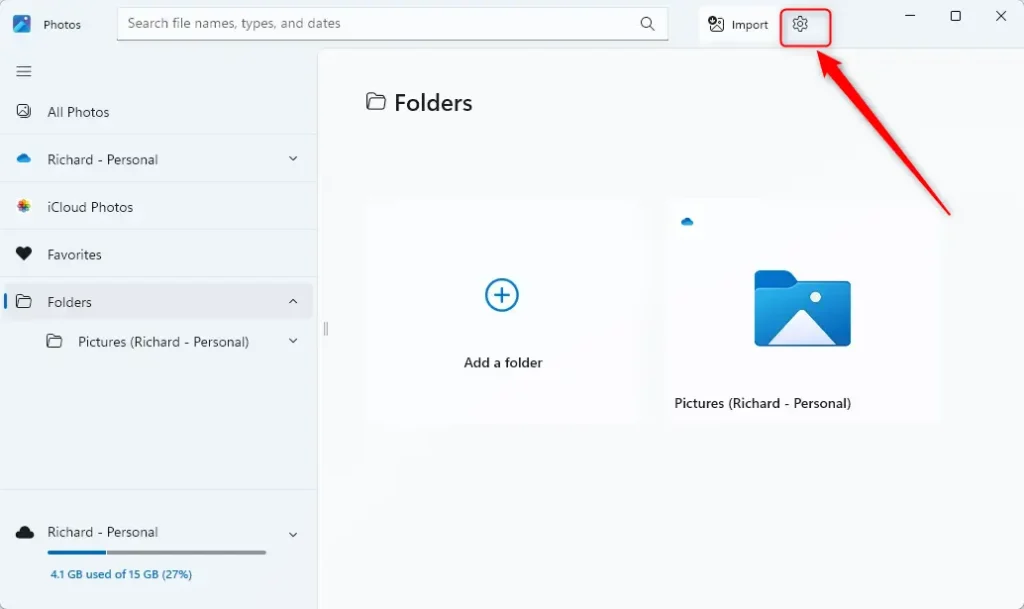
Scroll down to Personalization and toggle the “Performance” switch to the desired state.
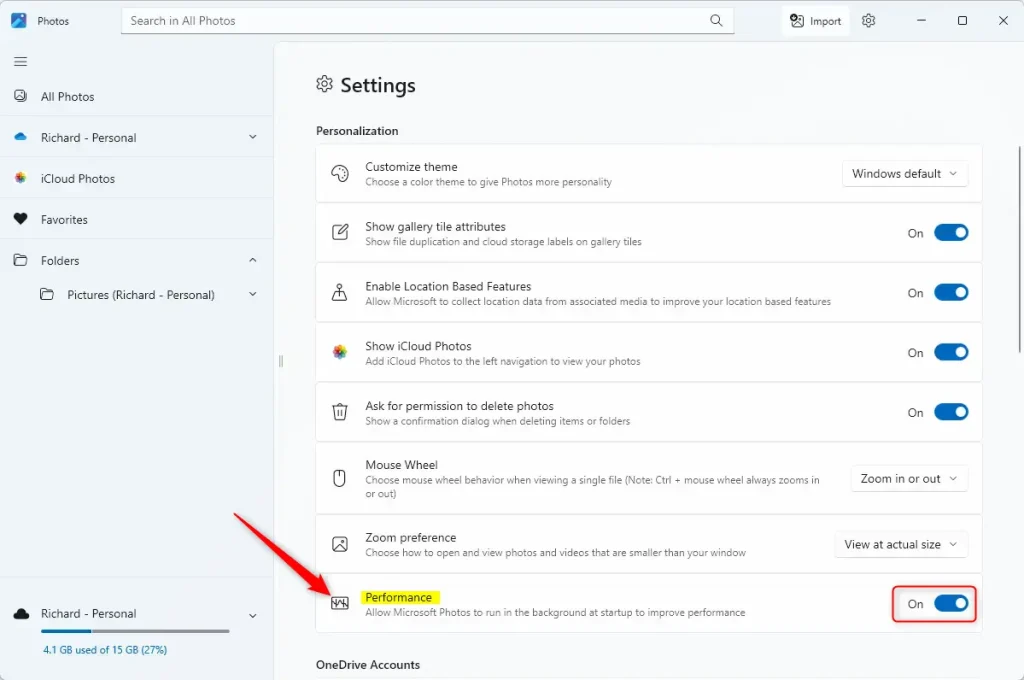
Changes apply immediately upon toggling the switch.
The Performance feature in the Microsoft Photos app enhances its responsiveness.:
- The Performance feature in the Microsoft Photos app can enhance its functionality and responsiveness.
- Users may experience improved performance and quicker access to their photos and videos by allowing the app to run in the background at startup.
- Conversely, disabling the Performance feature may benefit users who prefer to allocate resources elsewhere or have specific system preferences.
Was this guide helpful?

About the Author
Richard
Tech Writer, IT Professional
Richard is a writer at Geek Rewind who turns complex IT tasks into clear, step-by-step guides. He draws on years of hands-on experience in system administration and enterprise IT operations, focusing on Windows, Linux and WordPress: the problems people actually run into, and the fixes that work. His server and WordPress guides come from systems he runs himself. Richard builds and maintains the platform behind Geek Rewind, from its Ubuntu servers and Nginx configuration to its custom WordPress plugins. Many new tutorials start with readers' questions, and he's always glad to answer them in the comments.




No comments yet — be the first to share your thoughts!