How to Turn On or Off Mono Audio in Windows 11

You can turn on or off mono audio in Windows 11 to combine stereo sound into a single channel. This ensures you hear all audio content through both your speakers or headphones.
Mono audio is especially useful if you use only one earbud or headphone, or if you have hearing loss in one ear. When you enable it, Windows sends audio from both the left and right stereo channels to both of your ears. This way, you won’t miss a single sound.
For example, activating mono audio in Windows 11 is a key accessibility feature that ensures a complete listening experience for everyone.
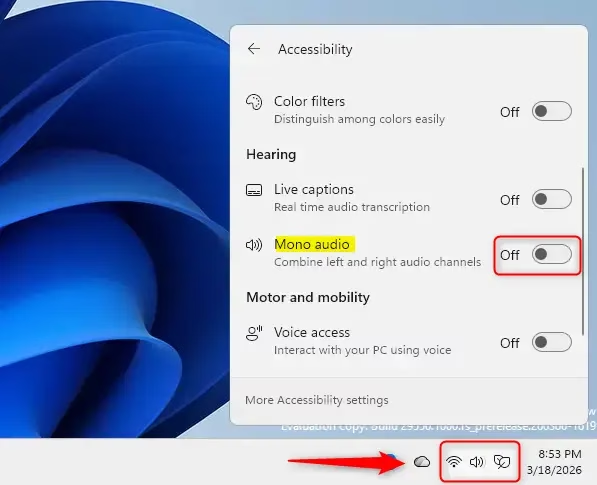
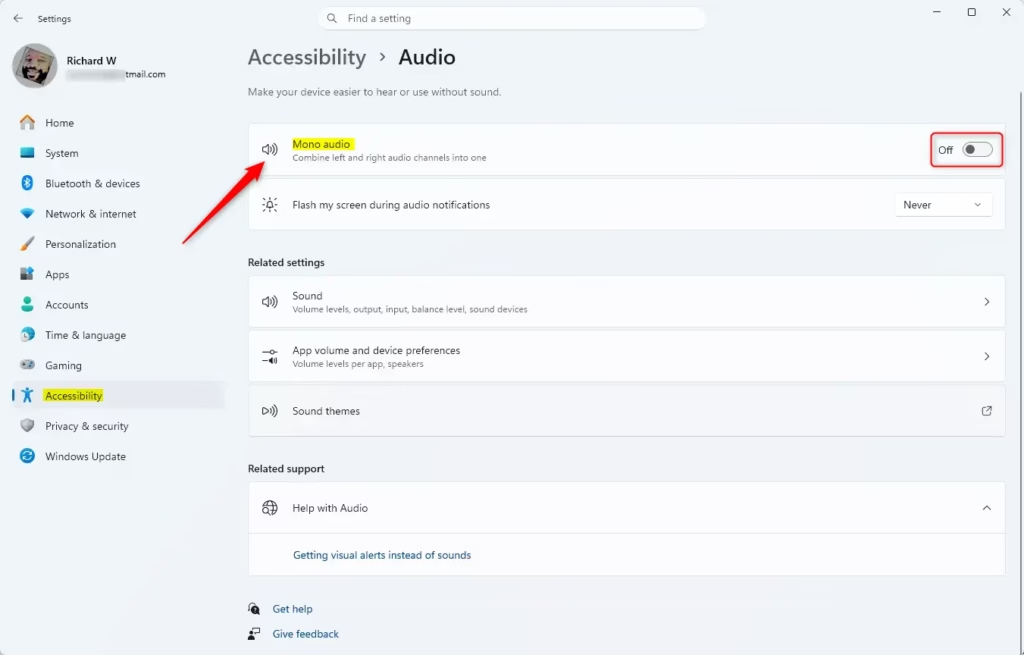
Combine stereo sound into a single channel by opening Quick Settings (⊞ Win+A) and clicking Accessibility, or navigate to Settings > System > Sound > Output devices. You can also find the option under Settings > Accessibility > Audio.
Option 1Turn On or Off Mono Audio in Quick Settings
- Open Quick Settings. Press
Win+A. - Click on Accessibility.
- Turn on or off Mono audio. Choose whatever works for you.
Option 2Turn On or Off Mono Audio in System Settings
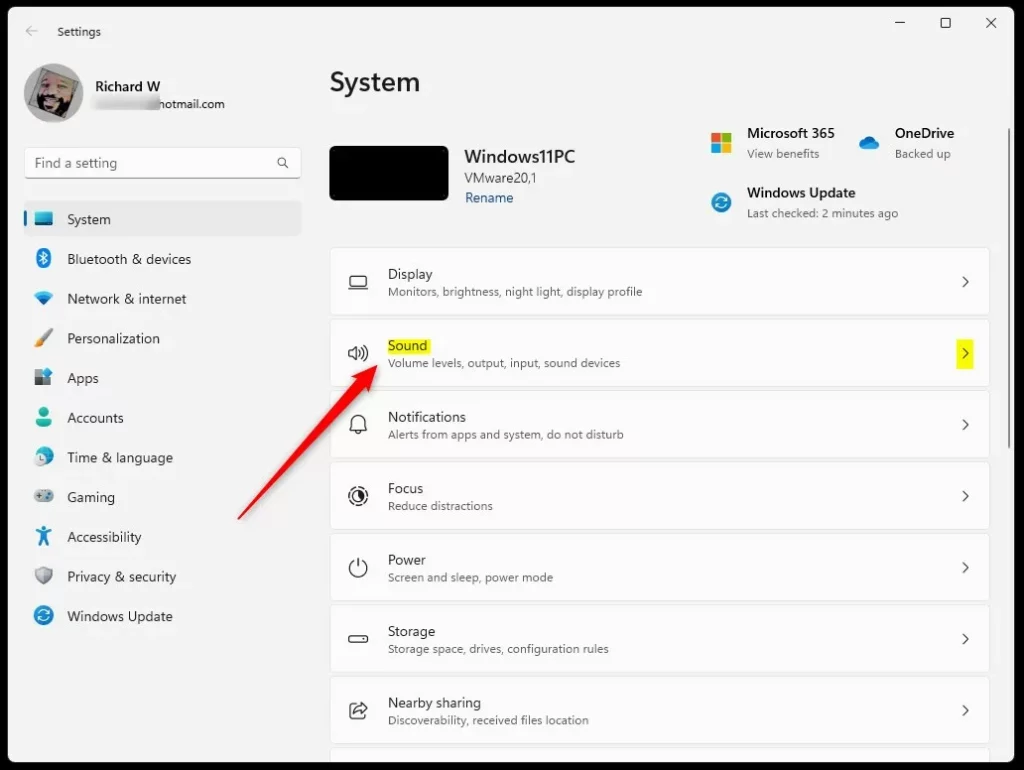
- Open Settings. Press
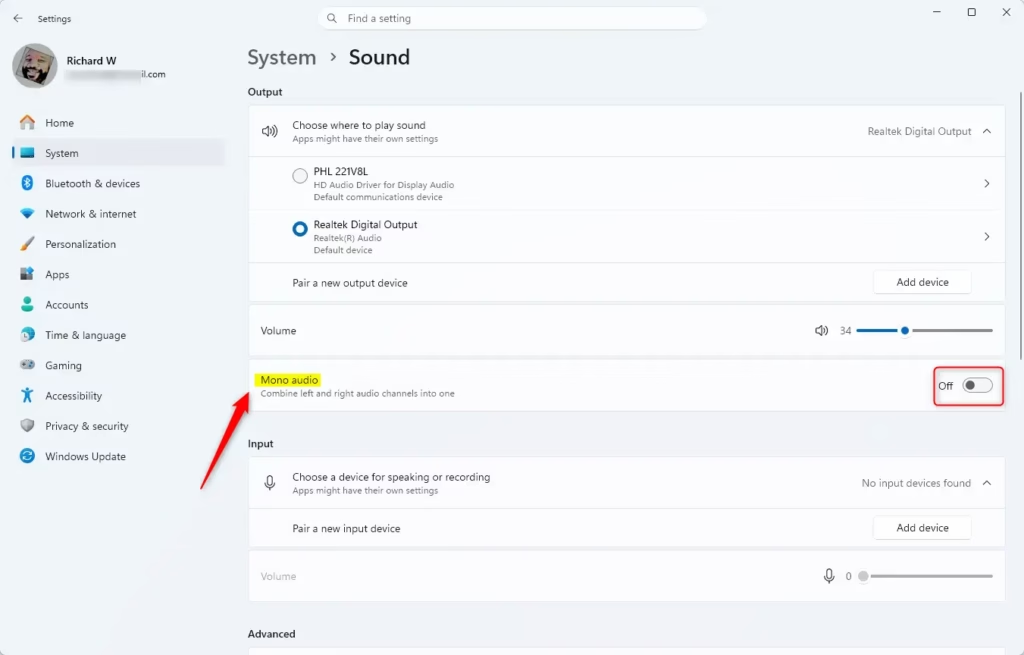
Win+I. - Click System on the left side. Then click Sound on the right side.
- Find Output devices. Turn on or off Mono audio based on what you need.
- You can now close Settings if you like.
Option 3Turn On or Off Mono Audio in Accessibility Settings
- Open Settings. Press
Win+I. - Click Accessibility on the left side. Click Audio under Hearing on the right side.
- Turn on or off Mono audio for what you want.
- You can now close Settings if you like.
Option 4Turn On or Off Mono Audio Using Registry
⚠️ You’ll need administrator privileges for this method.
Turn On Mono Audio
reg add "HKEY_CURRENT_USER\Software\Microsoft\Multimedia\Audio" /v AccessibilityMonoMixState /t REG_DWORD /d 1 /fTurn Off Mono Audio
This is the default setting.
reg add "HKEY_CURRENT_USER\Software\Microsoft\Multimedia\Audio" /v AccessibilityMonoMixState /t REG_DWORD /d 0 /fSummary
You can turn mono audio on or off in Windows 11 using four simple methods.
What does mono audio do on 🪟 Windows 11?
Mono audio in Windows 11 is an accessibility feature that converts stereo sound into a single channel. This way, you won’t miss a beat, even if you have partial hearing loss or prefer to listen through just one speaker.
How to set mono sound in 🪟 Windows 11?
Or maybe you have only one system peripheral. So, that’s the first way to enable mono audio. As a side note, if you head over to Accessibility settings…
Should I turn mono audio on?
Mono audio is a good choice when you need to hear a single voice or instrument more clearly.
How do I turn mono audio off in 🪟 Windows 11?
In Settings, select System from the left sidebar. Then, select Sound. In Sound settings, you’ll find the mono audio option. You can enable or disable it here. And that brings us to the end of this tutorial.
Was this guide helpful?

About the Author
Richard
Tech Writer, IT Professional
Richard, a writer for Geek Rewind, is a tech enthusiast who loves breaking down complex IT topics into simple, easy-to-understand ideas. With years of hands-on experience in system administration and enterprise IT operations, he’s developed a knack for offering practical tips and solutions. Richard aims to make technology more accessible and actionable. He's deeply committed to the Geek Rewind community, always ready to answer questions and engage in discussions.



No comments yet — be the first to share your thoughts!