How to Install NodeBB Forum on Ubuntu 24.04


NodeBB on Ubuntu 24.04 sets up a fast online discussion board using modern forum software powered by the Node.js runtime environment. Ubuntu 24.04 provides a stable Linux foundation that keeps your forum running 24 hours a day.
Nginx acts as a reverse proxy server to catch web traffic and send visitors straight to your board safely. You connect a MongoDB or Redis database to store all your member accounts, posts, and categories securely in the background.
Install PostgreSQL, Node.js, and Git. Create a dedicated user and directory for NodeBB, then clone the NodeBB repository. Run `./nodebb setup` to configure the forum with your database and other settings.
Install PostgreSQL
PostgreSQL (a database system used to store your forum data) installation on Ubuntu 24.04 starts by adding the official repository GPG key to your system. You need this database installed and running before you can set up NodeBB on your server.
Use the steps below to install it on Ubuntu.
First, add the PostgreSQL GPG key to Ubuntu. Run the command below to do that.
sudo apt install curl
curl https://www.postgresql.org/media/keys/ACCC4CF8.asc | gpg --dearmor | sudo tee /usr/share/keyrings/postgresql-key.gpg >/dev/null
Then, add the PostgreSQL APT repository to your sources list.
sudo sh -c 'echo "deb [signed-by=/usr/share/keyrings/postgresql-key.gpg arch=amd64] http://apt.postgresql.org/pub/repos/apt $(lsb_release -cs)-pgdg main" > /etc/apt/sources.list.d/pgdg.list'
Next, update and refresh the repository list and install PostgreSQL.
sudo apt update
sudo apt install postgresql postgresql-contrib
More details on installing PostgreSQL can be found in the link below.
Configure PostgreSQL and create NodeBB database
PostgreSQL configuration for your NodeBB forum requires opening the database command line tool to create a dedicated user, set a secure password, and establish a new database. NodeBB uses this specific database to store all user accounts, posts, and settings.
First, log on to the PostgreSQL console by running the command below.
sudo -u postgres psql
Confirm the password when prompted.
password postgres
Next, create a NodeBB database user account called 'nodebbuser.'
CREATE ROLE nodebbuser WITH LOGIN ENCRYPTED PASSWORD 'type_strong_password_here';
Next, create a 'nodebbdb' database for NodeBB and make the user above owner.
CREATE DATABASE nodebbdb OWNER nodebbuser;
Exit the database console.
q
Install Node.js
The NodeBB forum is written using the Node.js framework. You'll need a Node.js framework installed to run NodeBB.
Run the command below to install it.
curl -sL https://deb.nodesource.com/setup_lts.x | sudo -E bash -
sudo apt install nodejs
Install Git
You will also need Git installed to use and configure NodeBB. Then, perform the initial configuration of Git by running the command below.
sudo apt install git
git config --global user.name "Your Name"
git config --global user.email "youremail@domain.com"
Install NodeBB
NodeBB (the forum software you are setting up) installation on Ubuntu 24.04 involves creating a dedicated system user, setting up a web directory, and downloading the application files. This keeps the forum secure and isolated from the rest of your operating system.
sudo adduser nodebb --disabled-password
Create a directory for NodeBB.
sudo mkdir /var/www/html/nodebb -p
sudo chown -R nodebb:nodebb /var/www/html/nodebb
Next, switch to the NodeBB user account, navigate to the directory, and clone all the NodeBB files using Git.
sudo su - nodebb
cd /var/www/html/nodebb
Clone NodeBB to the /var/www/nodebb directory. The dot at the end of the command refers to the current directory.
git clone -b v2.x https://github.com/NodeBB/NodeBB.git .
NodeBB ships with a command-line utility. Use the following command to install NodeBB.
./nodebb setup
Complete the prompts and wait for the installation to complete.
This looks like a new installation, so you'll have to answer a few questions about your environment before we can proceed.
Press enter to accept the default setting (shown in brackets).
URL used to access this NodeBB (http://localhost:4567)
Please enter a NodeBB secret (ca8b716b-d793-4501-8db7-3a8a4f4f17ff)
Would you like to submit anonymous plugin usage to nbbpm? (yes)
Which database to use (mongo) postgres
2024-06-21T15:52:39.220Z [9899] - info:
Now configuring postgres database:
Host IP or address of your PostgreSQL instance (127.0.0.1)
Host port of your PostgreSQL instance (5432)
PostgreSQL username nodebbuser
Password of your PostgreSQL database
PostgreSQL database name (nodebb) nodebbdb
Enable SSL for PostgreSQL database access (false)
2024-06-21T15:53:21.697Z [9899] - info: [database] Checking database indices.
....................................................
Administrator username superadmin
Administrator email address superadmin@example.com
Password
Confirm Password
     ======================================================================

NodeBB Setup Completed. Run "./nodebb start" to manually start your NodeBB server.
Once everything is done, you can start NodeBB using the command below.
./nodebb start
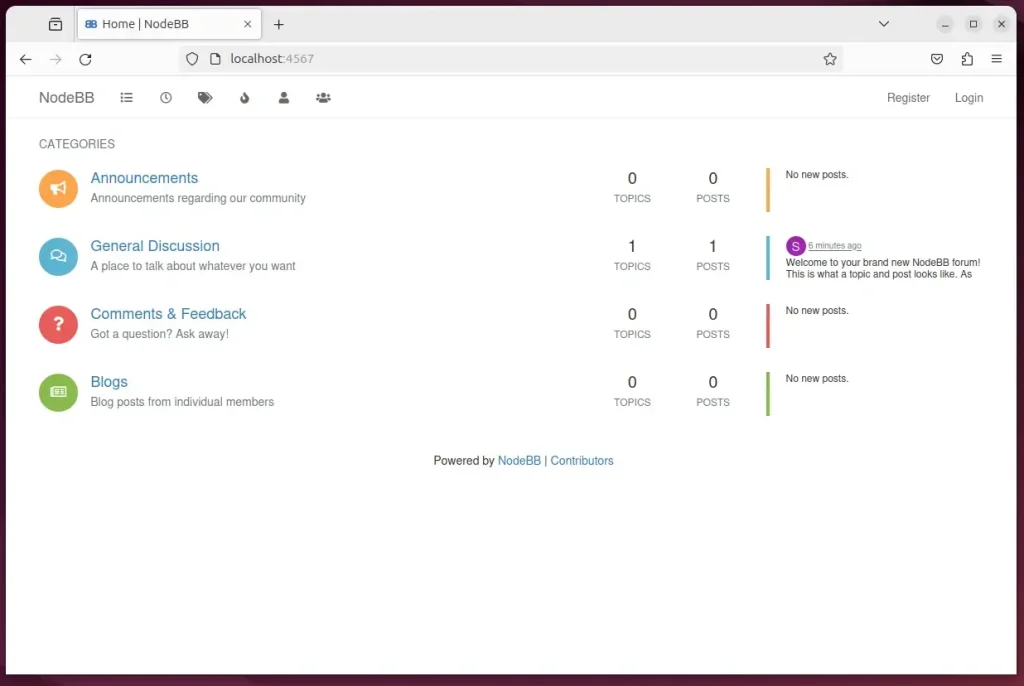
Then, open your browser and browse to the machine's local host or IP address, followed by port number 4567.
http://localhost:4567
Run NodeBB as a System Service
Running NodeBB as a system service on Ubuntu 24.04 ensures the forum starts automatically when your server boots up. You configure this by creating a service file that lets systemd (the system and service manager in Ubuntu) control the NodeBB background process.
First, stop the NodeBB service.
./nodebb stop
Next, run the command below to create a NodeBB system service file.
sudo nano /etc/systemd/system/nodebb.service
Copy and paste the lines below in the file and save it.
[Unit]
Description=NodeBB
Documentation=https://docs.nodebb.org
After=system.slice multi-user.target postgresql.service

[Service]
Type=simple
User=nodebb

StandardError=syslog
SyslogIdentifier=nodebb

Environment=NODE_ENV=production
WorkingDirectory=/var/www/html/nodebb
ExecStart=/usr/bin/env node loader.js --no-silent --no-daemon
Restart=always

[Install]
WantedBy=multi-user.target
Enable and start NodeBB.
sudo systemctl daemon-reload
sudo systemctl enable nodebb
sudo systemctl start nodebb
sudo systemctl status nodebb
The status option will display NodeBB as running and healthy.
nodebb.service - NodeBB
     Loaded: loaded (/etc/systemd/system/nodebb.service; enabled; preset: enabl>
     Active: active (running) since Fri 2024-06-21 11:07:42 CDT; 7s ago
       Docs: https://docs.nodebb.org
   Main PID: 12269 (node)
      Tasks: 22 (limit: 4561)
     Memory: 146.5M (peak: 146.9M)
        CPU: 2.324s
     CGroup: /system.slice/nodebb.service
             ├─12269 node loader.js --no-silent --no-daemon
             └─12280 /usr/bin/node /var/www/html/nodebb/app.js
Every time you start up the machine, NodeBB should be accessible using the local server name or IP address followed by the port number.
Set up a reverse proxy
Setting up a reverse proxy (a server that directs web traffic to your application) like Nginx or Apache makes your NodeBB forum accessible via a standard domain name instead of an IP address. The proxy handles incoming web requests and passes them securely to your forum application.
The two links below show you how to set up a reverse proxy using Nginx or Apache.
That should do it!
Conclusion:
- Installing NodeBB with Nginx on Ubuntu 24.04 enhances web traffic handling and security.
- PostgreSQL installation and configuration provide a solid foundation for the NodeBB database.
- Node.js installation ensures the functionality of the NodeBB forum platform.
- Git setup is essential for utilizing and configuring NodeBB efficiently
- Creating NodeBB as a systemd service streamlines management and ensures its availability
- Implementation of a reverse proxy further optimizes web traffic and accessibility for NodeBB
Was this guide helpful?

About the Author
Richard
Tech Writer, IT Professional
Richard is a writer at Geek Rewind who turns complex IT tasks into clear, step-by-step guides. He draws on years of hands-on experience in system administration and enterprise IT operations, focusing on Windows, Linux and WordPress: the problems people actually run into, and the fixes that work. His server and WordPress guides come from systems he runs himself. Richard builds and maintains the platform behind Geek Rewind, from its Ubuntu servers and Nginx configuration to its custom WordPress plugins. Many new tutorials start with readers' questions, and he's always glad to answer them in the comments.



No comments yet — be the first to share your thoughts!