How to Install Mcrypt PHP Module on Ubuntu 24.04


Installing the mcrypt PHP module on Ubuntu 24.04 adds encryption and decryption tools for older website code that still relies on this discontinued library. PHP removed mcrypt from its core software back in version 7.2, meaning modern servers running PHP 8.x no longer include it by default.
Legacy apps and older websites need this module to process secure data without breaking. You can add mcrypt to Ubuntu 24.04 using a trusted software repository (an archive of installable software packages) maintained by Ondřej Surý, which bridges the gap between modern PHP versions and outdated code.
Install the mcrypt PHP module on Ubuntu 24.04 by first installing necessary development packages with `sudo apt install gcc make autoconf libc-dev pkg-config libmcrypt-dev php-pear php-dev`. Then, run `sudo pecl install mcrypt` and enable the module by adding `extension=mcrypt.so` to your `php.ini` files.
Install PHP
Make sure PHP is already installed on your system before you start. Reviewing the guide ‘How to install PHP on Ubuntu’ helps handle that setup beforehand. Continuing with the following instructions happens once PHP runs successfully.
Proceed below after completing the PHP setup.
Install recommended packages
You need to install the required development tools and package repositories before you can install mcrypt PHP Ubuntu. Run the sudo apt install gcc make autoconf libc-dev pkg-config libmcrypt-dev php-pear php-dev command in your terminal to set up all the necessary compilers, development headers, and PEAR packages on your Ubuntu 24.04 system.
sudo apt install gcc make autoconf libc-dev pkg-config libmcrypt-dev php-pear php-dev
Next, add and update the channel for PEAR and PECL using the command below.
sudo pecl channel-update pecl.php.net
sudo pecl update-channels
After that, run the command below to build and install mcrypt.
sudo pecl install mcrypt
Enable the mcrypt module
You must enable the mcrypt module in your PHP configuration files so your web server can use it. The correct configuration file depends on whether you use Apache or Nginx with PHP-FPM, and you need to add the extension line to the right folder for your specific server setup to make it active.
For Apache, add the extension to the configuration file using `sudo nano /etc/php/8.3/apache2/php.ini`.
sudo -s
echo extension=mcrypt.so > /etc/php/8.3/apache2/php.ini
echo extension=mcrypt.so > /etc/php/8.3/cli/php.ini
For Nginx with PHP-FPM, open the corresponding file located at `sudo nano /etc/php/8.3/fpm/php.ini` instead.
sudo -s
echo extension=mcrypt.so > /etc/php/8.3/fpm/php.ini
echo extension=mcrypt.so > /etc/php/8.3/cli/php.ini
Web servers and PHP services require a restart following configuration updates.
Test PHP
You can test PHP to confirm that the install mcrypt PHP Ubuntu process worked correctly. Run the php -m | grep mcrypt command in your terminal to check if the module appears in your active module list, or use a browser-based test page to verify it works with your web server.
php -m | grep mcrypt
Output should display mcrypt.
Browser testing offers an alternative verification method.
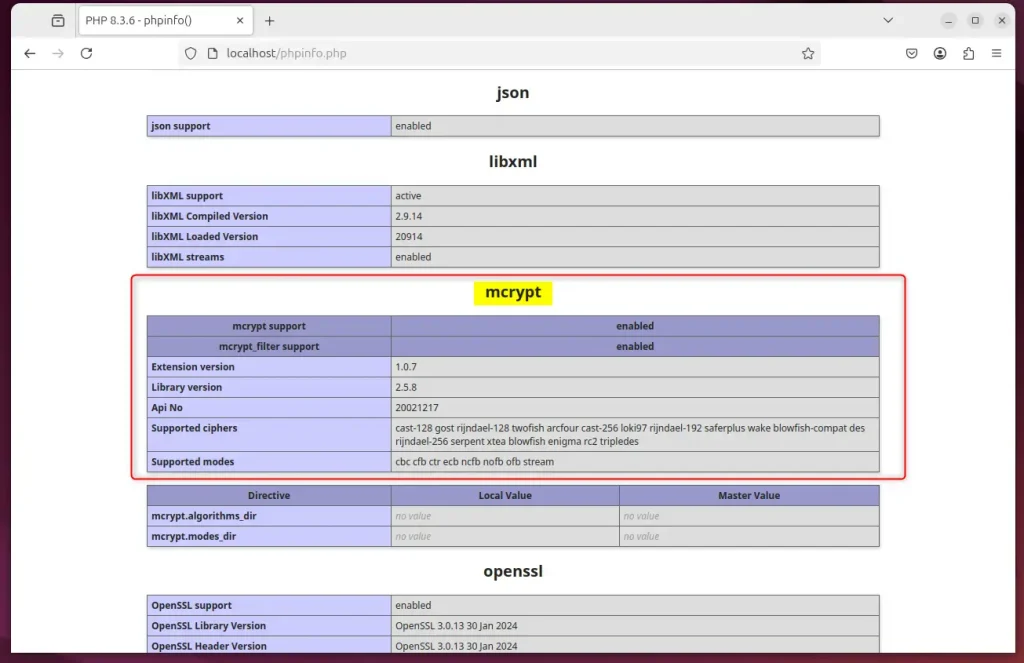
Configuration finishes here.
Test PHP using the command line or a web interface to ensure mcrypt is active and working properly.
- Understanding mcrypt: mcrypt provides essential encryption and decryption functions for PHP developers but is deprecated in newer PHP versions.
- Installation Prerequisites: Ensure PHP is installed before installing the mcrypt module.
- Recommended Packages: Install necessary packages such as gcc, make, and libmcrypt-dev to successfully build the mcrypt module.
- Enabling mcrypt: After installation, update the PHP configuration files for Apache and Nginx to enable the mcrypt extension.
- Testing the Installation: Verify that mcrypt is active using the command line or checking through a web interface.
Was this guide helpful?

About the Author
Richard
Tech Writer, IT Professional
Richard is a writer at Geek Rewind who turns complex IT tasks into clear, step-by-step guides. He draws on years of hands-on experience in system administration and enterprise IT operations, focusing on Windows, Linux and WordPress: the problems people actually run into, and the fixes that work. His server and WordPress guides come from systems he runs himself. Richard builds and maintains the platform behind Geek Rewind, from its Ubuntu servers and Nginx configuration to its custom WordPress plugins. Many new tutorials start with readers' questions, and he's always glad to answer them in the comments.


No comments yet — be the first to share your thoughts!