How to Install GitHub Desktop on Ubuntu 24.04

GitHub Desktop on Ubuntu 24.04 is a free graphical application that lets you manage your code projects without using the command line. It gives you a simple visual window to track changes, save updates, and share your work on GitHub.
You can set up this program on Ubuntu 24.04 by downloading its installer file or by using Flatpak. Once open, you can clone repositories, commit changes, and switch branches with a few mouse clicks.
Install GitHub Desktop by downloading the .deb package and running `sudo dpkg -i .deb`. Alternatively, use Flatpak with `flatpak install flathub io.github.shiftey.Desktop`. You can also add the Shiftkey PPA and install via APT with `sudo apt install github-desktop`.
Download and install GitHub from the Deb package
Installing GitHub Desktop on Ubuntu 24.04 using a Deb package requires downloading the installation file directly from the unofficial Shiftkey repository and installing it through your terminal. This method gets the official application running on your system without needing to set up third-party package managers. You just need to download the correct file for your system architecture and run a quick command to finish the setup.
First, run the command below to update Ubuntu.
sudo apt update
sudo apt upgrade
Then, browse and download the latest from download the latest release page.
On the download page, locate and copy the latest version of the link. Then, with the wget command, paste it on the command line.
wget https://github.com/shiftkey/desktop/releases/download/release-3.4.8-linux1/GitHubDesktop-linux-amd64-3.4.8-linux1.deb
Once downloaded, install it by running the command below.
sudo dpkg -i GitHubDesktop-linux-amd64-3.4.8-linux1.deb
After installing, click on Activities in the top left corner of your screen. Select Show Applications.
Search for GitHub Desktop in the application list or use the search bar. Click on the GitHub Desktop icon to launch the application.
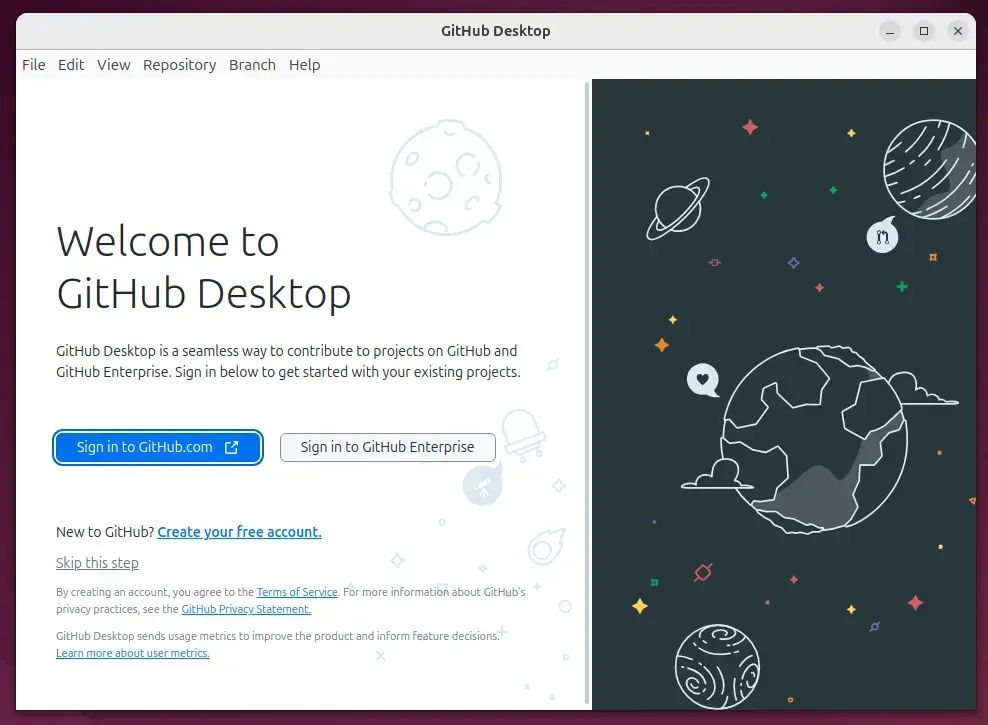
Start using GitHub Desktop.
Install GitHub Desktop from Flatpak
Installing GitHub Desktop on Ubuntu 24.04 using Flatpak (a universal software package system for Linux) gives you a sandboxed version of the app that updates automatically. Because Ubuntu does not include this package manager by default, you must first install the Flatpak service and add the Flathub app store. Once that setup is complete, you can download and run the software package with a single terminal command.
First, update and install Flatpak.
sudo apt update && sudo apt upgrade
sudo apt install flatpak
Next, add the Flatpak repository to Ubuntu.
sudo flatpak remote-add --if-not-exists flathub https://flathub.org/repo/flathub.flatpakrepo
Finally, install GitHub Desktop.
flatpak install flathub io.github.shiftey.Desktop
Once installed, you can launch it using the command below or open the app in the desktop apps center.
flatpak run io.github.shiftey.Desktop
Uninstall the app using the command below.
flatpak remove -y --delete-data io.github.shiftey.Desktop
Install GitHub Desktop from APT
Installing GitHub Desktop on Ubuntu 24.04 using the APT (Advanced Package Tool) package manager lets you receive regular software updates alongside your standard system patches. To use this method, you must add a third-party software repository maintained by Shiftkey to your system sources. After importing the required security key and adding the repository, you can install and update the application just like any other native Linux program.
First, run the command below to import the Shiftkey GPG key on Ubuntu.
wget -qO - https://apt.packages.shiftkey.dev/gpg.key | gpg --dearmor | sudo tee /usr/share/keyrings/shiftkey-packages.gpg > /dev/null
Next, add the Shiftkey repository to Ubuntu.
sudo sh -c 'echo "deb [arch=amd64 signed-by=/usr/share/keyrings/shiftkey-packages.gpg] https://apt.packages.shiftkey.dev/ubuntu/ any main" > /etc/apt/sources.list.d/shiftkey-packages.list'
After importing and adding the repository key, run the command below to update and install the GitHub Desktop.
sudo apt update
sudo apt install github-desktop
Once installed, you can launch it using the command below or open the app in the desktop apps center.
If you want to install the app, run the command below.
sudo apt remove github-desktop
sudo rm /etc/apt/sources.list.d/shiftkey-packages.list
That should do it!
Conclusion:
Installing GitHub Desktop on Ubuntu 24.04 can significantly enhance your development workflow. Whether you install it via Deb, Flatpak, or APT, GitHub Desktop provides a user-friendly interface that simplifies version control tasks.
- Multiple Installation Methods: You can choose between Deb packages, Flatpak, or APT based on your preference.
- User-Friendly Interface: GitHub Desktop's graphical interface makes managing Git repositories accessible for users at any skill level.
- Enhanced Collaboration: Easily manage pull requests and collaborate on projects with team members.
- Visual History: Gain a clear view of your repository's history and changes for better project management.
- Quick Access: After installation, you can quickly launch GitHub Desktop from the Activities menu or your application center.
Start using GitHub Desktop today to streamline your development process and make Git operations more efficient!
Can I install GitHub Desktop on Ubuntu?
Now we have a terminal. Let's increase the font. So you can see this more clearly.
How do I install GitHub Desktop?
In your computer's Downloads folder, double-click the GitHub Desktop zip file. After the file has been unzipped, double-click the GitHub Desktop application file. GitHub Desktop will launch after installation is complete.
Does GitHub have a desktop app for Linux?
Although GitHub Desktop doesn't have official support for Linux, the open-source community has stepped up to fill the void. Developers have created various forks of GitHub Desktop that are compatible with Linux distributions like Ubuntu, Fedora, and OpenSUSE.
Was this guide helpful?

About the Author
Richard
Tech Writer, IT Professional
Richard, a writer for Geek Rewind, is a tech enthusiast who loves breaking down complex IT topics into simple, easy-to-understand ideas. With years of hands-on experience in system administration and enterprise IT operations, he’s developed a knack for offering practical tips and solutions. Richard aims to make technology more accessible and actionable. He's deeply committed to the Geek Rewind community, always ready to answer questions and engage in discussions.



No comments yet — be the first to share your thoughts!