How to Install Dolibarr with Nginx on Ubuntu 24.04

Dolibarr version 18 with Nginx on Ubuntu 24.04 sets up a complete business system to track stock, manage customer details, and make invoices. Dolibarr is free open-source software that handles accounting and business tasks, while Nginx acts as a fast web server to display your pages.
You need a server running Ubuntu 24.04 along with root access to get started with this installation.
- Update your system and install the Nginx web server using
sudo apt updateandsudo apt install nginx. - Install the MariaDB database server using
sudo apt install mariadb-server. - Create a dedicated database and user for Dolibarr inside the MariaDB console.
- Install PHP and the required extensions using
sudo apt install php-fpm php-mysql php-cli php-xml php-gdand others. - Download the latest Dolibarr zip file from SourceForge, extract it into
/var/www/dolibarr, and set the correct file permissions. - Create an Nginx virtual host configuration file for Dolibarr in
/etc/nginx/sites-available/. - Enable the new site, restart Nginx using
sudo systemctl restart nginx, and open your domain or IP address in a web browser to finish the setup wizard.
Install Nginx and MariaDB using apt, then create a Dolibarr database and user. Install PHP and its required modules. Finally, download and configure Dolibarr itself.
Install Nginx HTTP server on Ubuntu
To install Nginx on Ubuntu for your Dolibarr server, open your terminal and run the commands sudo apt update followed by sudo apt install nginx. Nginx handles web requests and serves your Dolibarr application pages. Once the installation finishes, the web server starts automatically and sits ready for your next setup steps.
To do that, open the Ubuntu terminal and run the commands below to install the Nginx web server.
sudo apt update
sudo apt install nginx
Once Nginx is installed, the commands below can start, stop, and enable the Nginx web server to start automatically when your server boots up.
sudo systemctl stop nginx
sudo systemctl start nginx
sudo systemctl enable nginx
You can test the Nginx web server by opening your web browser and browsing to the server’s localhost or IP address.
http://localhost
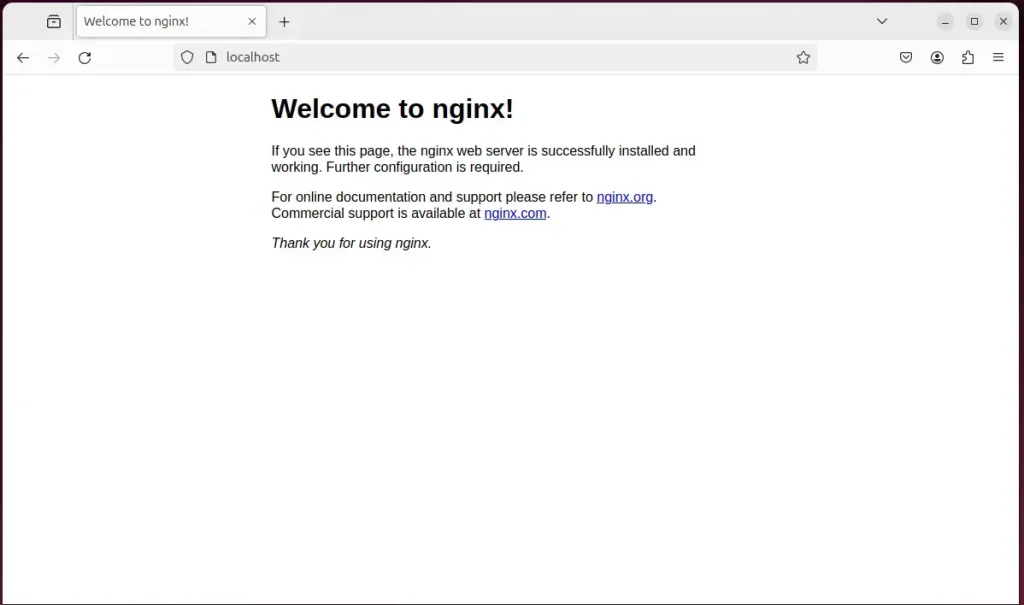
When you see the Welcome to nginx!, it means the Nginx HTTP server is successfully installed.
Additional help on installing Nginx on Ubuntu is in the link below.
Install the MariaDB database server on Ubuntu
To install the MariaDB database server on Ubuntu, open your terminal and run the standard package installation commands for your system. MariaDB provides the backend database storage that Dolibarr requires to save user accounts, products, and invoice data. Setting this up correctly ensures your application has a reliable place to store all its information.
To install and use the MariaDB database server, use the instructions below.
Open the Ubuntu terminal and run the commands below to install the MariaDB database server.
sudo apt update
sudo apt install mariadb-server
Once the MariaDB database server is installed, use the commands below to stop, start, and enable the MariaDB server to start automatically when the server boots.
sudo systemctl stop mariadb
sudo systemctl start mariadb
sudo systemctl enable mariadb
Run the following commands to validate and test if the MariaDB database server is installed successfully.
sudo mariadb
Once you run the commands above, it will log you onto the MariaDB console and display a message similar to the one below.
Welcome to the MariaDB monitor.  Commands end with ; or g.
Your MariaDB connection id is 32
Server version: 10.11.2-MariaDB-1 Ubuntu 23.04

Copyright (c) 2000, 2018, Oracle, MariaDB Corporation Ab and others.

Type 'help;' or 'h' for help. Type 'c' to clear the current input statement.

MariaDB [(none)]>
The message tells you that the server is installed successfully.
Additional help on installing MariaDB.
- How to install MariaDB on Ubuntu Linux
- MariaDB without password prompt
Create a Dolibarr database
To create a Dolibarr database, log into your MariaDB shell and run the SQL commands needed to set up a new database named dolibarrdb. You also need to create a dedicated database user called dolibarrdbuser and grant it full permissions over this new database so Dolibarr can read and write its data properly.
As part of the setup, we will create a dolibarrdb database and a user account called dolibarrdbuser.
The dolibarrdbuser receives full access rights to the dolibarrdb database. This step ensures the Dolibarr application can correctly manage all database records, which is essential for its operation after installation.
All the database steps above can be done using the commands below:
But first, log on to the MariaDB database server:
sudo mariadb
Then run the commands below to complete the steps:
CREATE DATABASE dolibarrdb CHARACTER SET utf8mb4 COLLATE utf8mb4_general_ci;
CREATE USER dolibarrdbuser@localhost IDENTIFIED BY 'type_your_password_here';
GRANT ALL ON dolibarrdb.* TO dolibarrdbuser@localhost WITH GRANT OPTION;
FLUSH PRIVILEGES;
exit
Install PHP on Ubuntu Linux
To install PHP on Ubuntu Linux for Dolibarr, run the command sudo apt install php-fpm php-intl php-mysql in your terminal. Dolibarr is built on PHP, so you need the language processor along with essential modules like intl and mysql to run all application features smoothly and connect to your database.
Then, run the commands below to install the latest PHP version.
sudo apt install php-fpm php-intl php-mysql php-curl php-cli php-zip php-xml php-gd php-common php-mbstring php-xmlrpc php-bcmath php-json php-sqlite3 php-soap php-zip php-ldap php-imap
Additional help on installing PHP
Download Dolibarr files
To download Dolibarr files, grab the latest archived package link from the official project download page and fetch it directly to your Ubuntu server using your terminal. Once you download the archive, you extract the application files into your web root directory to prepare them for the browser-based installation wizard.
Get the download link and download the archived package to your computer. Then, extract it.
First, navigate to the /tmp/ directory and download the Dolibarr files. Next, extract the content into the Dolibarr folder in the Nginx root directory.
The final step is to change the permissions. This will allow the Nginx web server to interact safely with the files, ensuring a secure environment for your Dolibarr installation.
Nginx root folder permissions require changing so the Dolibarr app can function correctly, a critical step for application operation. Run the following commands to update these permissions for the Dolibarr application.
cd /tmp
wget https://pilotfiber.dl.sourceforge.net/project/dolibarr/Dolibarr%20ERP-CRM/20.0.3/dolibarr-20.0.3.zip
unzip dolibarr-*.zip
sudo mv dolibarr-20.0.3 /var/www/dolibarr
sudo chown -R www-data:www-data /var/www/dolibarr/
Once you have completed all the above steps, continue configuring the Nginx web server below to serve the Dolibarr content.
Run the commands below to create a Nginx virtual host file for Dolibarr.
sudo nano /etc/nginx/sites-available/dolibarr.conf
Then, copy and paste the content block below into the Nginx server block.
server {
    listen 80;
    listen [::]:80;
    root /var/www/dolibarr/htdocs;
    index  index.php;
    server_name  dolibarr.example.com;

    access_log /var/log/nginx/example.com.access.log;
    error_log /var/log/nginx/example.com.error.log;

    location / {
        try_files $uri /index.php$is_args$args;
    }

   # Pretty REST API URL
    location ~ ^/api/(?!(index.php))(.*) {
        try_files $uri /api/index.php/$2?$query_string;
     }

    location ~ .php$ {
         include snippets/fastcgi-php.conf;
         fastcgi_pass unix:/var/run/php/php8.3-fpm.sock;
         fastcgi_param SCRIPT_FILENAME $document_root$fastcgi_script_name;
         include fastcgi_params;
    }

}
Save the file.
After configuring Dolibarr's virtual host file, you will enable the virtual host and restart the Nginx web server to apply these changes. Run the command `sudo a2ensite dolibarr.conf` to activate the virtual host, then execute `sudo systemctl restart nginx` to restart the Nginx web server.
sudo ln -s /etc/nginx/sites-available/dolibarr.conf /etc/nginx/sites-enabled/
sudo systemctl restart nginx.service
Setup Let’s Encrypt SSL/TLS for Dolibarr
To set up a Let's Encrypt SSL certificate for Nginx, generate your security keys and update your Nginx server block configuration to handle HTTPS traffic. Securing your Dolibarr connection encrypts login details and data traffic, keeping your system safe when users access the software over the internet.
Please read the post below for additional resources on installing and creating Let’s Encrypt SSL certificates for Nginx.
How to set up Let’s Encrypt SSL certificate for Nginx on Ubuntu Linux
Once you have restarted the Nginx web server, open your browser and browse to the server hostname or IP address defined in the Nginx server block.
http://dolibarr.example.com
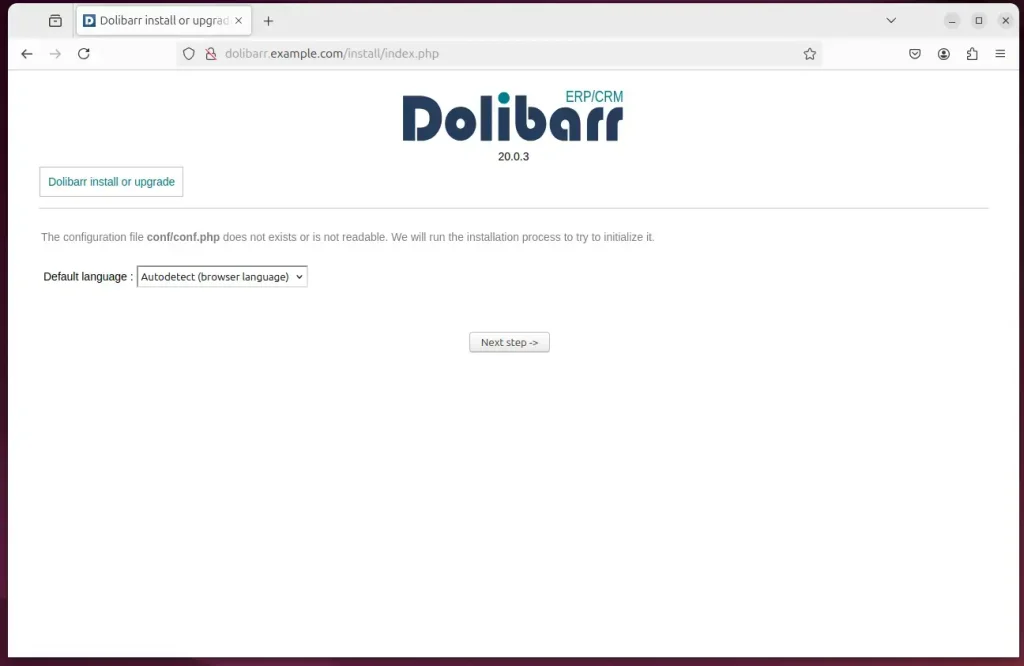
Dolibarr installation wizard should appear.
Select the installation language and continue.
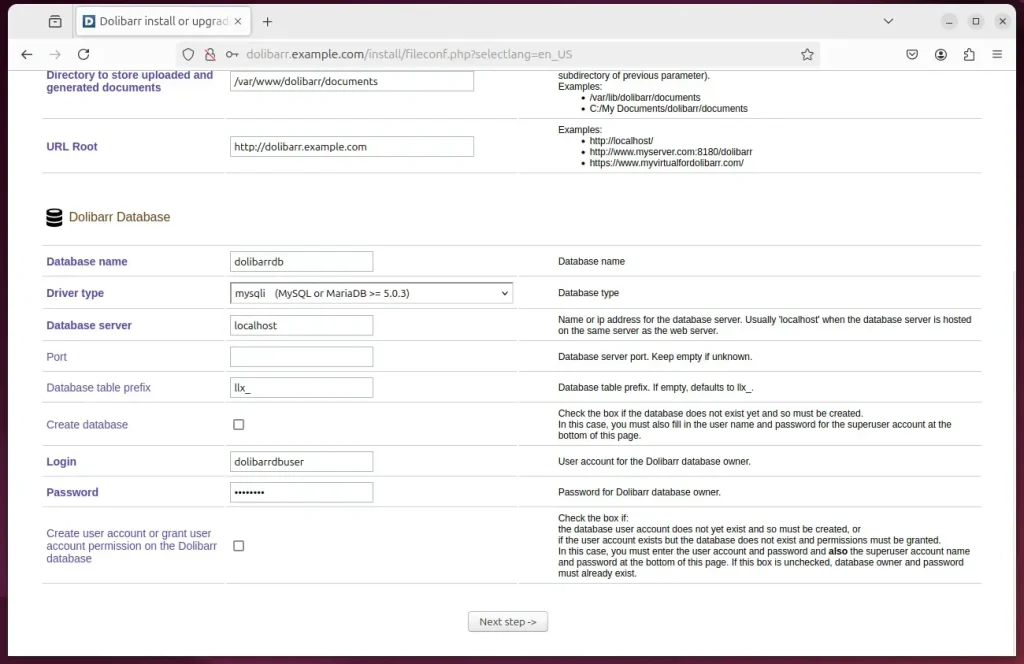
Next, type in the database name, account name, and password.
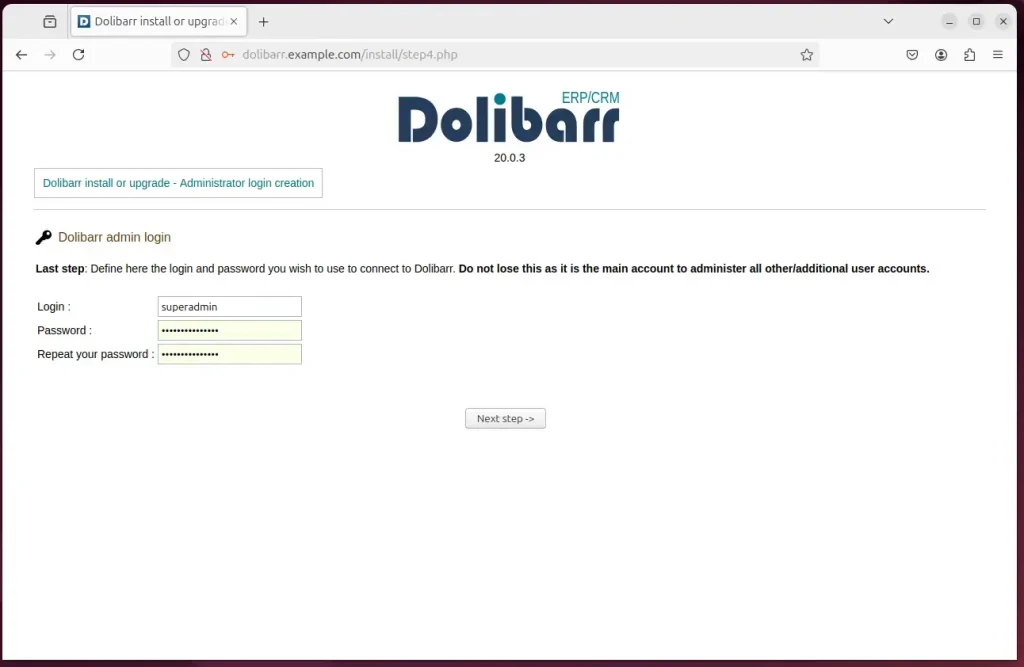
Create an admin account and complete the installation.
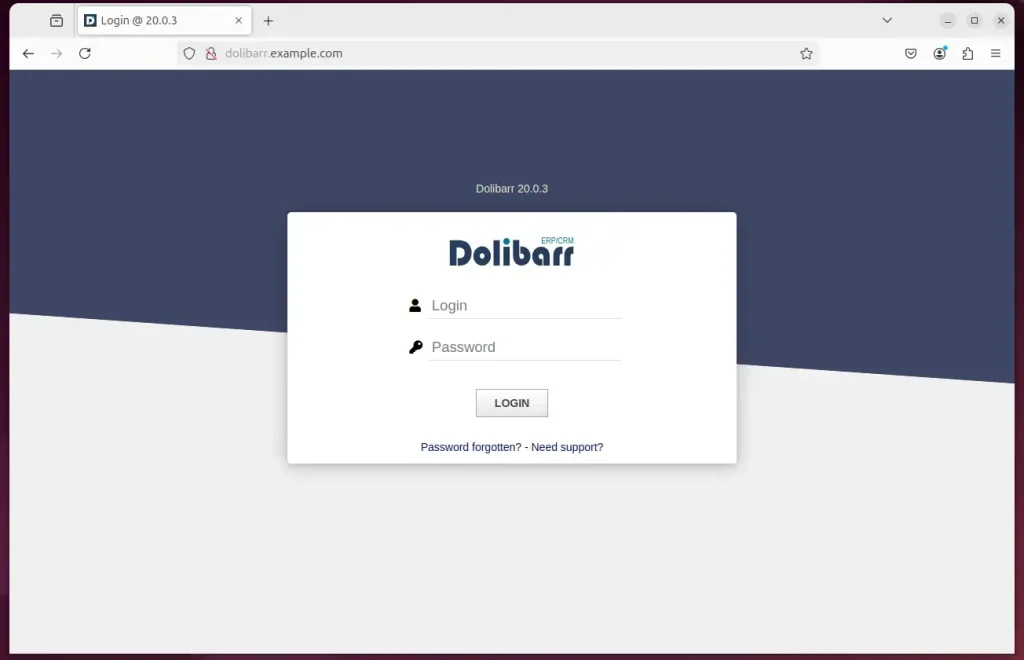
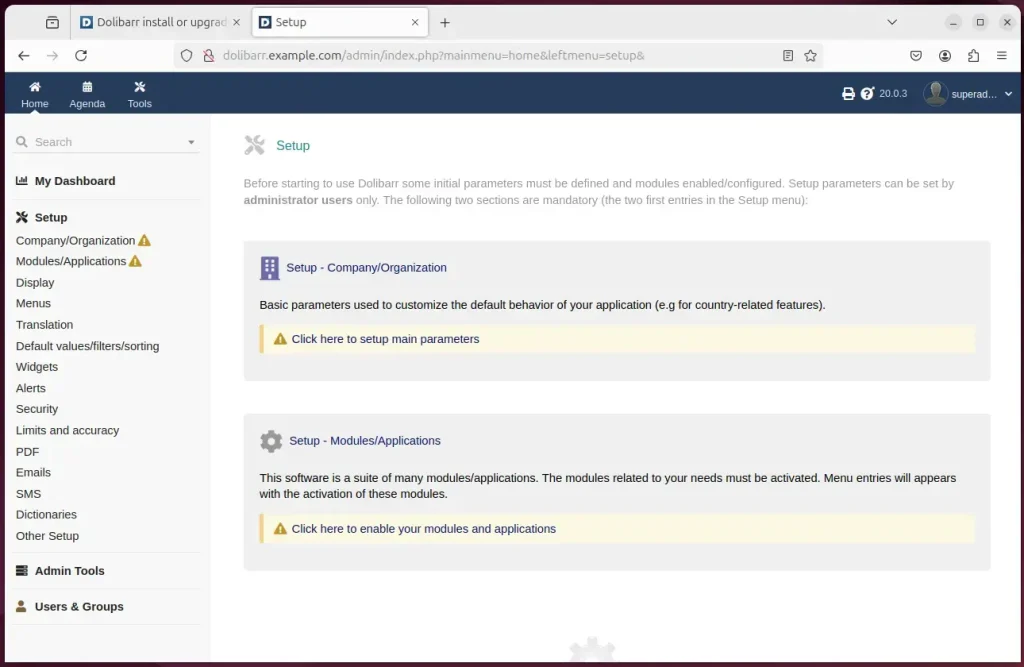
Dolibarr should be ready to use.
That should do it!
Conclusion:
In summary, installing Dolibarr with Nginx on Ubuntu 24.04 offers a robust and scalable solution for business management. Here are the key takeaways:
- Easy Installation: The installation process is straightforward and involves Nginx, MariaDB, and PHP prerequisites.
- High Performance: Nginx efficiently handles high traffic and offers low resource consumption, making it ideal for Dolibarr.
- Modular Software: Dolibarr's open-source nature allows for customization and scalability as business needs grow.
- Community Support: The strong community around Dolibarr ensures plenty of resources and help available online.
- Secure Setup: Implementing SSL/TLS with Let’s Encrypt enhances the security of your Dolibarr installation.
Following these Dolibarr installation steps on Ubuntu 24.04 with Nginx, you can successfully set up Dolibarr for your business needs and use its extensive feature set for tasks like accounting and customer management.
Was this guide helpful?

About the Author
Richard
Tech Writer, IT Professional
Richard is a writer at Geek Rewind who turns complex IT tasks into clear, step-by-step guides. He draws on years of hands-on experience in system administration and enterprise IT operations, focusing on Windows, Linux and WordPress: the problems people actually run into, and the fixes that work. His server and WordPress guides come from systems he runs himself. Richard builds and maintains the platform behind Geek Rewind, from its Ubuntu servers and Nginx configuration to its custom WordPress plugins. Many new tutorials start with readers' questions, and he's always glad to answer them in the comments.




No comments yet — be the first to share your thoughts!