Enable Single Click in Ubuntu File Manager


Single-click mode makes the Ubuntu file manager open folders and files with one click instead of two. It is a built-in setting in the default Files app (Nautilus) on Ubuntu 22.04 LTS and newer, so you don’t need any extra software.
Holding down the Ctrl key while you click still lets you pick several items, just like before. You can also hold Shift to select a range. The change takes a few seconds, and you can undo it from the same menu.
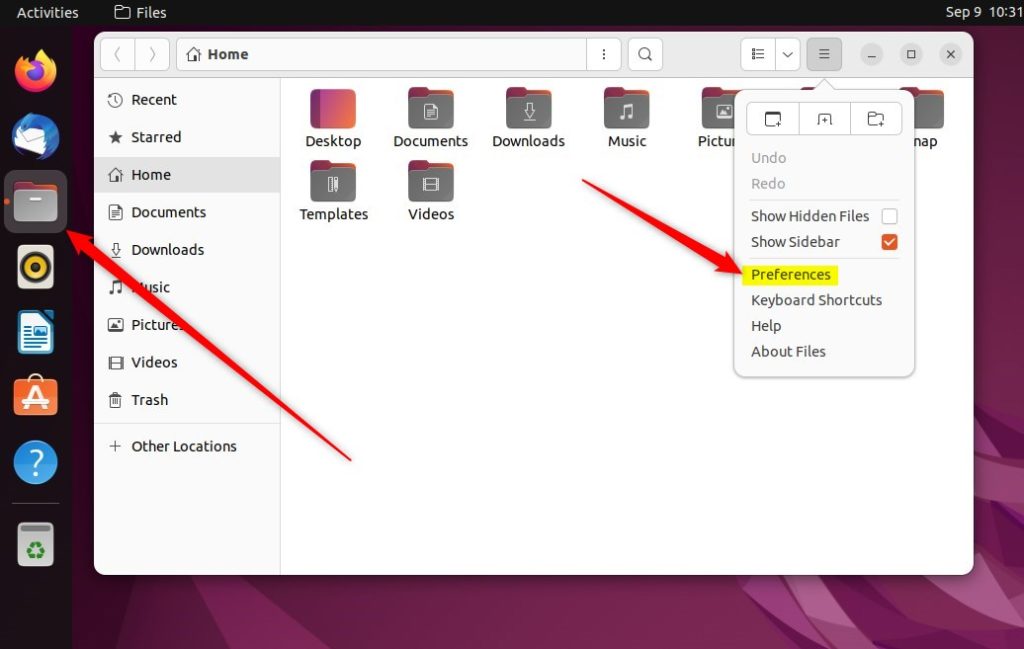
To turn on single click in the Ubuntu file manager, open Files, click the menu button with three horizontal lines in the top-right corner, and select Preferences. On the General tab, set Action to Open Items to Single click. The change saves immediately, and it applies only to your user account.
How to turn on or off single-click to open an item on Ubuntu Linux
It applies to your user account only, so other users on the same computer keep their own click behavior. You can go back to the standard double-click behavior at any time from the same menu.
Each of them keeps its own preferences.
- Open Files from the dock or by searching for “Files” in Activities.
- Click the menu button in the top-right corner of the window. It is the icon with three horizontal lines.
- Select Preferences from the menu.
A Preferences window opens on top of the file manager. If you can’t find the entry, make sure you clicked the menu in the Files window itself and not the system menu at the top of the screen.
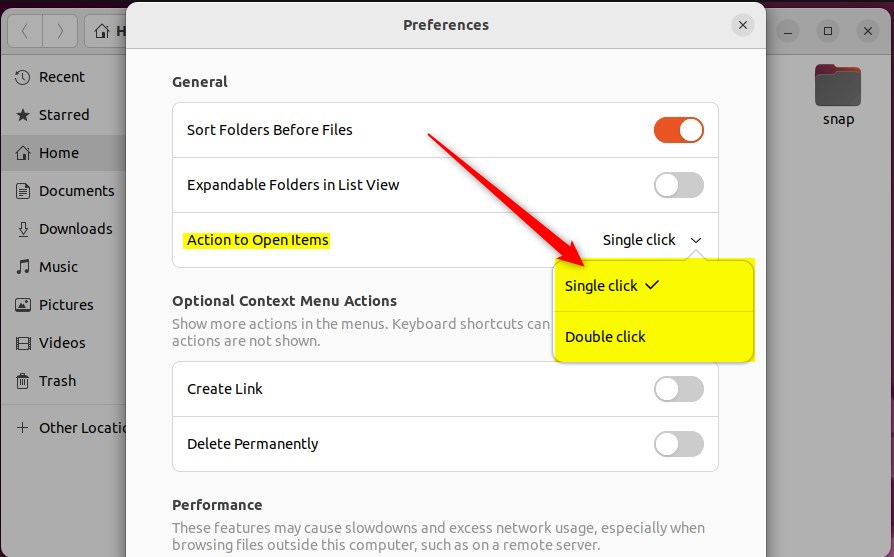
- In the Preferences window, stay on the General tab. It is normally the first page shown.
- Find the setting called Action to Open Items.
- Select Single click.
The choice is saved the moment you select it. There is no Apply or OK button to press.
The setting offers two options:
- Single click: one click opens a file or folder.
- Double click: the default. One click selects an item and a second click opens it.
To switch back, repeat the steps above and pick the other option:
- Open Files, click the menu button, then select Preferences.
- On the General tab, under Action to Open Items, select Double click.
The change takes effect immediately. You don't need to restart Files, log out or reboot. Files windows that were already open pick up the new behavior right away.
Test the new behavior before you close Preferences:
- Click once on a folder in the Files window. It should open straight away.
- Go back and hold Ctrl while you click several items. They should be selected without opening.
- Click and drag in an empty area of the window to draw a selection box around a group of items. This is a quick way to select things in single-click mode without opening them by accident.
If a click still needs a second click to open, reopen Preferences and check that Single click is selected.
Conclusion:
- Switching to single-click mode in Ubuntu Linux makes file and folder navigation more accessible for users who struggle with double-clicking.
- Users can easily revert to the default double-click mode by following the provided steps to adjust preferences in File Manager.
- These straightforward adjustments enhance the usability and ergonomics of Ubuntu Linux for a wider range of individuals.
That sums up enabling or disabling single-click mode in Ubuntu Linux!
Have a question about this guide?
Answered by AI from this guide. Good questions may be added to this page — please don't include personal details.
Did this guide fix your problem?

About the Author
Richard
Tech Writer, IT Professional
Richard is a writer at Geek Rewind who turns complex IT tasks into clear, step-by-step guides. He draws on years of hands-on experience in system administration and enterprise IT operations, focusing on Windows, Linux and WordPress: the problems people actually run into, and the fixes that work. His server and WordPress guides come from systems he runs himself. Richard builds and maintains the platform behind Geek Rewind, from its Ubuntu servers and Nginx configuration to its custom WordPress plugins. Many new tutorials start with readers' questions, and he's always glad to answer them in the comments.
No comments yet — be the first to share your thoughts!