Enable Metered Connection in Ubuntu Linux: Step-by-Step Guide


A metered connection tells Ubuntu that your current network has a data cap or charges for usage. Ubuntu then holds back large automatic downloads, such as software updates, so they don’t use up your allowance in the background. The setting works for both Wi-Fi and wired Ethernet connections, which makes it a good safeguard on capped plans.
The option is built into the Settings app on Ubuntu 22.04 LTS and newer. It is saved per network, so you turn it on once for each connection that needs it. Ubuntu keeps limiting background traffic on that network until you turn the option off or switch to an unlimited one.
To mark a connection as metered in Ubuntu, open Settings , click Network (or Wi-Fi ), then click the gear icon next to your active connection. On the Details tab, tick Metered connection and click Apply. Ubuntu then holds back large automatic downloads, such as software updates, on that network. Available in Ubuntu 22.04 LTS and newer.
How to turn on or off the metered connection in Ubuntu Linux
The setting is most useful on a mobile phone hotspot or any plan with a monthly limit. In short, you open Settings , go to Wi-Fi or Network, open the settings of your active connection, and change the Metered option. Depending on your Ubuntu version, this is a checkbox or toggle. The underlying values are automatic, yes and no.
Don’t leave it on indefinitely. When you are back on an unlimited network, turn it off, or check for updates by hand.
The change takes only a few moments. Most Ubuntu settings live in the central Settings panel, so start there.
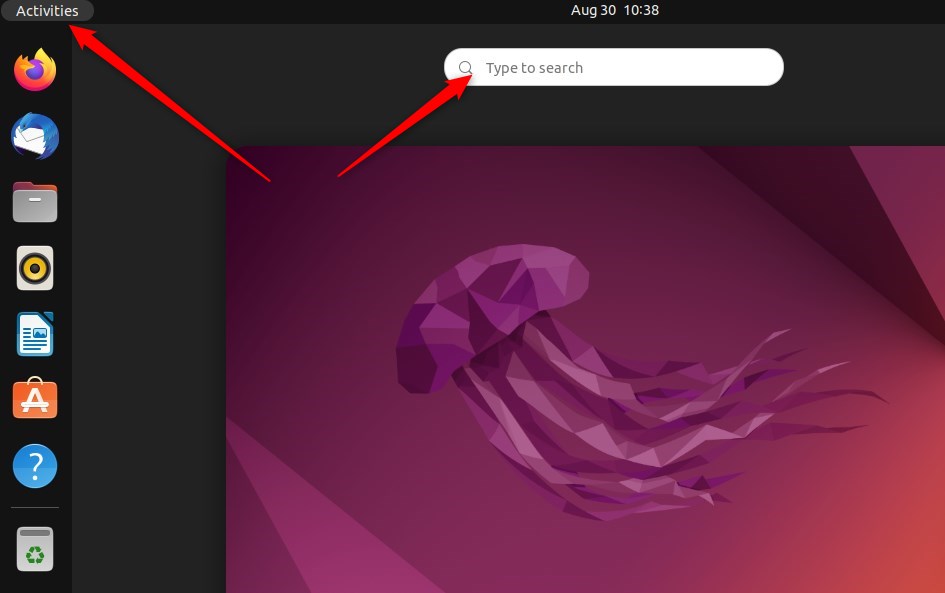
- Open the Activities overview in the top-left corner of the desktop.
- Type Settings in the search box.
- Click the Settings icon when it appears in the results. The Settings window opens.
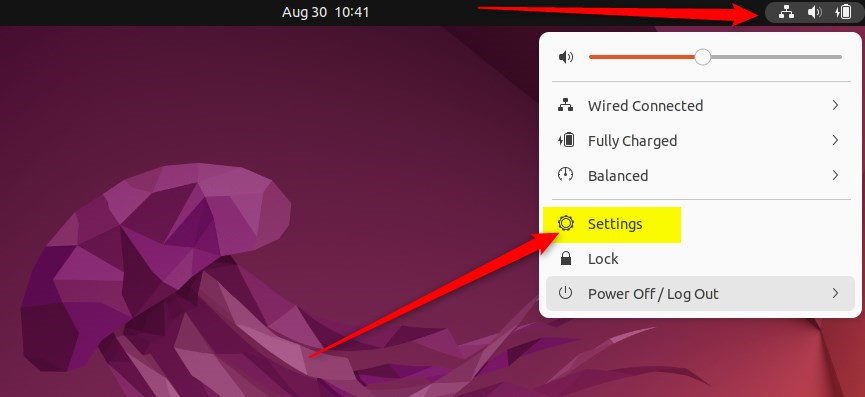
You can also open Settings from the system menu. Click the system menu in the top-right corner of the desktop (the area with the network, sound and power icons), then select Settings.
- In the Settings window, click the Network tile in the left sidebar. If you want to change a wireless connection, click Wi-Fi instead.
You manage each connection from here. If you don't see your wired adapter, check that the cable is connected. If you don't see Wi-Fi, check that the wireless adapter is detected and switched on.
- Find the network you are connected to and click the settings gear icon next to it.
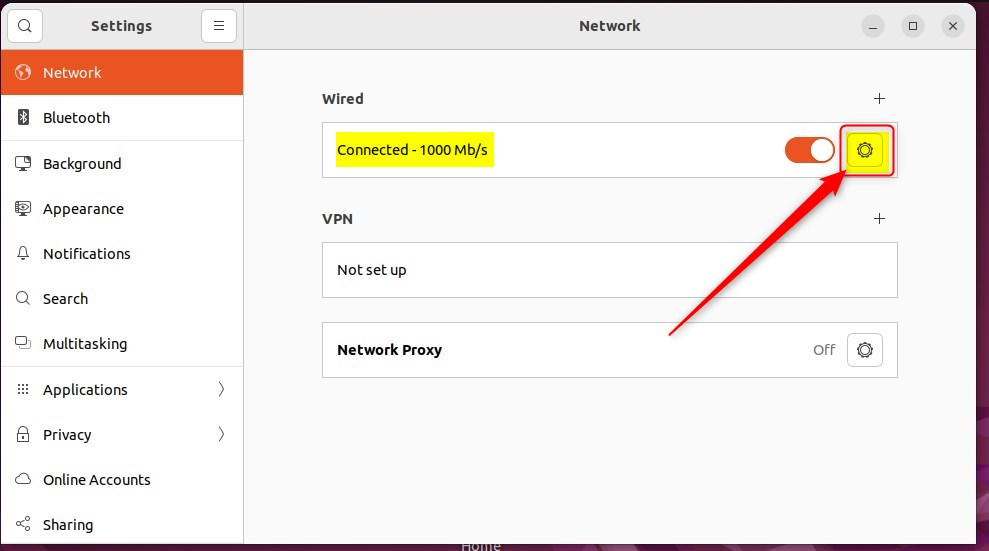
A window with the settings for that connection opens. For Wi-Fi, make sure you click the gear next to the network you are actually using, because each saved network has its own settings.
- Open the Details tab if it is not already selected.
- Check the box for Metered connection. The option may be described as having data limits or being able to incur charges. If your version shows a toggle instead, switch it on.
- Click Apply to save the change.

If the Apply button is greyed out, nothing has changed yet. Make sure the box is actually ticked. Labels and layout differ a little between Ubuntu versions, but the option is always in the settings of the individual connection.
Once the option is on, Ubuntu marks the connection as metered. Network data usage drops, because the system and some applications reduce background traffic, such as automatic updates, on a connection that limits data. How much each application cuts back depends on the application. Some respect the setting fully and others ignore it, so keep an eye on your usage if the cap is tight.
You don't need to restart. Close the Settings app and the change stays in place. To undo it, return to the same connection settings, clear the Metered connection box and click Apply.
- Metered connections in Ubuntu Linux are useful for controlling and reducing data usage on specific networks.
- Enabling a metered connection can prevent automatic downloads of updates and large packages, although it's important to stay vigilant about system security.
- Ubuntu Linux's centralized System Settings panel makes it easy to manage network settings, including enabling the metered connection feature.
- Once enabled, apps may adapt their behavior to reduce data usage, providing a more efficient experience while on a metered network.
Have a question about this guide?
Answered by AI from this guide. Good questions may be added to this page — please don't include personal details.
Did this guide fix your problem?

About the Author
Richard
Tech Writer, IT Professional
Richard is a writer at Geek Rewind who turns complex IT tasks into clear, step-by-step guides. He draws on years of hands-on experience in system administration and enterprise IT operations, focusing on Windows, Linux and WordPress: the problems people actually run into, and the fixes that work. His server and WordPress guides come from systems he runs himself. Richard builds and maintains the platform behind Geek Rewind, from its Ubuntu servers and Nginx configuration to its custom WordPress plugins. Many new tutorials start with readers' questions, and he's always glad to answer them in the comments.
No comments yet — be the first to share your thoughts!