How to Turn “Week Numbers” On or Off for Calendar in Ubuntu Linux


You can easily turn “Week Numbers” on or off for the Calendar in Ubuntu Linux to see the current week of the year.
Week numbers provide a clear way to identify which week of the year a specific date falls into, a feature not enabled by default in Ubuntu’s Calendar application.
For instance, by default, your Ubuntu Calendar might display the date “2024-07-29” without indicating it’s the 31st week of the year.
You can activate this setting within Ubuntu’s Calendar preferences, and just as easily disable it if you prefer a less cluttered view.
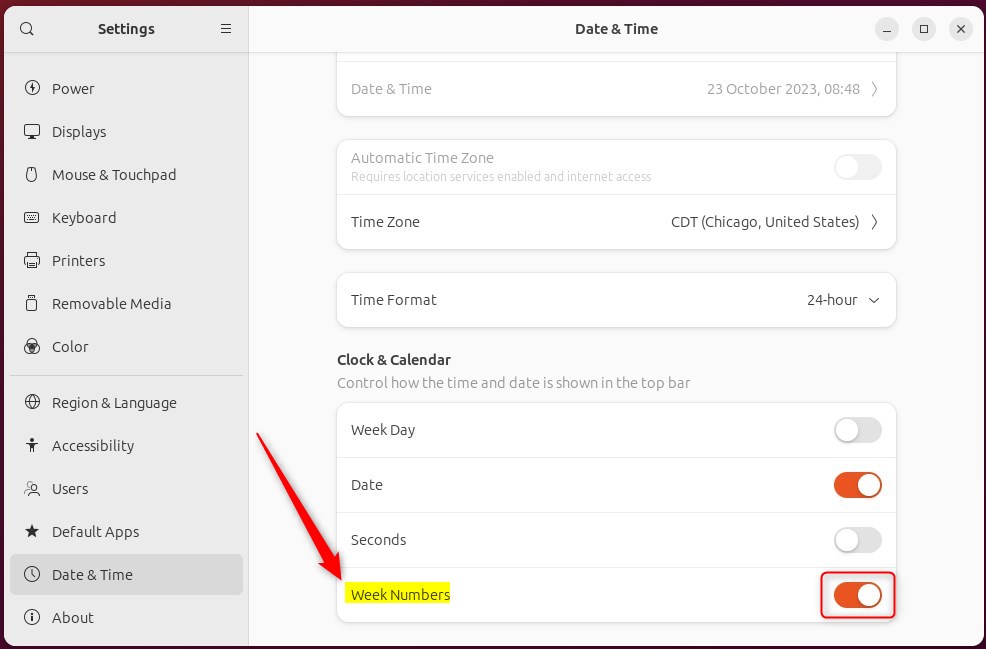
Click the System Menu, then Settings. Navigate to Date & Time in the sidebar. Toggle the “Week Numbers” switch to On to display them or Off to hide them.
Show or hide “Week Numbers” on the Calendar
You can turn Ubuntu Calendar week numbers on or off directly from your system settings, making it simple to see or hide them.
Here’s how.
- Click the System Menu in the top-right corner of your screen.
- Select the Settings (gear icon) button.
- In the left-hand sidebar, click on Date & Time.
- Locate the Week Numbers tile within the settings panel.
- Toggle the switch to On to display week numbers, or Off to hide them.
First, click the system menu in the top-right corner and select the Settings (gear icon).

In the Settings panel, click the Date & Time button in the left menu.

Next, find the Week Numbers tile in the Date & Time settings panel. Then, flip the switch to the On position to display Week Numbers on the calendar.
To disable it, flip the switch to the Off position.
When turned on, you’ll see the “Week Numbers” on the calendar.

That’s it!
Conclusion:
- Enabling or disabling “Week Numbers” in the Ubuntu Linux Calendar provides flexibility for personal or professional organizations.
- Following the simple steps outlined, users can effortlessly customize the display of week numbers based on their needs.
- Users can engage in the comments section for further contributions or to report any inaccuracies in the provided information.
How do I show week numbers in Ubuntu calendar?
In the calendar, on the View tab, select Calendar settings. Select Calendar > View. Under Calendar appearance, select Show week numbers, then select Save.
Was this guide helpful?

About the Author
Richard
Tech Writer, IT Professional
Richard, a writer for Geek Rewind, is a tech enthusiast who loves breaking down complex IT topics into simple, easy-to-understand ideas. With years of hands-on experience in system administration and enterprise IT operations, he’s developed a knack for offering practical tips and solutions. Richard aims to make technology more accessible and actionable. He's deeply committed to the Geek Rewind community, always ready to answer questions and engage in discussions.




No comments yet — be the first to share your thoughts!