

This post shows students and new users how to install MySQL or MariaDB database servers on Google Cloud servers running Ubuntu Linux.
If you want to run a website online, you’ll need a web server. You’ll probably also need a database server installed to run Dynamic and some popular CMS, like WordPress, Drupal, or Drupal.
MySQL and MariaDB are the most popular open-source database servers used today and run on most websites online.
This is the sixth post in this series, which can be used as a beginner’s guide to learning how to create a website domain, set up a Google Cloud server with Ubuntu Linux, and install software and packages to build and run a website online.
In this series:
- How to create a website domain
- How to set up a Google Cloud server with Ubuntu Linux
- How to install Apache on a Google Cloud server (alternative to Nginx)
- How to install Nginx on a Google Cloud server (alternative to Apache)
- How to install PHP on a Google Cloud server
Now that you’ve learned how to create a website domain and set up a Google Cloud server, this post shows you how to install MySQL or MariaDB on Google Cloud servers with Ubuntu Linux.
A web server allows content to be published and served to clients and your audience browsing your website. A database server will enable you to store your website content efficiently.
A database server is required if you’re running a popular content management system (CMS).
In our first post, we mentioned that after you create a domain name, it can’t be used until forwarded or pointed to a server. The second post showed you how to point a domain to a server we created.
At this point, we’re ready to connect to our Google Cloud server and begin installing software and additional packages that will be used to run a website online.
How to connect to the Google Cloud server
Google Cloud server (Compute Engine) allows users to connect using SSH from the browser window to their virtual machine (VM) instance within the Google Cloud Console.
SSH from the browser supports the following:
- Web browsers
- The latest version of Google Chrome
- Firefox
- Microsoft Edge
- Microsoft Internet Explorer 11 and later
- Safari 8 and later. Note that Safari is not supported in private browser mode.
- Virtual machine configurations
- All Linux VM images are natively available in Google Cloud.
No additional software or browser extensions are needed. Simply login to Google Cloud Console and go to Menu ==> Compute Engine ==> VM instances.
In the list of virtual machine instances, click SSH in the row of the instance that you want to connect to.

Alternatively, you can open an SSH connection to an instance by clicking its name and SSH from the instance details page.
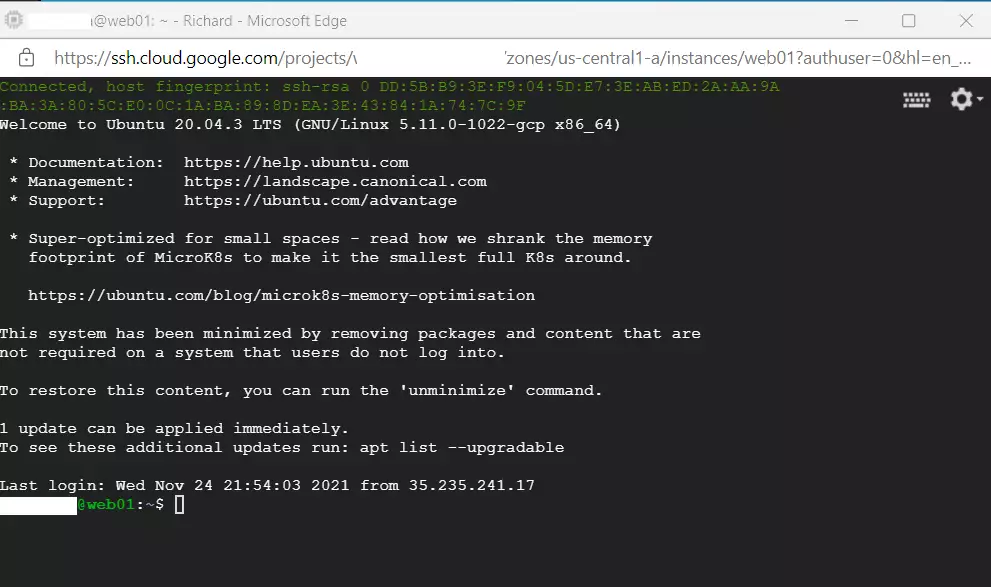
An SSH terminal window with the Ubuntu Linux instance created in the series’s second post will open.
You should now be able to run commands in Ubuntu Linux created on the Google Cloud server.
How to install a database server on Google Cloud Servers
Installing MySQL or MariaDB on Ubuntu Linux is no different, whether on Google Cloud or a local VM instance.
Both MySQL and MariaDB packages are available in Ubuntu’s default repositories. One can use the apt-get commands to download and install database packages on Ubuntu Linux.
Below is a detailed post that provides help installing MySQL or MariaDB on Ubuntu Linux. Click on it to learn more about installing and managing MySQL or MariaDB database servers on Ubuntu Linux.
How to install MySQL or MariaDB on Ubuntu Linux
You can store content within a database with a database server installed and your domain name pointing to your Google Cloud server.
We’re now far ahead in creating a website online using a web server, PHP server-side language, and a database server. We’re ready to tie all these servers and software together for your website to be prepared.
We’re now ready to configure our servers and packages to get the website going.
Please stay tuned and continue reading up on our previous posts.
Conclusion:
In summary, setting up a MySQL or MariaDB database server on your Google Cloud server with Ubuntu is crucial in building your website. Following the steps outlined in this guide, you can efficiently manage your database needs and ensure your content is stored securely. Here are the key takeaways:
- Establishing a web and database server is essential for running dynamic websites and CMS platforms.
- Google Cloud offers user-friendly SSH access to connect to your virtual machines.
- MySQL or MariaDB can be installed easily using Ubuntu’s default repositories and
apt-getcommands. - Each step in this series builds on the previous one, culminating in a fully operational website.
Stay tuned for our next post, where we will delve deeper into configuring your servers and finalizing your website setup!


Leave a Reply