

This article explains enabling or disabling “Preview Microsoft Edge releases early” for Windows Insider Preview (WIP) users.
The Microsoft Edge browser is the default browser in Windows 11. However, users can switch to their preferred or favorite browser anytime. Edge is based on Chromium, similar to Google Chrome and other Chromium-based browsers today.
To preview new Microsoft Edge releases, a new toggle has been added to the Microsoft Edge browser for Windows Insider Program (WIP) members.
Previously, one needed to download a separate (Canery) version of Edge to test early releases, but now WIP users in the Beta and Dev Release Channel can do this inside the Microsoft Edge app.
When enrolled, new features ship about every 4 weeks, with security and quality updates shipping as needed.
Enabling early releases of Microsoft Edge allows users to gain access to new features and updates before they are officially released to the public. This can benefit users who want to stay up-to-date with the latest developments and test new features before they become widely available.
Additionally, early releases can allow users to provide feedback and suggestions to Microsoft, which can help improve the browser’s overall experience.
Enable or disable “Preview Microsoft Edge releases early”
As mentioned above, users enrolled in the Windows Insider Program (WIP) can turn on “Preview Microsoft Edge releases early” to test out features unavailable to the general public.
Users can test out the feature without downloading the Canary version of Edge.
Here’s how to do it.
First, open the Microsoft Edge browser.
Then click on Setting and more (Alt+F) three dots (…) in the upper right-hand corner to access the Settings menu.

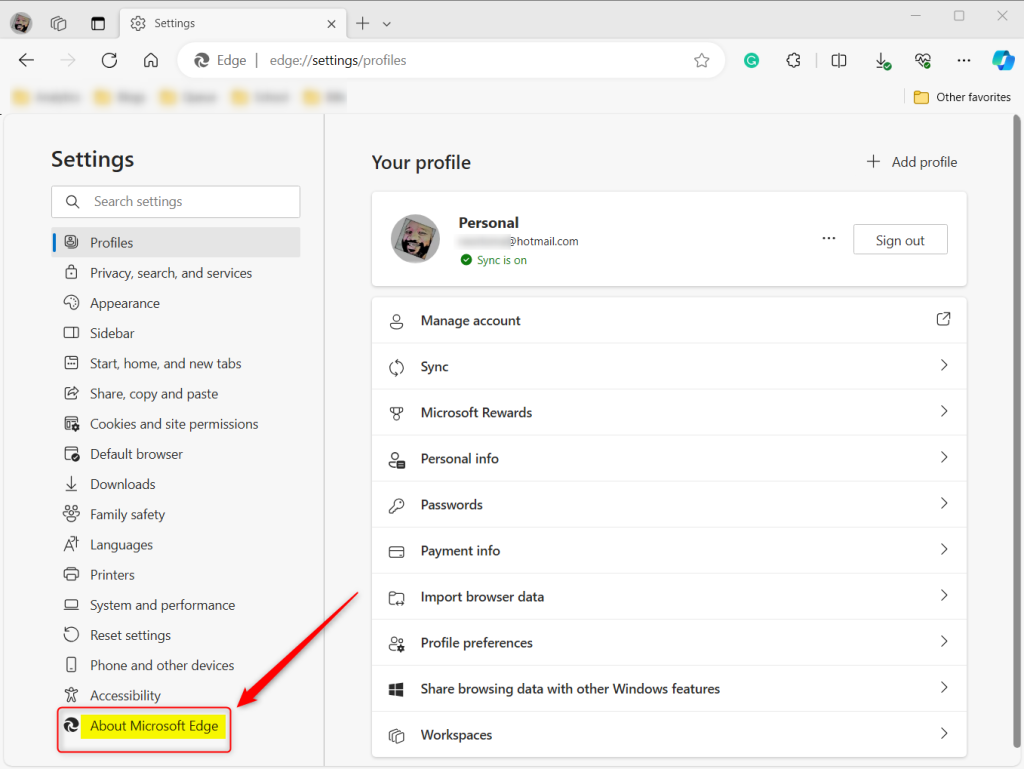
On the Settings page on the left panel, click the About Microsoft Edge button.
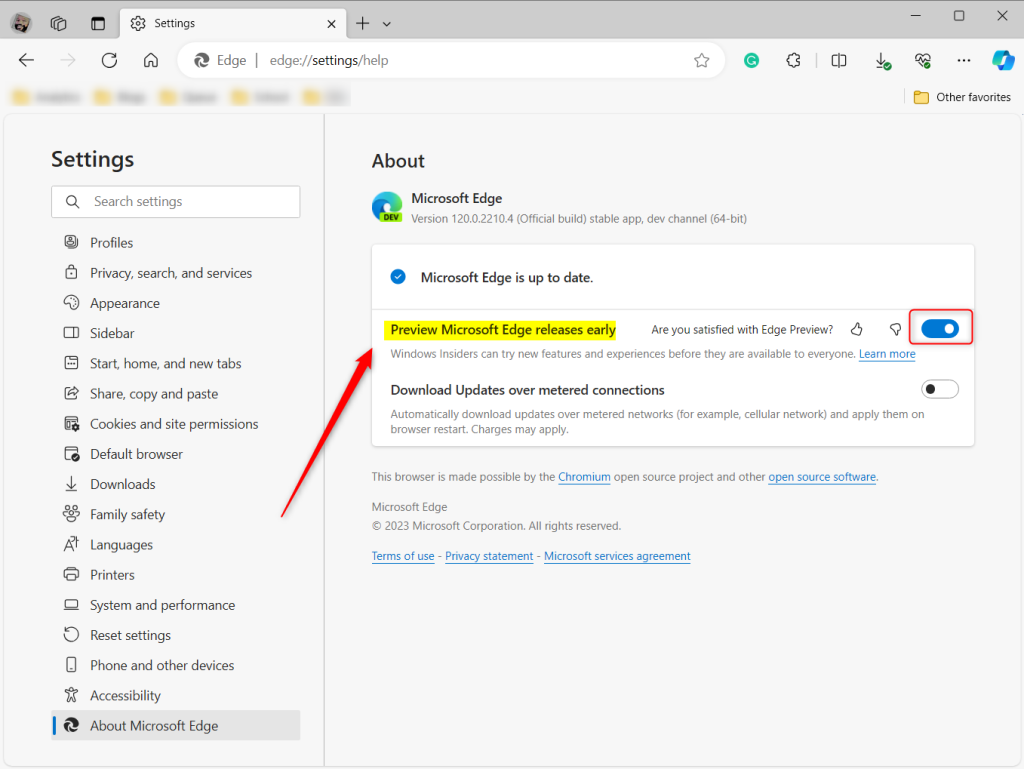
On the right, under About, select the “Preview Microsoft Edge releases early” tile. Then, toggle the switch button to the On position to enable it.
To disable it, toggle the switch button to the Off position.
You will be prompted to restart to apply the changes.
That should do it!
Reference:
Conclusion:
- Enabling early releases of Microsoft Edge provides access to new features and updates before their public release
- Testing new features before they become widely available allows users to stay up-to-date and provide valuable feedback to improve the overall browsing experience
- By following the steps above, users can easily enable or disable “Preview Microsoft Edge releases early” and stay informed about the latest developments in the Microsoft Edge browser.
Frequently Asked Questions
How can I enable early Edge releases on Windows Insider?
What benefits do I get from enabling early Edge releases?
Can I disable early Edge releases after enabling them?
Do I need to download a separate version of Edge to access early releases?
How often do new features ship for early Edge releases?
Leave a Reply