How to Install MongoDB with PHP on Ubuntu 24.04


MongoDB installation with PHP on Ubuntu 24.04 links your web server to a NoSQL database that stores application data as documents rather than traditional table rows. This setup requires installing both the database software and a specialized driver to let PHP scripts read, save, and update data on your server.
Install MongoDB, your chosen web server (Apache or Nginx), and PHP. Then, install the MongoDB PHP driver using `pecl install mongodb` and enable it in your PHP configuration files. Finally, restart your web server and PHP.
Install MongoDB
To use MongoDB, PHP, and a web server, you must first install MongoDB. If you haven’t installed it yet, read the post below to learn how to do that.
How to install MongoDB on Ubuntu
After installing MongoDB, continue below.
Apache
To run MongoDB, PHP, and Apache, refer to the post below for instructions on how to install Apache on Ubuntu.
How to install Apache on Ubuntu
After installing Apache, continue below.
Install Nginx
If you prefer to use Nginx instead of Apache, install Nginx on Ubuntu. If you haven't done so, read the post below to learn how.
How to install Nginx on Ubuntu
After installing Nginx, continue below.
Install PHP
To install PHP and the required modules to work with MongoDB on Ubuntu 24.04, open your terminal and run sudo apt install php php-common php-mongodb php-pear php-dev. These packages give your web server the core tools and database extensions needed to run PHP code that connects to MongoDB without errors.
You install specific PHP modules to use MongoDB with PHP and Apache. These modules, such as `php-mongodb`, allow your PHP code to communicate with the MongoDB database, enabling you to store, retrieve, and manage your data effectively.
Apache:
sudo apt install php php-common php-mongodb php-pear php-dev
If you plan to use MongoDB with PHP and [Nginx], then install the PHP modules below.
Nginx:
sudo apt install php-fpm php-common php-mongodb php-pear php-dev
After installing the PHP, continue below.
Install MongoDB PHP drivers
To install MongoDB PHP drivers on Ubuntu 24.04 so your web applications can communicate with the database, run sudo pecl install mongodb in your terminal and press Enter to accept the default settings when prompted. This builds the official driver extension that glues your PHP code and MongoDB together.
This will glue MongoDB and PHP together.
sudo pecl install mongodb
During the installation, accept the default prompts for all the choices.
Enable developer flags? (yes/no) [no] :
Enable code coverage? (yes/no) [no] :
Use system libraries for libbson, libmongoc, and libmongocrypt? (yes/no) [no] :
Enable client-side encryption? (auto/yes/no) [auto] :
Enable Snappy for compression? (auto/yes/no) [auto] :
Enable zlib for compression? (auto/system/bundled/no) [auto] :
Enable zstd for compression? (auto/yes/no) [auto] :
Enable SASL for Kerberos authentication? (auto/cyrus/no) [auto] :
Enable crypto and TLS? (auto/openssl/libressl/darwin/no) [auto] :
Use system crypto profile (OpenSSL only)? (yes/no) [no] :
Use bundled or system utf8proc for SCRAM-SHA-256 SASLprep? (bundled/system) [bundled] :
After building and installing the MongoDB PHP drivers, execute the command below to add it to the PHP configuration file.
This assumes you are running PHP 8.3.
Apache: Run:
sudo -s
sudo echo "extension=mongodb.so" >> /etc/php/8.3/apache2/php.ini
sudo echo "extension=mongodb.so" >> /etc/php/8.3/cli/php.ini
Nginx: Run:
sudo -s
sudo echo "extension=mongodb.so" >> /etc/php/8.3/fpm/php.ini
sudo echo "extension=mongodb.so" >> /etc/php/8.3/cli/php.ini
After setting everything up, restart the web server and PHP. Then, run the PHP test page.
You should see MongoDB PHP module installed with PHP.
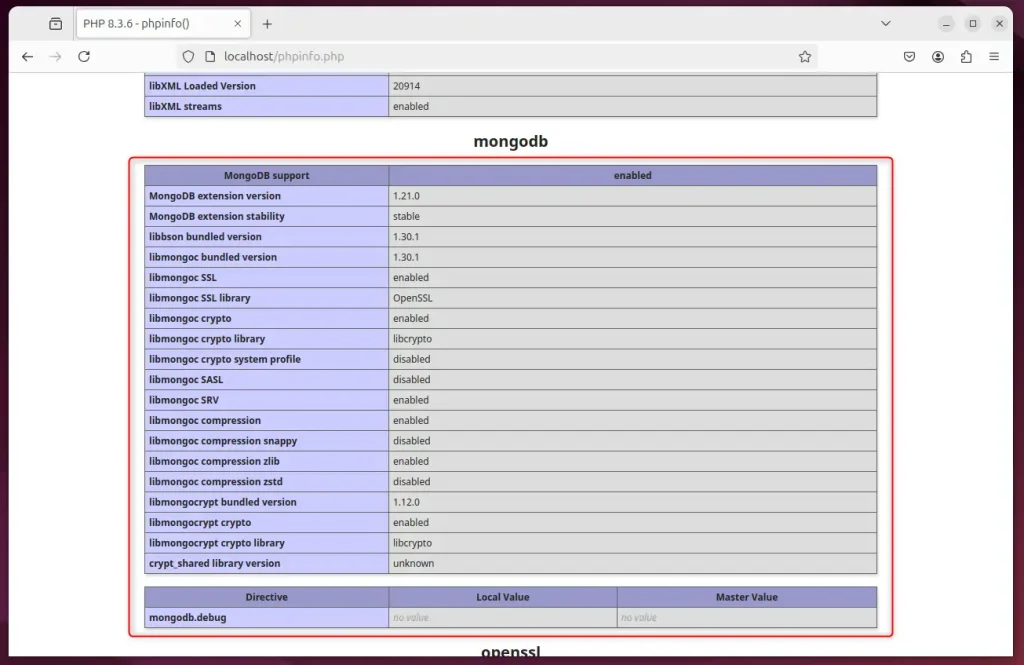
That should do it!
Conclusion:
In summary, integrating MongoDB with PHP and a web server like Apache or Nginx allows developers to build modern, scalable web applications. Here are the key takeaways:
- Flexible Data Storage: MongoDB's JSON-like data model provides a dynamic schema, facilitating easier changes and scalability.
- Seamless Integration: Works well with popular PHP frameworks like Laravel, Symfony, and CodeIgniter.
- Installation Process: Follow the steps to install MongoDB, Apache/Nginx, and the required PHP modules.
- PHP Drivers: Ensure the MongoDB PHP drivers are installed and configured correctly to enable communication between MongoDB and PHP.
- Testing: Always verify the installation by checking the PHP test page for the MongoDB module.
By following the installation steps for MongoDB on Ubuntu 24.04, you can significantly enhance your web applications with MongoDB's powerful features.
Was this guide helpful?

About the Author
Richard
Tech Writer, IT Professional
Richard is a writer at Geek Rewind who turns complex IT tasks into clear, step-by-step guides. He draws on years of hands-on experience in system administration and enterprise IT operations, focusing on Windows, Linux and WordPress: the problems people actually run into, and the fixes that work. His server and WordPress guides come from systems he runs himself. Richard builds and maintains the platform behind Geek Rewind, from its Ubuntu servers and Nginx configuration to its custom WordPress plugins. Many new tutorials start with readers' questions, and he's always glad to answer them in the comments.

No comments yet — be the first to share your thoughts!