How to Enable Hybrid Sleep on Windows 11

This guide explains how to manage Hybrid Sleep on your Windows 11 computer.
To enable Hybrid Sleep, open Control Panel, navigate to Power Options, then “Change plan settings,” “Change advanced power settings,” expand “Sleep,” and set “Allow hybrid sleep” to “On.” This setting may be unavailable if your system uses Modern Standby.
What is Hybrid Sleep?
Hybrid Sleep on Windows 11 is a smart way to save power while keeping your work safe. It’s like a mix of Sleep mode, which wakes your PC up fast, and Hibernation, which saves everything to your hard drive in case the power goes out.
Why use it? It keeps your data secure while letting you wake your PC up in seconds.
What happens when done? Your computer will enter a state that protects your work from sudden power loss while maintaining quick access to your desktop.
How to Enable Hybrid Sleep on 🪟 Windows 11
You can easily turn on hybrid sleep in Windows 11 by changing your power settings through the Control Panel. This feature helps protect your work if the power suddenly cuts out, while still letting you wake your computer up quickly.
Step 2: Click on Hardware and Sound.
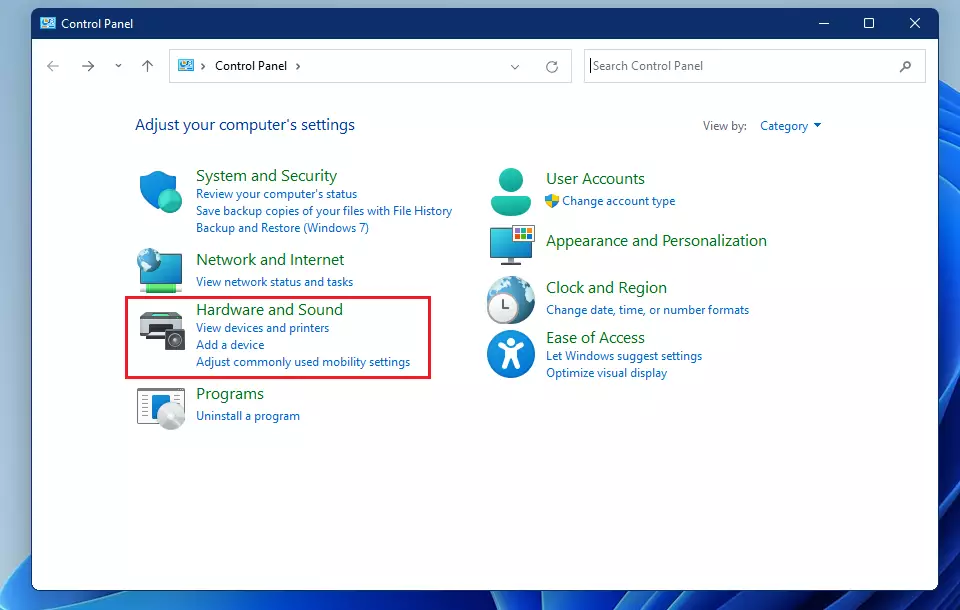
Step 3: Next, click on Power Options.
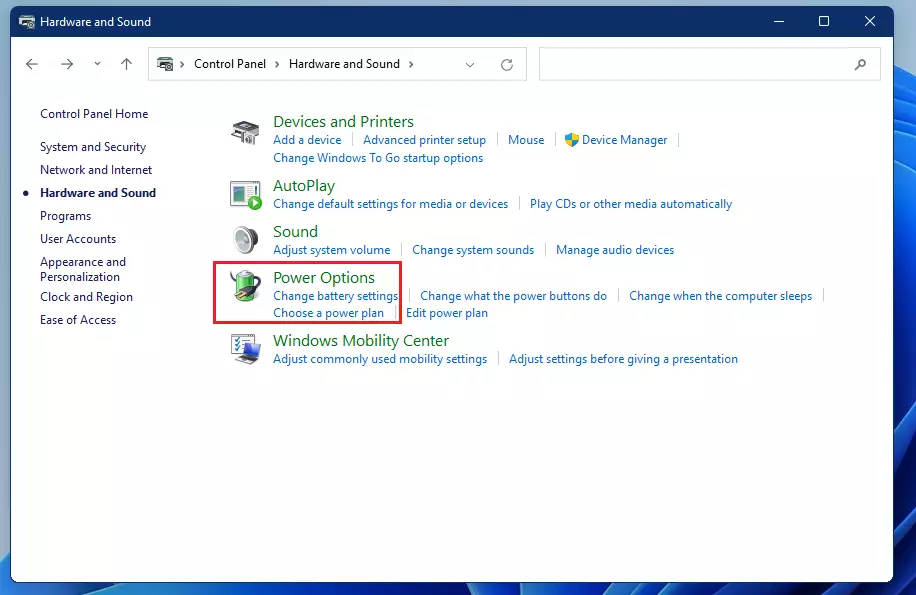
Step 4: Find your active power plan and click ‘Change plan settings’ next to it.
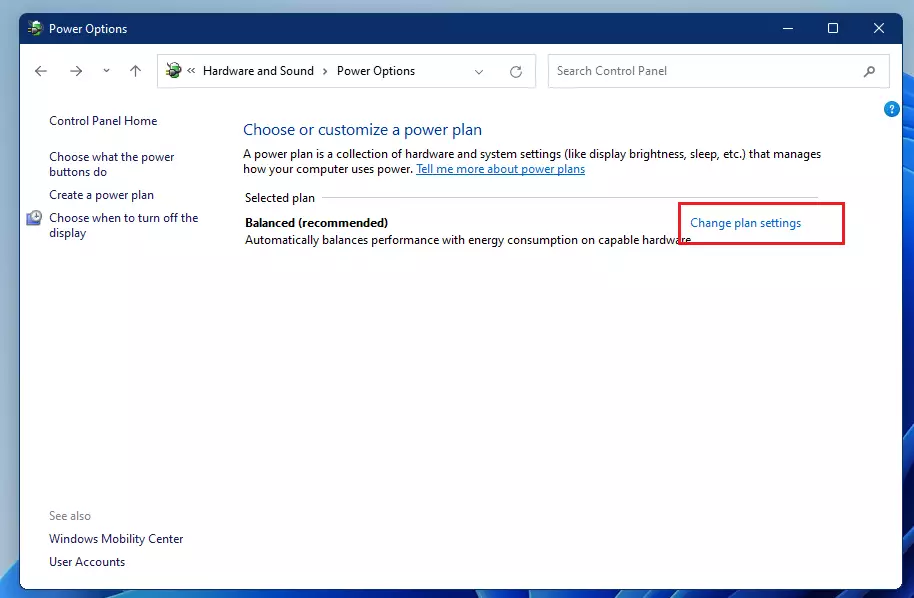
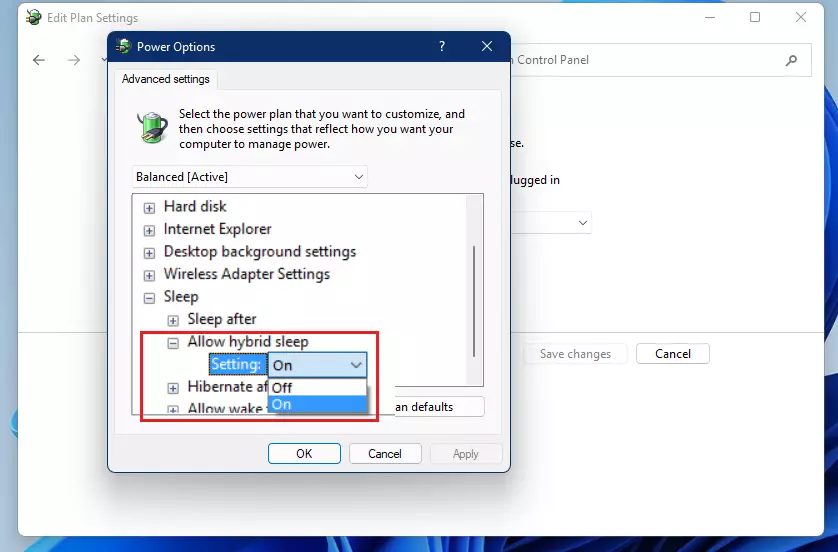
Step 5: Click ‘Change advanced power settings.’
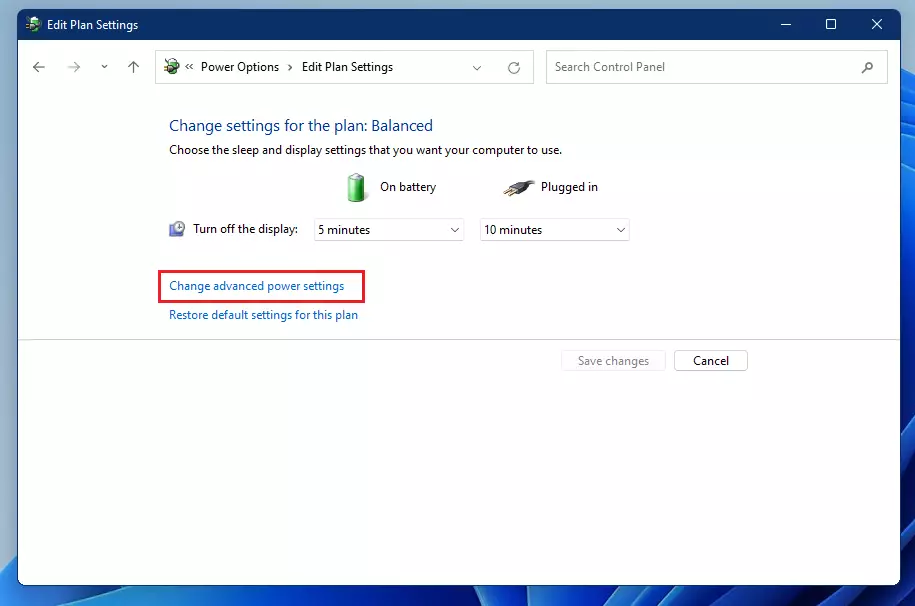
Step 6: ⚠️ Admin privileges required: Expand the ‘Sleep’ folder and set ‘Allow hybrid sleep’ to ‘On.’
Does Hybrid Sleep work with Modern Standby?
Hybrid Sleep generally doesn’t work with Modern Standby, a newer power system that acts more like a smartphone.
Troubleshooting: The Hypervisor Conflict
If you see an error about the hypervisor not supporting a standby state, it usually means features like virtual machines are blocking deep sleep.
Command Line Configuration
You can also adjust power settings using the command line. ⚠️ Admin privileges required: Open Command Prompt as Administrator and use the official Microsoft Powercfg documentation as a guide.
Use this command to check if hibernation is enabled, which is required for Hybrid Sleep:
powercfg -h on
Summary
Hybrid Sleep offers a safe way to protect your data, especially for desktop users who want a balance between quick wake-ups and power loss protection.
Why is Hybrid Sleep not showing in my Power Options?
If you can’t find the Hybrid Sleep option in your Power Options, it’s likely because your system uses Modern Standby, which manages power differently.
Was this guide helpful?

About the Author
Richard
Tech Writer, IT Professional
Richard, a writer for Geek Rewind, is a tech enthusiast who loves breaking down complex IT topics into simple, easy-to-understand ideas. With years of hands-on experience in system administration and enterprise IT operations, he’s developed a knack for offering practical tips and solutions. Richard aims to make technology more accessible and actionable. He's deeply committed to the Geek Rewind community, always ready to answer questions and engage in discussions.


Second paragrapgh “but if there is some kinD of power failure” just a teenie-tiny typo
[…] has multiple Sleep or hibernation modes: Hybrid Sleep is a type of sleep state that […]
[…] your computer goes to sleep, the power usage is reduced, allowing users to save their work and sessions without worrying about losing them. Your PC can […]
[…] has multiple sleep or hibernation modes: A Hybrid sleep is a type of sleep state that […]
[…] Sleep: Your PC goes into a low-power sleep mode. […]
[…] default, when you put a Windows computer to sleep or if a laptop goes into modern standby or hibernation, it normally waits until you press a button before it wakes from […]