How to Change Phone Link App Theme in Windows 11

You change the Phone Link app theme in Windows 11 by adjusting your Windows accent color and dark/light mode settings.
The Phone Link app itself lacks an independent theme option. It directly mirrors the system-wide appearance choices you make in Windows 11. This ensures seamless integration and a consistent look across your PC.
For instance, if you set Windows 11 to use a blue accent color and enable Dark Mode, your Phone Link app will instantly adopt these same visual cues. You can easily toggle between light and dark themes directly within Windows 11’s Personalization settings.
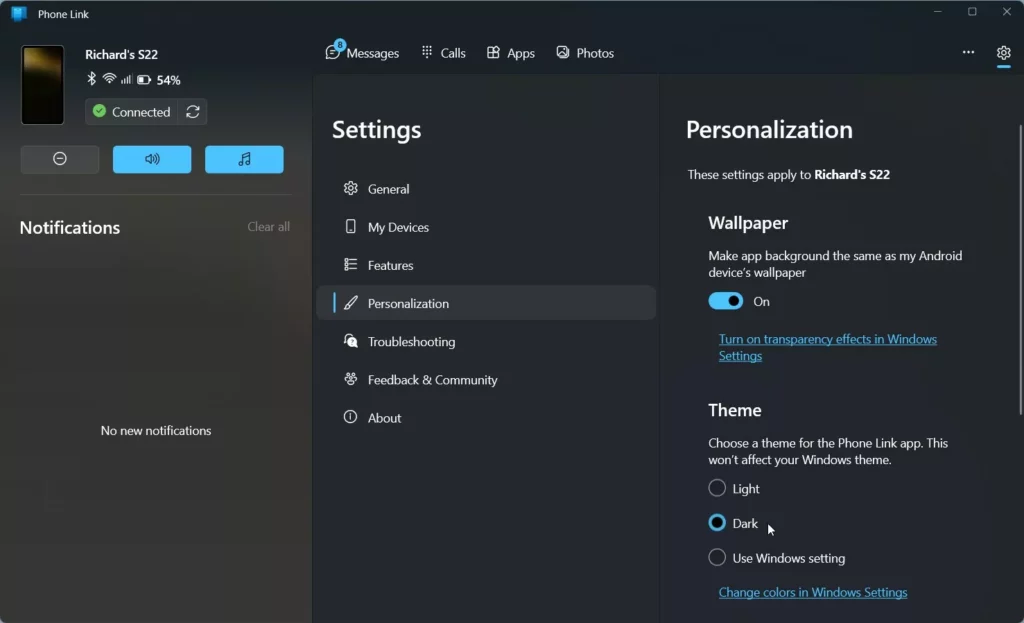
Change the Phone Link app theme by going to its Settings (gear icon) and selecting Light, Dark, or Use Windows settings. The app uses your Windows color settings unless you manually override it within the Phone Link app.
Why change your Phone Link app theme?
Changing the Phone Link app theme can make it easier on your eyes, especially when you’re using your computer in a dimly lit room.
What happens when done?
Changing the Phone Link app theme immediately updates the app’s colors, and this usually only affects the Phone Link app itself, not your whole computer.
Steps to change your Phone Link theme
You can change your Phone Link app theme by opening the app and going to its settings, a simple process that doesn’t require admin rights.
- Open the Phone Link app. You can find it by clicking the Start menu, selecting All apps, and choosing Phone Link.
- Once the app is open, click the Settings (gear) icon located at the top right corner of the window.
Note: You do not need admin privileges to perform these steps.
- Look for the Personalization section.
- Under the Theme menu, pick the look you prefer:
- Light: A bright white background.
- Dark: A black background that is easier on the eyes.
- Use Windows settings: The app will automatically match whatever theme your computer is currently using.
- Close the app to save your changes.
Accessibility and High Contrast
The Phone Link app works with your Windows High Contrast settings, making sure it’s easy to read if you use these special themes for better visibility.
Summary
You can easily change your Phone Link app theme to suit your preferences, whether you like a light or dark look, for a more comfortable experience.
Can I set Phone Link to Dark Mode if Windows is in Light Mode?
Yes. By navigating to the Phone Link settings menu, you can manually select ‘Dark’ mode regardless of your Windows system theme. This allows you to keep your desktop in Light mode while keeping the Phone Link app dark for better visibility of your messages and notifications.
Why does my Phone Link app look different from my Windows theme?
If your app looks different, it is likely because the ‘Theme’ setting inside the Phone Link app is set to a specific mode (Light or Dark) rather than ‘Use Windows settings.’ Check the app’s gear icon settings to ensure it is synchronized with your system preferences.
Does changing the theme affect battery usage?
On devices with OLED screens, using the ‘Dark’ mode can help save battery life because the display does not need to power as many pixels. On standard LCD screens, the impact on battery usage is generally negligible, though it remains a popular choice for comfort.
Was this guide helpful?

About the Author
Richard
Tech Writer, IT Professional
Richard, a writer for Geek Rewind, is a tech enthusiast who loves breaking down complex IT topics into simple, easy-to-understand ideas. With years of hands-on experience in system administration and enterprise IT operations, he’s developed a knack for offering practical tips and solutions. Richard aims to make technology more accessible and actionable. He's deeply committed to the Geek Rewind community, always ready to answer questions and engage in discussions.


[…] Next, select the Appearance tab and click Dark under Dark mode. SelectUse system settings if the Windows theme is set to Dark mode. […]
[…] app, send and receive text messages from the app, add or remove Phone Link on the widgets board, turn dark mode on or off, open your phone screen in the app, turn show notifications for all my apps on or off, show […]