How to Use Fast User Switching in Windows 11

Fast User Switching in Windows 11 lets you quickly switch between different user accounts on your PC without needing to log out completely.
This feature is incredibly useful when multiple people use the same computer, like in a family or office setting.
You can switch accounts with just a few clicks directly from the Start Menu or Lock Screen, typically available on Windows 11 Home and Pro versions.
Why Use Fast User Switching?
Why use this feature? It allows multiple people to share one PC while keeping their own apps and files private. What happens when done? Your current session stays active in the background, allowing you to resume work instantly when you return.
Prerequisites
To use these features, ensure you have multiple user accounts set up. Note that Windows 11 Home and Pro both support this, but some advanced settings require administrative access.
Method 1Switch from the Login Screen
The login screen is the primary way to switch. Simply click the account name on the bottom left to swap sessions.
Method 2Switch from the Start Menu
Click the Start button, select your profile icon, and choose another user from the list.
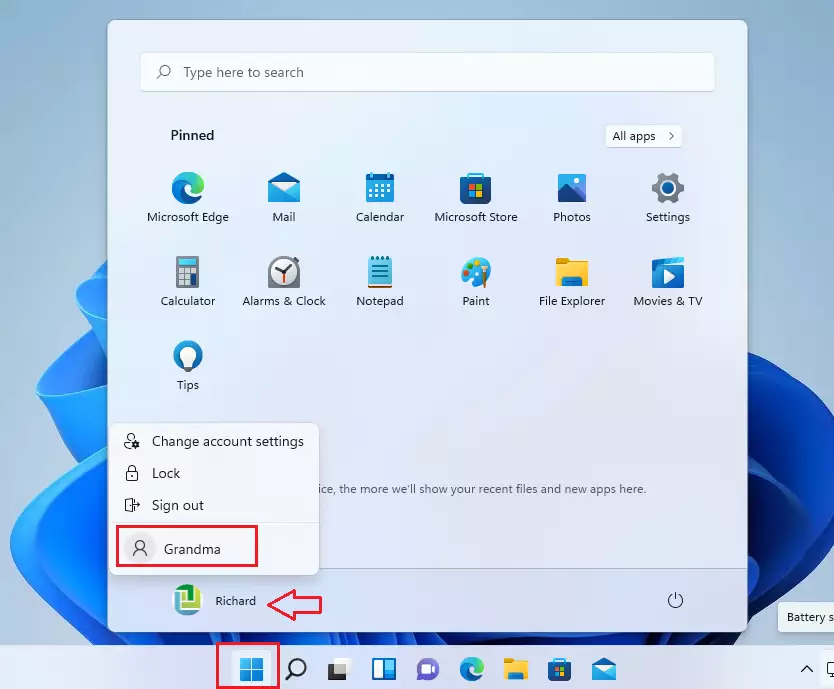
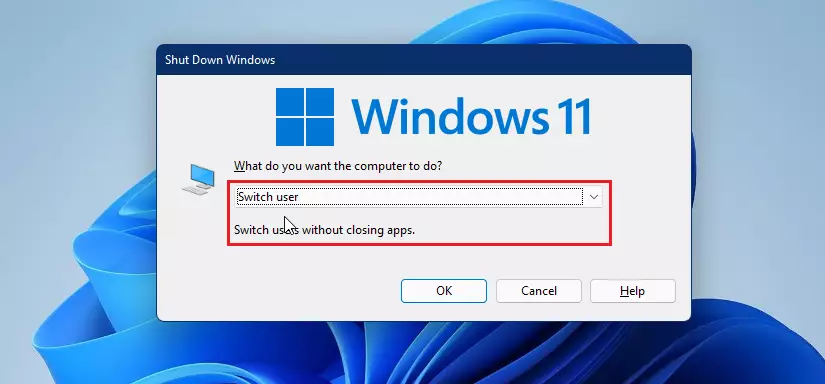
Method 3Use the Shutdown Dialog Window
- Press
WIN + Dto show your desktop. - Press
ALT + F4to open the shutdown menu. - Select Switch user from the dropdown list.
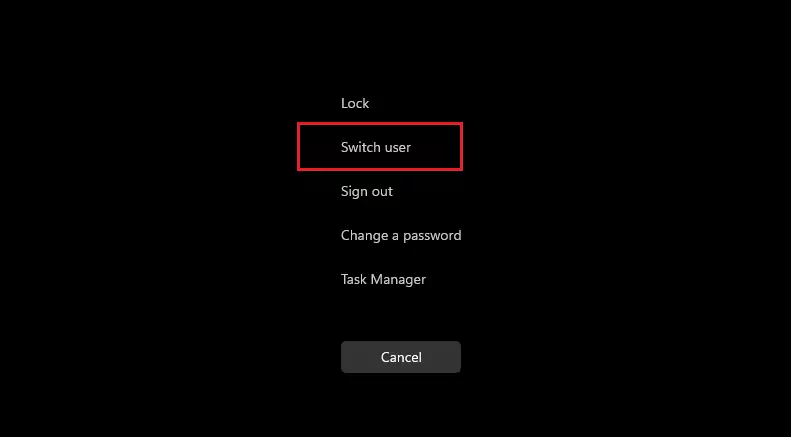
Method 4Use Ctrl+Alt+Del
- Press
CTRL + ALT + DEL. - Select Switch user from the blue screen menu.
Troubleshooting: Fix Missing Fast User Switching
If the option is missing, you may need to check your system policies. Note: This requires administrative privileges.
Using the Registry Editor
You can force the feature to appear using the Registry Editor. Warning: Incorrect changes can damage your system.
- Press
WIN + R, typeregedit, and press Enter. - Navigate to:
HKEY_LOCAL_MACHINE\SOFTWARE\Microsoft\Windows\CurrentVersion\Policies\System - Look for
HideFastUserSwitching. If it exists, set the value to 0. If it does not exist, right-click, create a new DWORD (32-bit) Value, and name itHideFastUserSwitchingwith a value of 0.
Using Group Policy Editor
If you have Windows 11 Pro, you can use the Group Policy Editor:
- Press
WIN + R, typegpedit.msc, and press Enter. - Go to
Computer Configuration\Administrative Templates\System\Logon. - Find Hide entry points for Fast User Switching and set it to Disabled.
Performance Impact on System Resources
Does Fast User Switching consume more RAM? Yes. Because every logged-in user keeps their background apps running, your computer uses more memory. If your PC feels slow, sign out of unused accounts to free up system resources.
Summary
Fast User Switching is a powerful tool for Windows 11 multi-user performance. By using the Start menu, login screen, or keyboard shortcuts, you can manage accounts efficiently. If you encounter issues, check your registry or group policy settings to ensure the feature is enabled. Always save your work, as keeping multiple sessions open consumes significant RAM.” }
Why can’t I see the switch user option in my Start menu?
This often happens if the feature is disabled via Group Policy or Registry settings. It can also occur if the computer is joined to a specific domain that restricts multi-user sessions. Check your registry settings or contact your system administrator to ensure the policy is not blocking the switch user interface.
Was this guide helpful?

About the Author
Richard
Tech Writer, IT Professional
Richard, a writer for Geek Rewind, is a tech enthusiast who loves breaking down complex IT topics into simple, easy-to-understand ideas. With years of hands-on experience in system administration and enterprise IT operations, he’s developed a knack for offering practical tips and solutions. Richard aims to make technology more accessible and actionable. He's deeply committed to the Geek Rewind community, always ready to answer questions and engage in discussions.



[…] as well as the user’s sign-in tile, is displayed. This behavior is the same when the Switch user feature is […]
[…] all users at the bottom of the Sign-in screen. Instead of listing all user accounts, you will see a Switch user […]