How to Safely Eject External Drives in Ubuntu


Safely ejecting external drives in Ubuntu stops your computer from corrupting files or losing data. Ubuntu finishes all background writing tasks before you unplug the device. Pulling out a USB stick while data is still moving can break the file system beyond repair and ruin your files.
You can protect your files in a couple of clicks with the desktop file manager, or from the terminal. This guide covers the file manager method, which works the same on any current Ubuntu desktop and needs no commands.
Open the Files app from Activities, find your drive in the left sidebar, and click the eject icon next to its name. Wait for the drive to vanish from the sidebar, then unplug it. Ubuntu writes out any data still held in memory during this step. If you see a “Volume is busy” warning, close any open file or app using the drive first.
How to safely eject the external drive in Ubuntu Linux
Unmounting tells the system to stop using the drive and to write out any data still waiting in memory. Ubuntu often holds writes back for a short time, so a copy that looks finished may not be fully on the drive yet. Ejecting forces that last write to complete.
The short version looks like this:
- Open the Files app.
- Find your drive in the left sidebar.
- Click the eject icon next to its name.
- Wait for the drive to disappear from the sidebar, then unplug it.
First, open the Files application. You can find it from the Activities overview.
- Click Activities in the top-left corner of the screen, or press the Super key (the Win on most keyboards).
- Type Files in the search box.
- Click the Files icon in the results.
The Files window opens, with a sidebar on the left that lists Home, Documents and your other places.
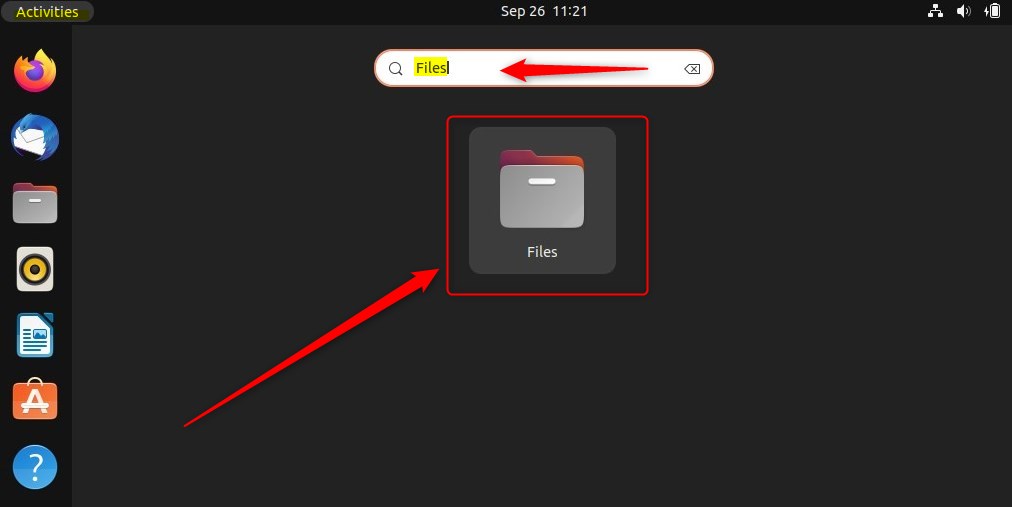
You can also open the file manager from the Dock, where its icon is pinned by default. The Files app handles your system directories and any connected drives, so it is the one place you need for this job.
If you removed the icon from the Dock at some point, use the search method above.
Now find your drive and eject it.
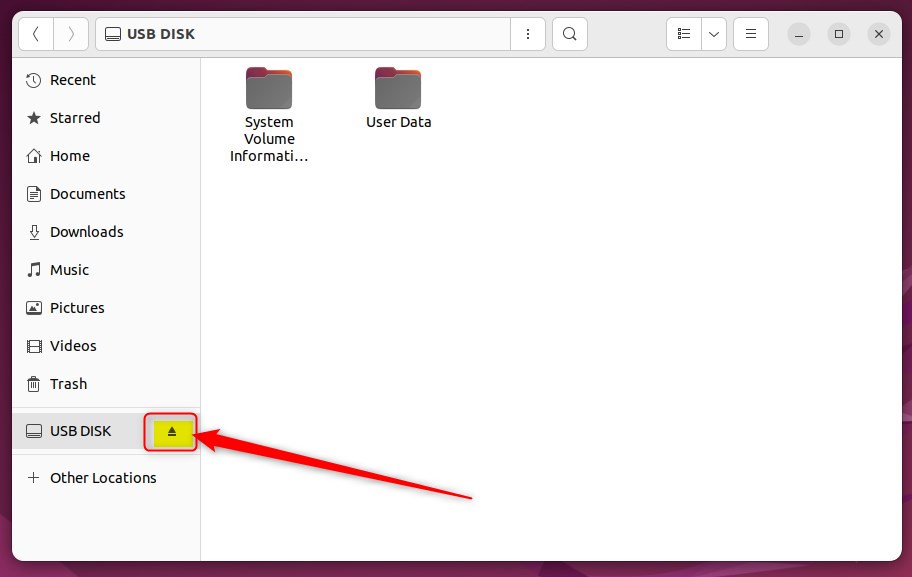
- Look in the left sidebar of the Files window and locate your external drive. It is usually listed below your standard folders and shows the drive’s label or its size.
- Check that nothing is still copying to or from the drive. If a progress window is open, wait for it to finish.
- Click the small eject icon next to the drive’s name.
The drive disappears from the sidebar. At that point it is safe to unplug the device.
If one physical drive shows several entries in the sidebar, it has several partitions. Eject each entry in turn, then unplug the drive.
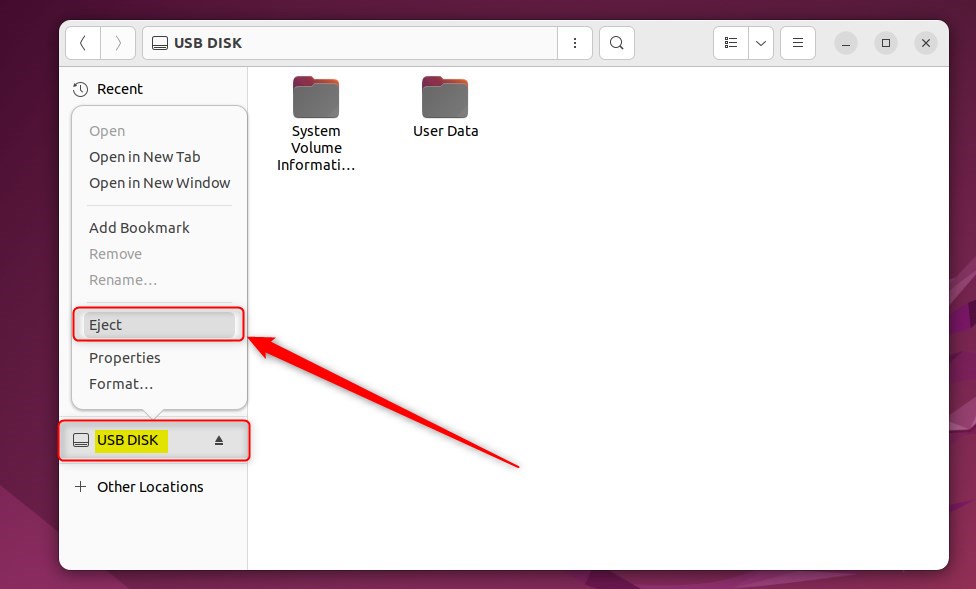
You can also use the right-click menu instead of the eject icon.
- Right-click the device’s name in the sidebar.
- Select Eject from the menu.
The result is the same as clicking the icon: the drive vanishes from the sidebar. Depending on the type of device, the menu may word this option slightly differently, for example Unmount or Safely Remove Drive. All of them do the same safe job.
Open files lock the device in place, and you get a “Volume is busy” warning when you try to disconnect. The cause is usually a document, a video or a terminal window that still uses something on the drive. Do not unplug the drive while this warning is showing.
- Read the warning. It tells you the volume is still in use.
- Cancel the prompt.
- Close any file, app or window that is using the drive.
- Click the eject icon again.
To dismiss the warning and keep the drive connected, click Cancel. The drive stays mounted and your files stay as they were, so you can fix the cause and try again.
Active files must be closed before you click the eject icon. Check any app that may have opened a file from the drive, such as a text editor, a media player or a second Files window browsing the drive. Once they are closed, the eject goes through and the drive leaves the sidebar.
If you ejected a drive by mistake and want it back, unplug it and plug it in again. Ubuntu mounts it again and shows it in the sidebar.
The setup is complete. From now on, eject the drive from the sidebar every time before you pull it out, especially after copying large files.
Conclusion:
- Safely ejecting external storage devices in Ubuntu Linux is crucial to prevent data loss or damage.
- Utilize the "Files" application to eject external drives from Ubuntu Linux safely.
- Always ensure that files on the device are closed and not in use by any application before ejecting the device.
- Following these steps will help maintain the integrity of your data and prevent any potential loss or damage to your files.
Have a question about this guide?
Answered by AI from this guide. Good questions may be added to this page — please don't include personal details.
Did this guide fix your problem?

About the Author
Richard
Tech Writer, IT Professional
Richard is a writer at Geek Rewind who turns complex IT tasks into clear, step-by-step guides. He draws on years of hands-on experience in system administration and enterprise IT operations, focusing on Windows, Linux and WordPress: the problems people actually run into, and the fixes that work. His server and WordPress guides come from systems he runs himself. Richard builds and maintains the platform behind Geek Rewind, from its Ubuntu servers and Nginx configuration to its custom WordPress plugins. Many new tutorials start with readers' questions, and he's always glad to answer them in the comments.
No comments yet — be the first to share your thoughts!