How to Extend Windows 11 Notification Duration

You extend Windows 11 notification duration to keep alerts visible for longer than the default 5 seconds.
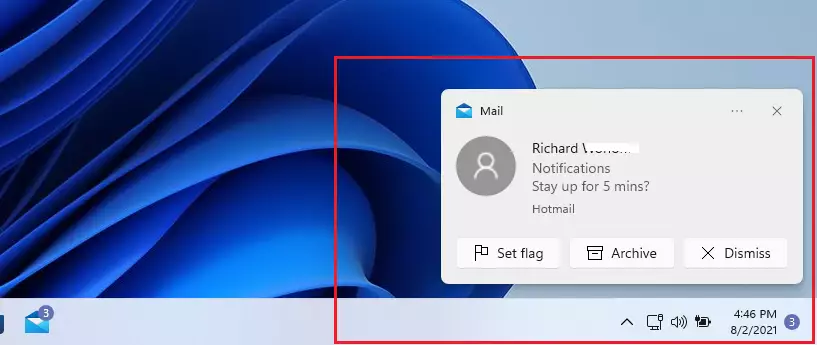
Notifications in Windows 11 usually vanish after just five seconds, often before you can fully process them. This quick dismissal can be annoying, especially for crucial alerts like system updates or important messages.
Fortunately, you can easily adjust this setting to make notifications stay on your screen for up to five minutes. This simple tweak ensures you catch every important piece of information.
You can extend Windows 11 notification duration in Settings under Accessibility > Visual effects. Select “Dismiss notifications after this amount of time” and choose a duration from 5 seconds to 5 minutes. This keeps alerts visible for longer, preventing missed information.
What happens when done?
After you make the change, your computer will keep notification banners on your screen for your chosen length of time. This makes them easier to read and ensures you won’t miss critical system or app updates.
Prerequisites
Before you begin, ensure you are logged into your computer with a standard user account. If you plan to use the Registry Editor method, you will need administrative privileges to modify system settings.
Method 1Using Accessibility Settings
You can change how long Windows 11 notifications stay on your screen using the Accessibility settings, and it’s a simple way to adjust the notification duration without needing special permissions.
- Open the Windows Settings app on your computer.
- Select Accessibility from the list on the left side of the window.
- Click on the Visual effects tile on the right side.
- Find the option labeled “Dismiss notifications after this amount of time.”
- Click the menu to pick a new duration. You can choose anywhere from 5 seconds up to 5 minutes.
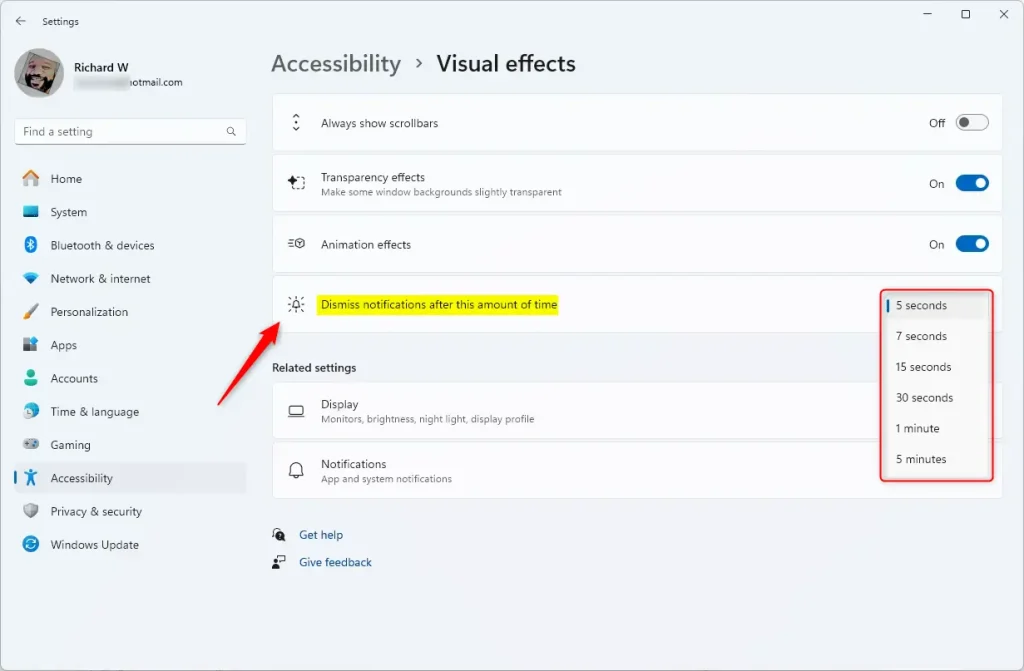
Close the Settings app once you have made your choice. Your next notification will stay on your screen for the new amount of time you selected.
Method 2Using the Registry Editor (Advanced)
For a more advanced way to control Windows 11 notification duration, you can use the Registry Editor, but this method requires administrator rights and careful steps to change the setting.
- Press ⊞ Win+R, type regedit, and hit Enter.
- Navigate to
HKEY_CURRENT_USER\Control Panel\Accessibility. - Look for the DWORD value named MessageDuration. If it does not exist, right-click and create a new DWORD (32-bit) value.
- Double-click MessageDuration and set the value to your desired time in seconds.
Understanding Notification Center and Do Not Disturb
Changing the notification duration does not affect the Notification Center. All alerts are still saved there for later viewing. Additionally, if you have Do Not Disturb mode enabled, notifications will be silenced and sent directly to the Notification Center regardless of your duration settings.
Can I set notifications to stay on screen forever?
No, Windows 11 does not currently support an option to keep notifications on screen indefinitely. The maximum duration you can select through the Accessibility settings is 5 minutes. After this time, the notification will automatically disappear and move to the Notification Center for you to review later.
Why do my notifications disappear before I can read them?
Notifications disappear quickly because the default system setting is often set to 5 seconds. If you are reading a long message or are away from your desk, this time is usually insufficient. You can fix this by increasing the duration in the Accessibility settings menu.
Is there a group policy setting for notification duration?
While there are many Group Policy settings for Windows, there is no direct policy specifically for toast notification duration. Most users should rely on the Accessibility settings or the Registry Editor to manage how long these banners stay visible on their desktop environment.
Was this guide helpful?

About the Author
Richard
Tech Writer, IT Professional
Richard, a writer for Geek Rewind, is a tech enthusiast who loves breaking down complex IT topics into simple, easy-to-understand ideas. With years of hands-on experience in system administration and enterprise IT operations, he’s developed a knack for offering practical tips and solutions. Richard aims to make technology more accessible and actionable. He's deeply committed to the Geek Rewind community, always ready to answer questions and engage in discussions.



[…] you can be notified whenever others share files with you. In addition, you will also receive notifications whenever others edit to make changes to your shared OneDrive […]