How to Install Fleet Osquery Manager on Ubuntu Linux


Fleet Osquery Manager is a central control panel that lets you track and secure every networked computer from one place. It works with osquery, an open-source tool that turns your operating system into a database so you can run standard checks on hardware and software using SQL commands.
You can run live queries, check device health, and spot security problems across machines on your network in real time. For example, the system quickly finds any Ubuntu 22.04 LTS hosts running old security packages.
This guide uses Ubuntu 22.04 LTS. You need a user with sudo rights, a working internet connection, and a domain name pointing at the server if you want the HTTPS setup at the end. The order is: MariaDB, Redis, Fleet itself, a systemd service, then Nginx with SSL.
Open a terminal and run sudo apt update, then sudo apt install mariadb-server redis-server. Create a Fleet database with sudo mariadb, then run CREATE DATABASE fleetdb; CREATE USER ‘fleetuser’@’localhost’ IDENTIFIED BY ‘password’; GRANT ALL PRIVILEGES ON fleetdb.* TO ‘fleetuser’@’localhost’;. Install Fleet, create a systemd service, and configure Nginx for HTTPS.
Install MariaDB Database Server
Fleet uses MySQL-compatible databases, and MariaDB fits that need. Run these commands in a terminal to install MariaDB:
sudo apt update sudo apt install mariadb-server
The first command refreshes the package list. The second installs MariaDB. Confirm with Y if apt asks. When it finishes you are back at the shell prompt with no error messages.
After installation, make sure the service starts whenever your computer turns on. The commands below stop the service, start it again, and then enable it at boot:
sudo systemctl stop mariadb
sudo systemctl start mariadb
sudo systemctl enable mariadb
The stop and start pair simply makes sure the service is running from a clean state. To confirm it is up, run sudo systemctl status mariadb and look for "active (running)". Press Q to leave the status screen.
Setup Fleet Database
Setting up the Fleet database for Fleet Osquery Manager Ubuntu requires securing your MariaDB instance and creating a dedicated database. Run the secure installation script to remove test accounts and protect your root login. After that, log into MariaDB to create the new database and user account that Fleet will use to store all its data.
Using a separate database and user means Fleet never needs the MariaDB root account. If the Fleet credentials ever leak, the damage stays limited to that one database.
sudo mariadb-secure-installation
Follow the prompts to remove guest users and secure the root account (your main administrator account). On a fresh Ubuntu install the root account has no password, so press Enter when asked for the current password. The script then asks a series of yes/no questions. Answering yes to removing anonymous users, disallowing remote root login, removing the test database and reloading the privilege tables is the safe choice for a Fleet server.
Next, log in to MariaDB using this command: sudo mariadb -u root -p. If it asks for a password, enter the MariaDB root password you set in the script, or just press Enter if you left it unset. You should now see a prompt that begins with MariaDB [(none)]>. Then, inside the MariaDB prompt, run these commands to create the database and user:
CREATE DATABASE fleetdb;
CREATE USER 'fleetuser'@'localhost' IDENTIFIED BY 'your_strong_password';
GRANT ALL PRIVILEGES ON fleetdb.* TO 'fleetuser'@'localhost';
FLUSH PRIVILEGES;
EXIT;
You will need it later in the Fleet configuration file. Each statement should answer with "Query OK", and EXIT; returns you to the normal shell. Note that the user is limited to localhost, so this only works if Fleet runs on the same server as the database.
Install Redis Server
Fleet relies on Redis (an in-memory data store used for caching and messaging) to handle quick data tasks, such as tracking live query results. Install it with this command, then enable it at boot and start it:
sudo apt install redis
sudo systemctl enable redis-server
sudo systemctl start redis-server
The service is called redis-server, as the last two commands show. If apt cannot find a package named redis on your release, install redis-server instead and run the same two systemctl commands. Check that it is running with sudo systemctl status redis-server. By default Redis listens only on the local machine, which is what you want here.
Install Fleet Osquery Manager
Containerizing the application via Docker remains the best practice for maintaining updates and isolating dependencies, although running Fleet as a raw binary is technically supported.
Pick one method. The Docker route is easier to upgrade, because you swap the image instead of replacing files by hand. The binary route gives you fewer moving parts on a small server. The sections below cover both.
Docker Deployment (Recommended)
Here's how to get started with Docker Deployment:
- Install Docker on your Ubuntu system, using either Ubuntu's own packages or Docker's official repository.
- Create a folder for your configuration, for example one that holds your Fleet config file and any certificates.
- Run Fleet as a container and mount that folder into it, so the configuration lives on the host rather than inside the container.
This keeps your setup isolated and clean for future updates. One thing catches people out: inside a container, localhost means the container itself, not your server. If MariaDB and Redis run on the host, point Fleet at the host's address instead. The MariaDB user created earlier is limited to localhost, so you may need to create a matching user for the address the container connects from.
Manual Binary Installation
Installing Fleet Osquery Manager Ubuntu manually without Docker lets you run the software directly on your server. This process involves using terminal commands to fetch the latest release package from GitHub, unpack the files, and place the executable binaries into your system path so the application runs correctly.
LATEST_VERSION=$(curl -s https://api.github.com/repos/fleetdm/fleet/releases/latest | grep tag_name | cut -d '"' -f 4)
curl -LO https://github.com/fleetdm/fleet/releases/download/$LATEST_VERSION/fleet_$LATEST_VERSION_linux.tar.gz
tar xf fleet_$LATEST_VERSION_linux.tar.gz
sudo cp fleet /usr/local/bin/
The first line asks the GitHub API for the newest release tag and stores it in a variable. The second downloads the archive, the third unpacks it, and the last copies the fleet binary into /usr/local/bin.
Check these points before you trust the result:
- The shell reads $LATEST_VERSION_linux as one variable name, which is empty. Writing the variable as ${LATEST_VERSION}_linux avoids that.
- Fleet release tags and file names do not always match each other exactly. Open the releases page on GitHub and compare the real file name with the one the script builds.
- The archive usually unpacks into its own folder. Run ls to find it and change into it before the copy step, or the cp command will report that fleet does not exist.
When it works, fleet version prints the version number.
Systemd Service
Creating a systemd service file for Fleet Osquery Manager Ubuntu allows the application to run automatically in the background as a system process. You need to write a service configuration file that defines the execution user, the path to the binary, and automatic restart rules so the app stays online after a server reboot.
The file below runs Fleet as a user named fleet and reads /etc/fleet/fleet.yml. Both must exist before you start the service. Create a fleet system user, and create the config file with your database name, user and password from earlier plus the Redis address. If either is missing, the service fails to start.
sudo nano /etc/systemd/system/fleet.service
This opens a blank file in the nano editor. Add this configuration:
[Unit]Description=Fleet Osquery Manager
After=network.target
User=fleet
ExecStart=/usr/local/bin/fleet serve --config /etc/fleet/fleet.yml
Restart=always
WantedBy=multi-user.target
Save with Ctrl+O then Enter, and leave nano with Ctrl+X. In this file, After=network.target makes Fleet wait for networking, Restart=always brings it back if it crashes, and WantedBy=multi-user.target lets it start at boot.
Enable and start the service. The daemon-reload command makes systemd read the new file, so run it first:
sudo systemctl daemon-reload
sudo systemctl enable fleet
sudo systemctl start fleet
Check the result with sudo systemctl status fleet. You want to see "active (running)". If it shows "failed", run sudo journalctl -u fleet to read the log. The usual causes are a wrong database password, a missing config file, or a missing fleet user. Fleet also needs its database tables created before the first real start, using Fleet's own database prepare step, so check Fleet's documentation if the log complains about missing tables.
Configure Nginx Reverse Proxy
Configuring an Nginx reverse proxy for Fleet Osquery Manager Ubuntu handles incoming web traffic and secures your login sessions with SSL certificates. This setup routes public web requests from port 443 securely to the backend application running locally on port 8080.
Install Nginx, Certbot and the Certbot Nginx plugin with this command:
sudo apt install nginx certbot python3-certbot-nginx
Create an Nginx configuration file that points to your server's domain and forwards traffic to your Fleet port (usually 8080). Use Certbot to automatically attach your SSL certificate to the site.
Keep these points in mind:
- Your domain's DNS record must already point at this server, and ports 80 and 443 must be open in any firewall. Certbot cannot issue a certificate otherwise.
- Fleet serves HTTPS on its own by default. If Nginx handles SSL and talks to Fleet over plain HTTP on the local port, turn TLS off in the Fleet config file, or the proxy connection will fail.
- Test the Nginx file for syntax errors and reload Nginx after each change. A typo can stop the site from loading.
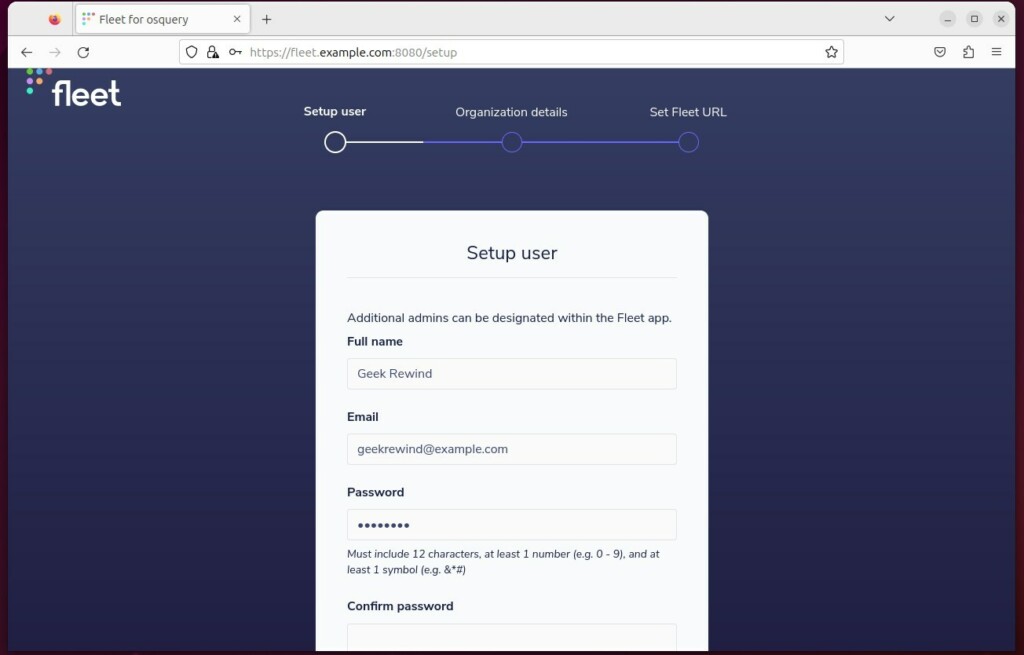
Once finished, visit your domain in a web browser to finalize the setup. You should see the Fleet setup page over HTTPS with a padlock. If you get a 502 Bad Gateway error, Fleet is not running or Nginx is pointing at the wrong port. Check the Fleet service status first.
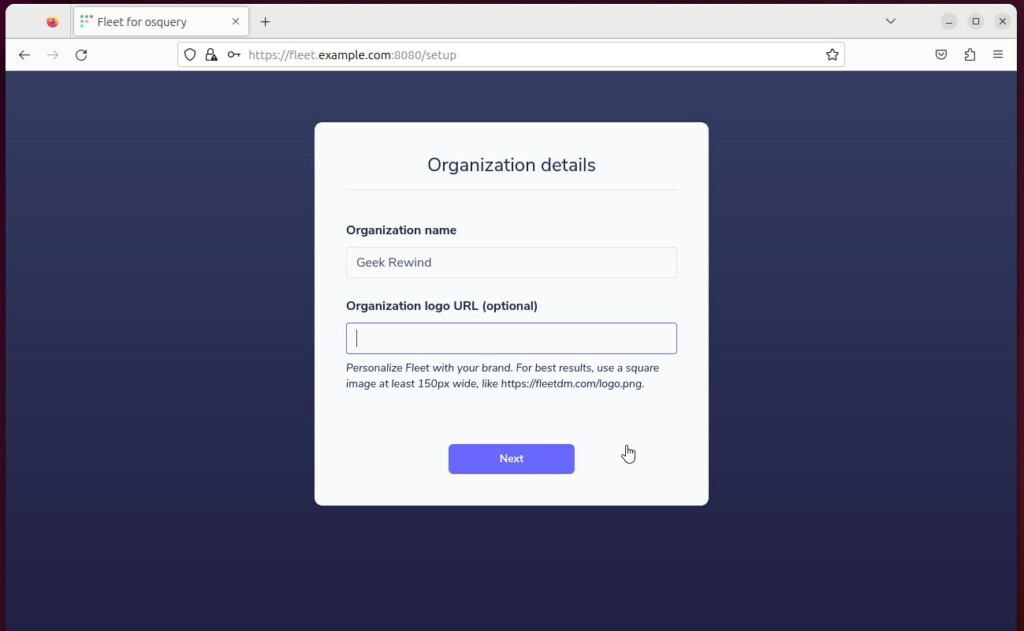
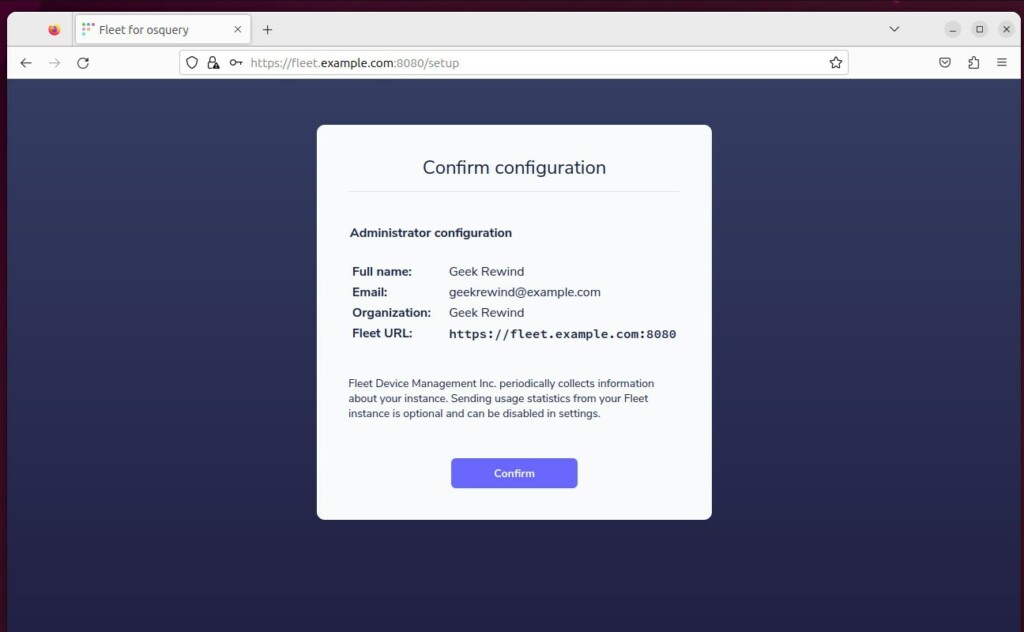
Follow the screen prompts to create your admin account. Use a strong, unique password, since this account controls queries on every enrolled device. After you finish the prompts, Fleet takes you to the dashboard.
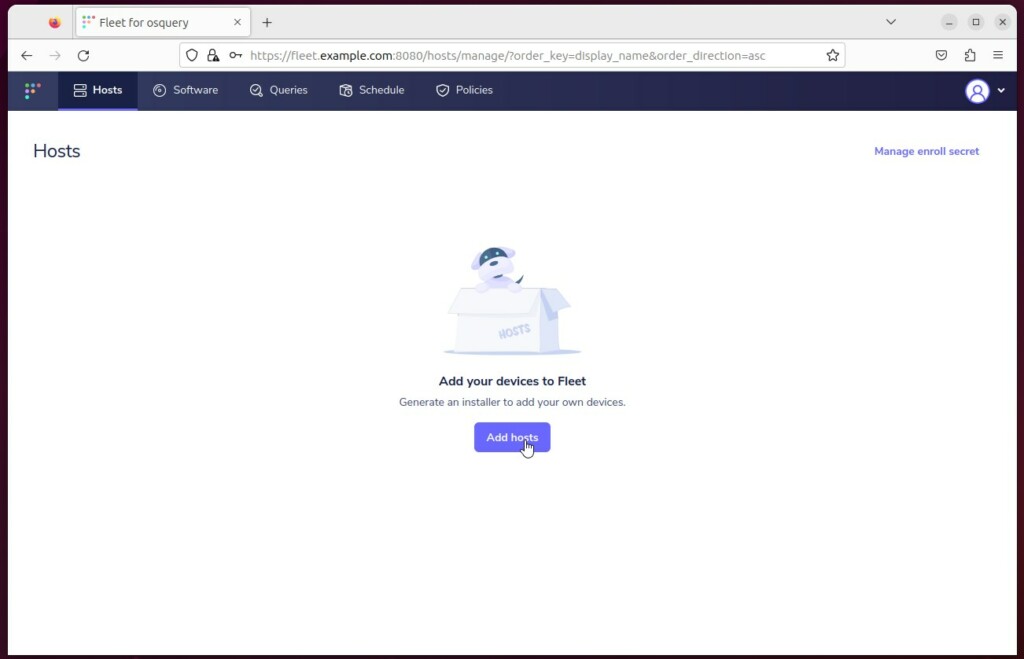
You can now add your devices to the dashboard. In the Fleet interface, look for the option to add hosts. It gives you an enrollment package or command for each device type, and a machine appears in the host list once its osquery agent connects.
Conclusion
Fleet Osquery Manager installation is now complete. Your infrastructure now supports enterprise-grade endpoint monitoring. Production-ready tooling like Docker and Nginx guarantees long-term stability and secure administrative access.
Before you rely on it, take a backup of the fleetdb database and keep your Fleet config file somewhere safe. Also watch for new Fleet releases and apply updates regularly.
[Unit] [Service] [Install] [1] [5395] [5395]Was this guide helpful?

About the Author
Richard
Tech Writer, IT Professional
Richard is a writer at Geek Rewind who turns complex IT tasks into clear, step-by-step guides. He draws on years of hands-on experience in system administration and enterprise IT operations, focusing on Windows, Linux and WordPress: the problems people actually run into, and the fixes that work. His server and WordPress guides come from systems he runs himself. Richard builds and maintains the platform behind Geek Rewind, from its Ubuntu servers and Nginx configuration to its custom WordPress plugins. Many new tutorials start with readers' questions, and he's always glad to answer them in the comments.


No comments yet — be the first to share your thoughts!