How to Generate and Manage GPG Keys on Ubuntu Linux


GPG keys on Ubuntu Linux let you lock up your private messages and files so nobody else can read them. Gnu Privacy Guard (a free tool that keeps your digital data safe) relies on a pair of matching keys to secure your files.
The system creates a public key that you share with friends so they can send you secret messages, alongside a private key that you keep hidden on your computer to open those messages. You can use these steps on Ubuntu 20.04 LTS and later versions to build new key pairs, check your active keys, and back up your data.
Generate GPG keys by opening the terminal and running `gpg –gen-key`. You will be prompted for your name and email to identify the key. Confirm the details, and then generate random bytes by performing other actions to create your public and private key pair.
How to install GnuPG
You can install GnuPG on Ubuntu using the terminal to start creating and managing your GPG keys. GnuPG is the standard software tool used on Linux for encrypting files and signing digital communications. Open your terminal app, type sudo apt update followed by sudo apt install gnupg, and press Enter to complete the installation process.
On Linux systems, a popular tool to help with GPG is GnuPG.
GnuPG is a free software implementation of the OpenPGP standard that enables you to encrypt and sign your data and communications using GPG encryption.
Launch the command line terminal on Ubuntu and execute the following commands to install GnuPG, a free software that lets you encrypt and sign data.
sudo apt update
sudo apt install gnupg
After installing GnuPG, execute the commands below to verify its installation and which encryption algorithms are supported.
gpg --help

Output:
gpg --help
gpg (GnuPG) 2.2.4
libgcrypt 1.8.1
Copyright (C) 2017 Free Software Foundation, Inc.
License GPLv3+: GNU GPL version 3 or later <https://gnu.org/licenses/gpl.html>
This is free software: you are free to change and redistribute it.
There is NO WARRANTY, to the extent permitted by law.

Home: /home/richard/.gnupg
Supported algorithms:
Pubkey: RSA, ELG, DSA, ECDH, ECDSA, EDDSA
Cipher: IDEA, 3DES, CAST5, BLOWFISH, AES, AES192, AES256, TWOFISH,
CAMELLIA128, CAMELLIA192, CAMELLIA256
Hash: SHA1, RIPEMD160, SHA256, SHA384, SHA512, SHA224
Compression: Uncompressed, ZIP, ZLIB, BZIP2

Syntax: gpg [options] [files]
Sign, check, encrypt or decrypt
Default operation depends on the input data
How to generate your GPG key pair
Now that GnuPG is installed, you'll need to generate your own GPG key pair, consisting of a private and public key.
The private key acts as your master key, allowing you to decrypt or encrypt your files and create signatures using it.
The GPG public key allows others to view content you encrypted with your GPG private key. Sharing your GPG public key also proves that content encrypted with your GPG private key comes from you.
To generate your key pair, run the commands below:
gpg --gen-key
To initiate the GPG key generation process, you will be asked to provide your real name and email address to identify the key. You should see output similar to the following:
gpg --gen-key
gpg (GnuPG) 2.2.4; Copyright (C) 2017 Free Software Foundation, Inc.
This is free software: you are free to change and redistribute it.
There is NO WARRANTY, to the extent permitted by law.

Note: Use "gpg --full-generate-key" for a full featured key generation dialog.

GnuPG needs to construct a user ID to identify your key.

Real name: Richard
Email address: admin@example.com
You selected this USER-ID:
    "Richard <admin@example.com>"

Change (N)ame, (E)mail, or (O)kay/(Q)uit? O
We need to generate a lot of random bytes. It is a good idea to perform
some other action (type on the keyboard, move the mouse, utilize the
disks) during the prime generation; this gives the random number
gpg: revocation certificate stored as '/home/richard/.gnupg/openpgp-revocs.d/77B56FA102AECAC136D1C361F6A785CA937400D3.rev'
public and secret key created and signed.

pub   rsa3072 2019-07-01 [SC] [expires: 2021-06-30]
      77B56FA102AECAC136D1C361F6A785CA937400D3
uid                      Richard <admin@example.com>
sub   rsa3072 2019-07-01 [E] [expires: 2021-06-30]
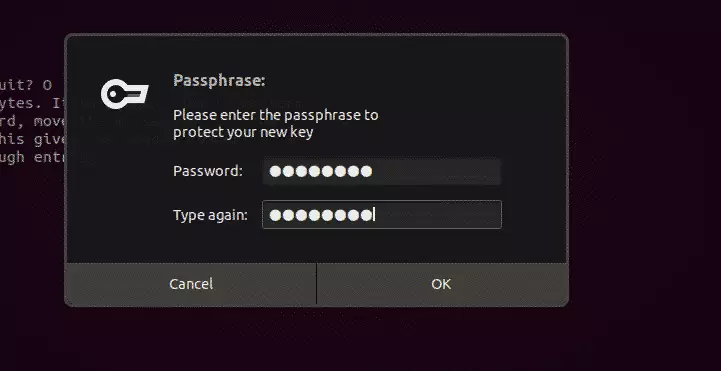
After that, your key pair should be generated.
How to export your public key
You can export your GPG public key on Ubuntu to share it with other people so they can verify your digital identity and send you encrypted messages. Run the command gpg --armor --export your_email@example.com > public_key.asc in your terminal, replacing the email address with your own, to save your public key as a text file.
It is also used to decrypt the content you encrypted.
gpg --armor --export admin@example.com > public_key.asc
You can also use the commands below to export the key into a readable text file.
gpg --armor --output key.txt --export admin@example.com
You can then send the public key file to those who should get it.
How to encrypt and decrypt files
You can encrypt and decrypt files on Ubuntu using terminal commands once your GPG keys are ready. To lock a file so only the intended recipient can read it, run the gpg --encrypt command with your recipient details. Later, you can unlock that same file using your private key when you need to read the contents.
gpg --encrypt --recipient 'admin@example.com' --output confidential.txt.enc public.txt
You should see the output below:
Output
gpg: checking the trustdb
gpg: marginals needed: 3  completes needed: 1  trust model: pgp
gpg: depth: 0  valid:   1  signed:   0  trust: 0-, 0q, 0n, 0m, 0f, 1u
gpg: next trustdb check due at 2021-06-30
You can now delete the public.txt file and only have the encrypted version.
Decrypting Files
To decrypt the confidential.txt.enc file using the public key. Run the commands below:
gpg --decrypt --output public.txt confidential.txt.enc
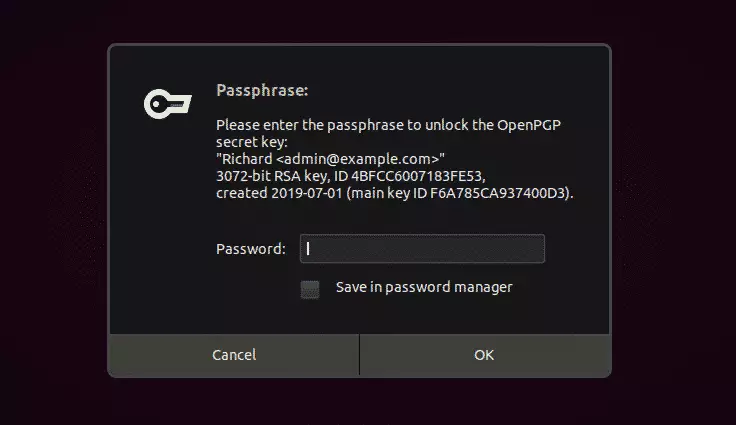
Enter the key to decrypt.
Output
gpg: encrypted with 3072-bit RSA key, ID 4BFCC6007183FE53, created 2019-07-01
"Richard <admin@example.com>"
The confidential.txt.enc file becomes public.txt.
Windows users can use Gpg4win instead.
That should do it!
Conclusion:
In summary, mastering GPG key management on Ubuntu Linux is essential for securing sensitive data. Here are the key takeaways:
- GPG encryption protects your data by requiring a valid key pair for access.
- Installing GnuPG is the first step in leveraging GPG encryption on Ubuntu.
- Generating a GPG key pair includes creating both a public and private key.
- Your public key can be shared with others to allow them to send you secure messages.
- Encrypting files safeguards their content, making them unreadable without the corresponding private key.
- Decrypting files requires providing the passphrase associated with your private key.
- Understanding and utilizing GPG keys can significantly enhance your data security and privacy.
Was this guide helpful?

About the Author
Richard
Tech Writer, IT Professional
Richard, a writer for Geek Rewind, is a tech enthusiast who loves breaking down complex IT topics into simple, easy-to-understand ideas. With years of hands-on experience in system administration and enterprise IT operations, he’s developed a knack for offering practical tips and solutions. Richard aims to make technology more accessible and actionable. He's deeply committed to the Geek Rewind community, always ready to answer questions and engage in discussions.




Tks for sharing the tutorial.
But, I have a few questions:
1) how to backup and recover your gnupg key created with this process if you need to reinstall your system ?
2) if you have a desktop, a laptop and a netbook, should you install the same key you created on the first one on the two others ?
2.1) if yes, do I use same method as question 1, above, to recover the key on the new system ?
2.2) if not, I believe I will need to backup all new keys (of each system) if I need to reinstall the any one system. But this will became a mess for backups of common used shared/files on a the file-server from the different machines, if files are encrypted. How to avoid this ?
Best regards
why go over exporting and not cover importing?
exporting is intuitive from the man page. no one on the entire goddamn internet has accurate instructions for importing.
accurate solutions actually work instead of just issuing different errors
When I generate key for the 2nd time. Its failing, getting struck.
This is a very confusing tutorial. Several file names are used with no explanation of what they represent. Shaded text is clipped at the right margin. No reason is given why a private key is needed to decrypt a file. The decryption method is totally arcane. This site has no value whatever, IMO.